•
Compact
Photo
Printer
SELPHY
CP71
0
Front
View
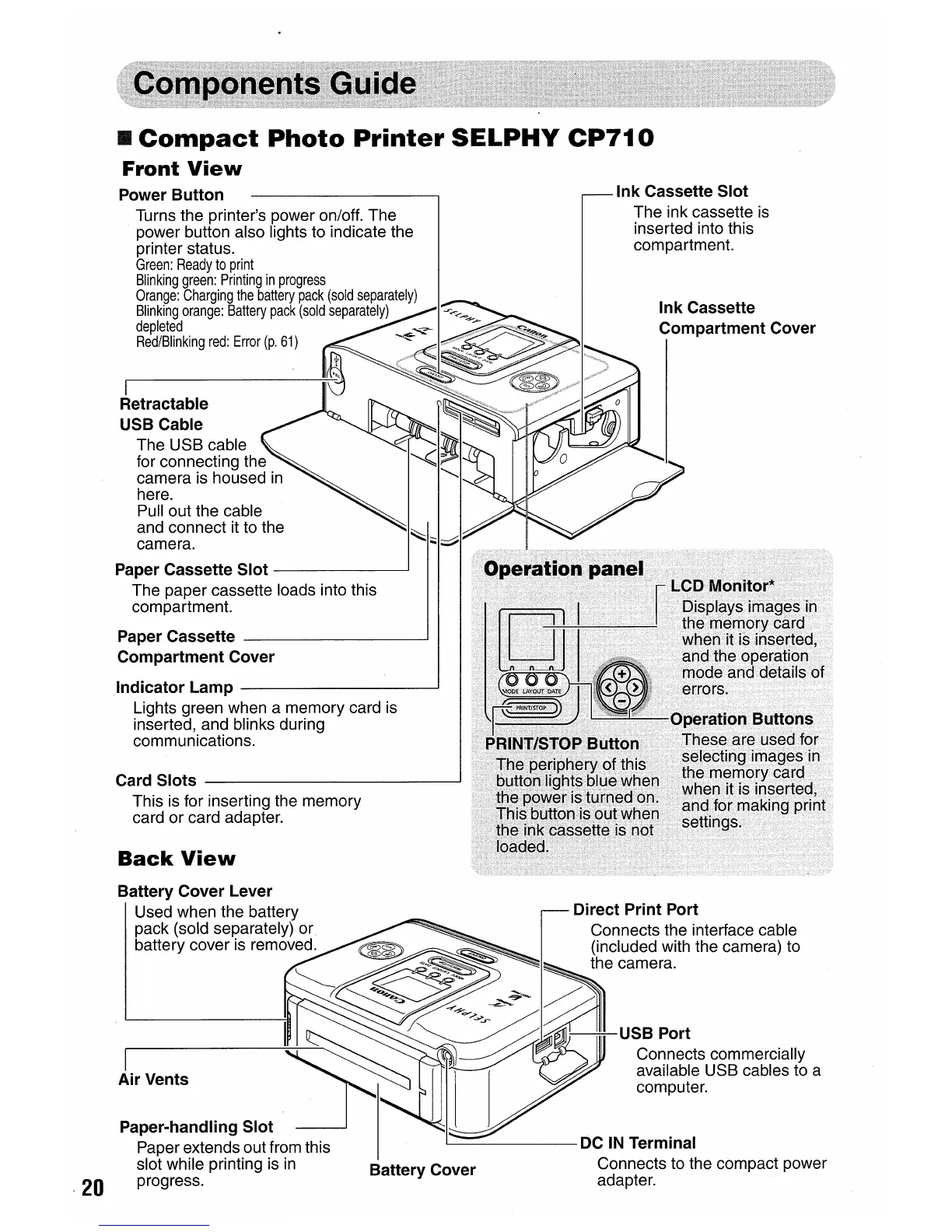
Power Button
Turns the printer's power on/off. The
power button also lights to indicate the
printer status.
Green:
Ready
to
print
Blinking
green:
Printing
in
progress
Orange:
Charging
the
battery
pack
(sold
separately)
Blinking
orange:
Battery
pack
(sold
separately)
depleted
Red/Blinking
red:
Error
(p.
61)
I
Retractable
USB Cable
The USB cable
for connecting the
camera is housed
in
here.
Pull out the cable
and connect it to the
camera.
Paper Cassette Slot
----J
The paper cassette loads into this
compartment.
Paper Cassette
--1
Compartment Cover
Indicator Lamp
---J
Lights green when a memory card
is
inserted, and blinks during
communications.
Card Slots
-----J
This
is
for inserting the memory
card or card adapter.
Back
View
Ink Cassette Slot
The ink cassette
is
inserted into this
compartment.
In
k Cassette
Compartment Cover
Battery Cover Lever
Used when the battery
pack (sold separately)
or.
battery cover is removed.
I
Air Vents
Battery Cover















 To Next Page