•
Compact
Photo
Printer
SELPHY
CP510
Front
View
Battery Cover
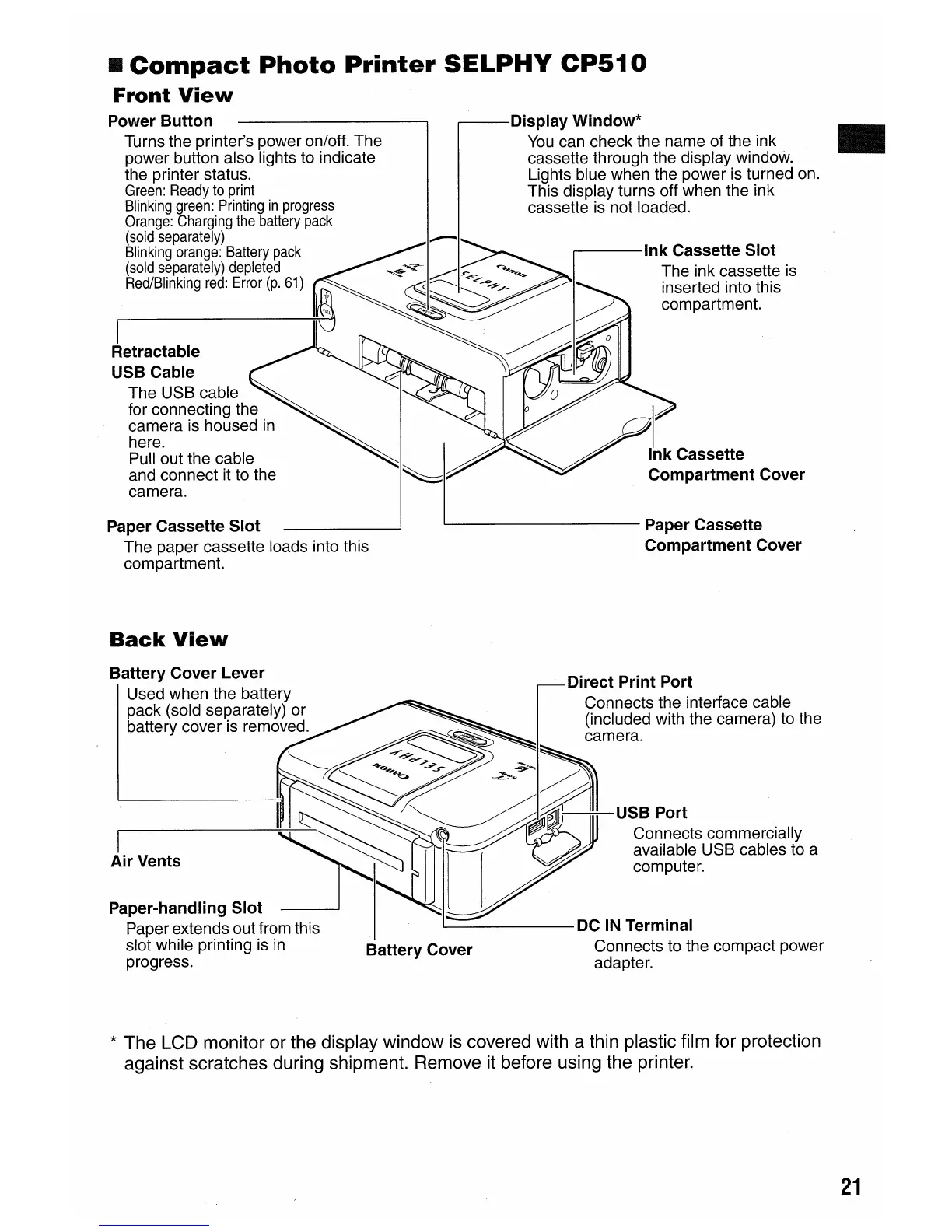
Power
Button
Turns the printer's power on/off. The
power button also lights to indicate
the printer status.
Green:
Ready
to
print
Blinking
green:
Printing
in
progress
Orange:
Charging
the
battery
pack
(sold
separately)
Blinking
orange:
Battery
pack
(sold
separately)
depleted
Red/Blinking
red:
Error
(p.
61)
I
Retractable
USB Cable
The USB cable
for connecting the
camera is housed
in
here.
Pull out the cable
and connect it to the
camera.
Paper Cassette
Slot
The paper cassette loads into this
compartment.
Back
View
Battery Cover Lever
Used when the battery
pack (sold separately) or
battery cover is removed.
I
Air
Vents
Display Window*
You
can check the name of the ink
..
cassette through the display window.
Lights blue when the power is turned on.
This display turns off when the ink
cassette is not loaded.
....---Ink
Cassette
Slot
The ink cassette is
inserted into this
compartment.
I
Ink
Cassette
Compartment Cover
L--
Paper Cassette
Compartment Cover
'---------
DC
IN
Terminal
Connects to the compact power
adapter.
*
The LCD monitor or the display window
is
covered with a thin plastic film for protection
against scratches during shipment. Remove it before using the printer.
21















 To Next Page