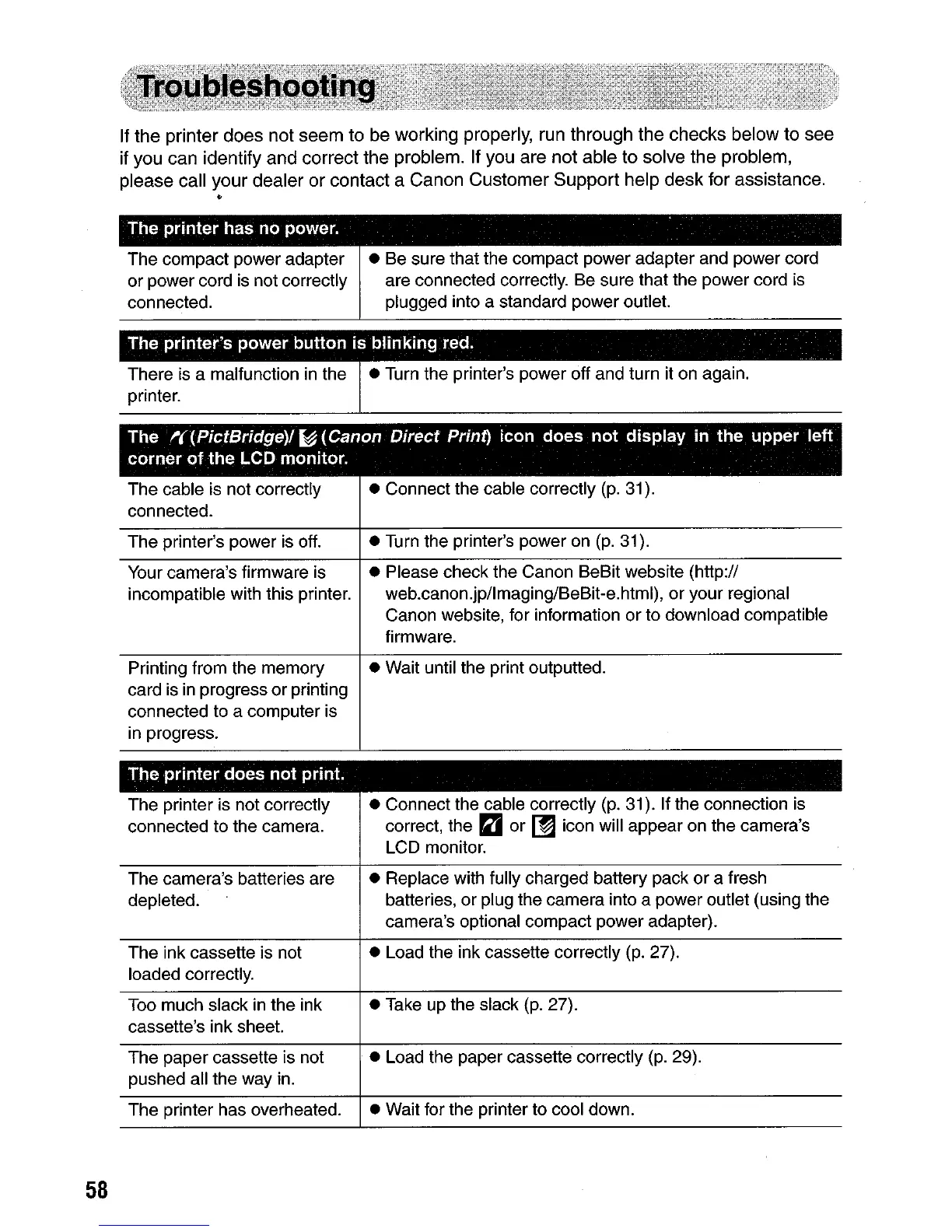
If
the
printer
does
not
seem
to
be working properly, run through the checks
below
to
see
if you can identify
and
correct the problem. If you are
not
able to solve
the
problem,
please call
your
dealer
or
contact a
Canon
Customer
Support
help
desk
for assistance.
*'
The
printer
has no power. .
The compact power adapter
or power cord
is
not correctly
connected.
• Be sure that the compact power adapter and power cord
are connected correctly. Be sure that the power cord
is
plugged into a standard power outlet.
There
is
a malfunction in the
printer.
• Turn the printer's power off and turn it on again.
The
~(PictBridge)/
~
(Canon
Direct
Print) icon
does
not
display in the upper left
corner
of
the LCD monitor.
58
The cable
is
not correctly
connected.
The printer's power
is
off.
Your camera's firmware is
incompatible with this printer.
Printing from the memory
card
is
in progress or printing
connected to a computer is
in progress.
The
printer
does
not
print.
The printer is not correctly
connected to the camera.
The camera's batteries are
depleted.
The ink cassette is not
loaded correctly.
Too much slack in the ink
cassette's ink sheet.
The paper cassette is not
pushed all the way in.
The printer has overheated.
• Connect the cable correctly
(p.
31).
• Turn the printer's power
on
(p.
31).
• Please check the Canon BeSit website (http://
web.canon.jp/lmaging/BeBit-e.html), or your regional
Canon website, for information or to download compatible
firmware.
• Wait until the print outputted.
• Connect the cable correctly
(p.
31). If the connection
is
correct, the D or
[!J
icon will appear on the camera's
LCD monitor.
• Replace with fully charged battery pack or a fresh
batteries, or plug the camera into a power outlet (using the
camera's optional compact power adapter).
• Load the ink cassette correctly
(p.
27).
• Take up the slack
(p.
27).
• Load the paper cassette correctly
(p.
29).
• Wait for the printer to cool down.





 To Next Page