Macintosh
CPPRINTER
s'o'lut'io~'[;isr""'"
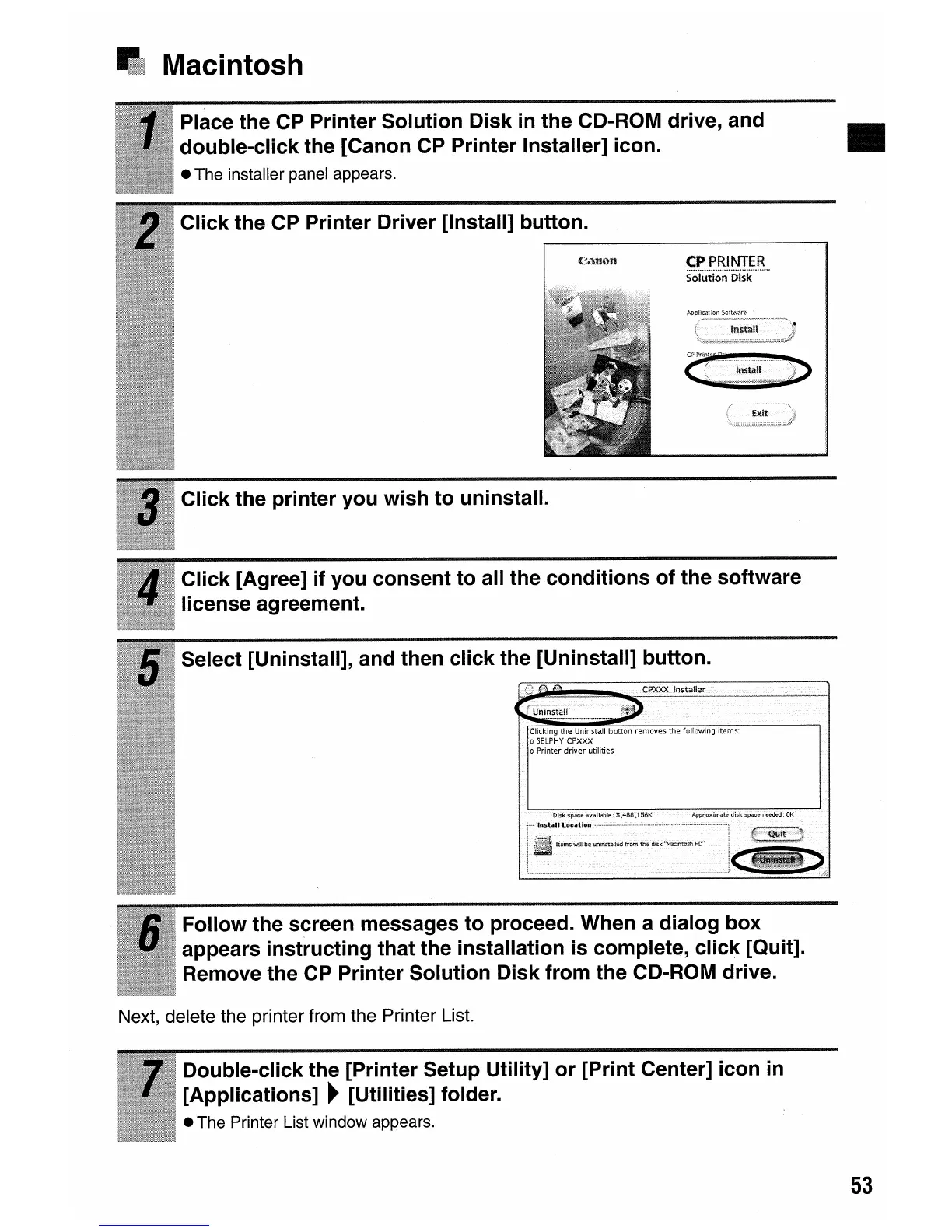
Click the CP Printer Driver [Install] button.
Click the printer you wish to uninstall.
Place the CP Printer Solution Disk
in
the CD-ROM drive, and •
double-click the [Canon CP Printer Installer] icon.
• The installer panel appears.
Select [Uninstall], and then click the [Uninstall] button.
Click [Agree] if you consent to all the conditions of the software
license agreement.
Follow the screen messages to proceed. When a dialog box
appears instructing that the installation is complete, click [Quit].
Remove the CP Printer Solution Disk from the CD-ROM drive.
Next, delete the printer from the Printer List.
Double-click the [Printer Setup Utility] or [Print Center] icon
in
[Applications]
~
[Utilities] folder.
• The Printer List window appears.
53









 To Next Page