3-CONTROLSANDINSTRUMENTS
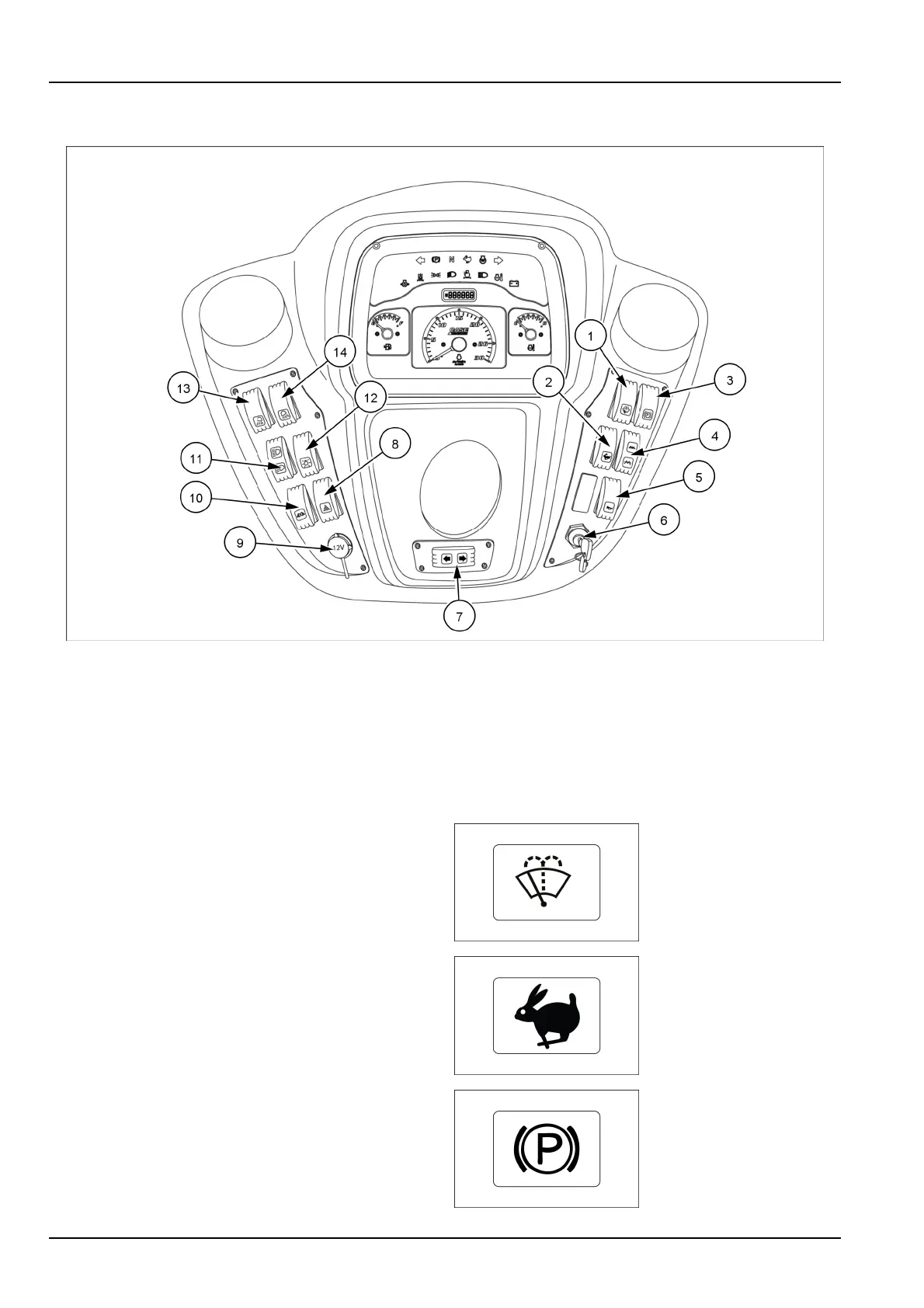
Operatorcontrolpanel
PTIL17COM1112FA1
1.
Frontwindshieldwiper(ifavailable)
8.Hazardswitch
2.Highspeedswitch9.Powersocket
3.Parkingbrakeswitch10.
Sideworklampswitch
4.Frequencyselectorswitch11.
High/lowbeamswitch
5.
Hornswitch12.Masterlampswitch
6.Ignitionkey13.Frontworklightswitch
7.
Direction/turnindicatorswitch
14.Rearworklightswitch
Frontwindshieldwiperswitch(ifavailable)
Presstheswitch(1)oncetoactivatethefrontwindshield
wiper.Keeptheswitch(1)pressedtostartthewaterjet.
2.Speedselectorswitch
Pressthelowerendoftheswitchtoselecthightravel
speed.Presstheupperendoftheswitchtoselectlow
travelspeed.
3.Parkingbrakeswitch
Presstheparkingbrakeswitchtoengagetheparking
brake.Electricalcircuitisdesignedinsuchawaythat
brakecanbeappliedonlywhenmachineisinneutraland
enginecan'tbestartedwhenparkingbrakeswitchison.
3-8



 To Next Page