3-CONTROLSANDINSTRUMENTS
General
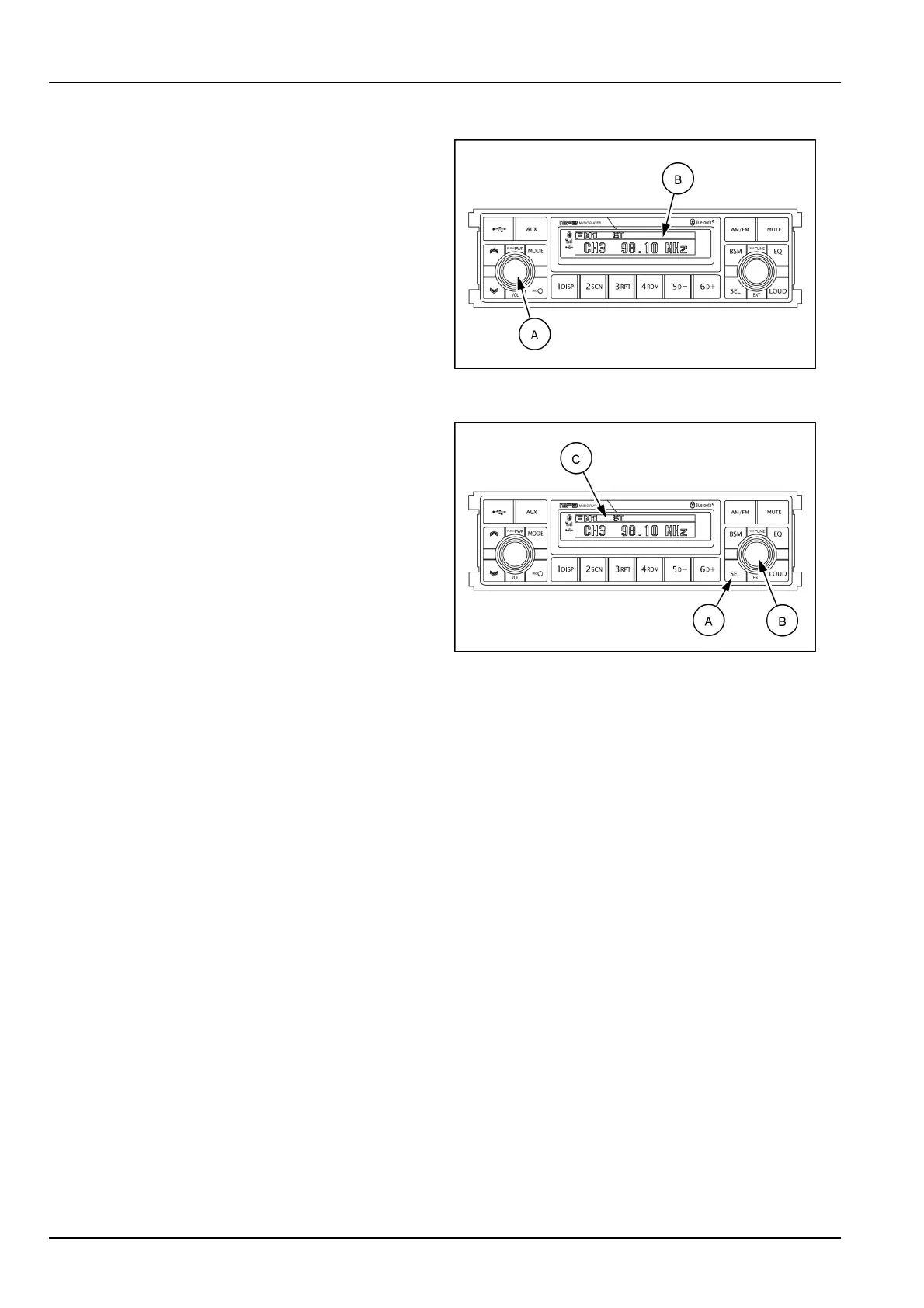
(1)Powerandvolumeknob
PowerON/OFFbutton
Pressthepowerbutton(A)toturntheunitONorOFF
shortly.WhenthepowerisON,thepreviousmode(last
memory)willappear.
Volumeup/downcontrol
Turnthevolumeup/downbutton(A)right-handtoin-
creasethevolumelevel.Thelevelwillbeshownin
VOLUMExxontheLCDscreen(B).
Turnthevolumeup/downbutton(A)left-handtode-
creasethevolumelevel.After5sofvolumeindication,
theLCDscreen(B)willreturntothepreviousmode.
SMIL16MEX3084AA2
(2)Audioselectionknoband(SEL)button
Theaudioselectionknob(B)allowsyoutoadjustthe
sound.EachtimeyoupressSELbutton(A)shortly,the
LCDscreen(C)showseachmodeasfollows:
•
BASS
•
TREBLE
•
BAL(Balance)
NOTE:whenthebutton(A)ispressed,LCDscreen(C)
showstheselectedfunctionfor5sandthenreturnsback
tothepreviousmode.Onselectedfunction,levelcanbe
controlledbyturningthisbutton.Thedisplaywillautomat-
icallyreturntonormalindicationin5safterthelastadjust-
mentismadeorwhenanotherfunctionisactivated.
SMIL16MEX3084AA3
BASScontrol
Toadjustthebasslevel,rstselectthebassmodeby
pressingtheSELbutton(A)untilBASSindicationap-
pearsontheLCDscreen(C).
Within5sofchoosingtheBASSmode,turnthese-
lectionknob(B)right–hand/left-handtoadjustthebass
levelasdesired.TheBASSlevelwillbeshownonthe
LCDscreen(C)fromaminimumofBASS–10toamax-
imumofBASS+10.
TheLCDscreen(C)willautomaticallyreturntothenor-
malindicationin5safterthelastadjustmentorwhen
anotherfunctionisactivated.
TREBLEcontrol
ToadjusttheTREBLElevel,rstselecttheTREBLE
modebypressingtheSELbutton(A)untilTREBLEin-
dicationappearsontheLCDscreen(C).
Within5sofchoosingtheTREBLEmode,turnthese-
lectionknob(B)right–hand/left-handtoadjusttheTRE-
BLElevelasdesired.TheTREBLElevelwillbeshown
ontheLCDscreen(C)fromaminimumofTREBLE-10
toamaximumofTREBLE+10.
TheLCDscreen(C)willautomaticallyreturntothenor-
malindicationin5safterthelastadjustmentorwhen
anotherfunctionisactivated.
3-34













 To Next Page