3-CONTROLSANDINSTRUMENTS
Radio
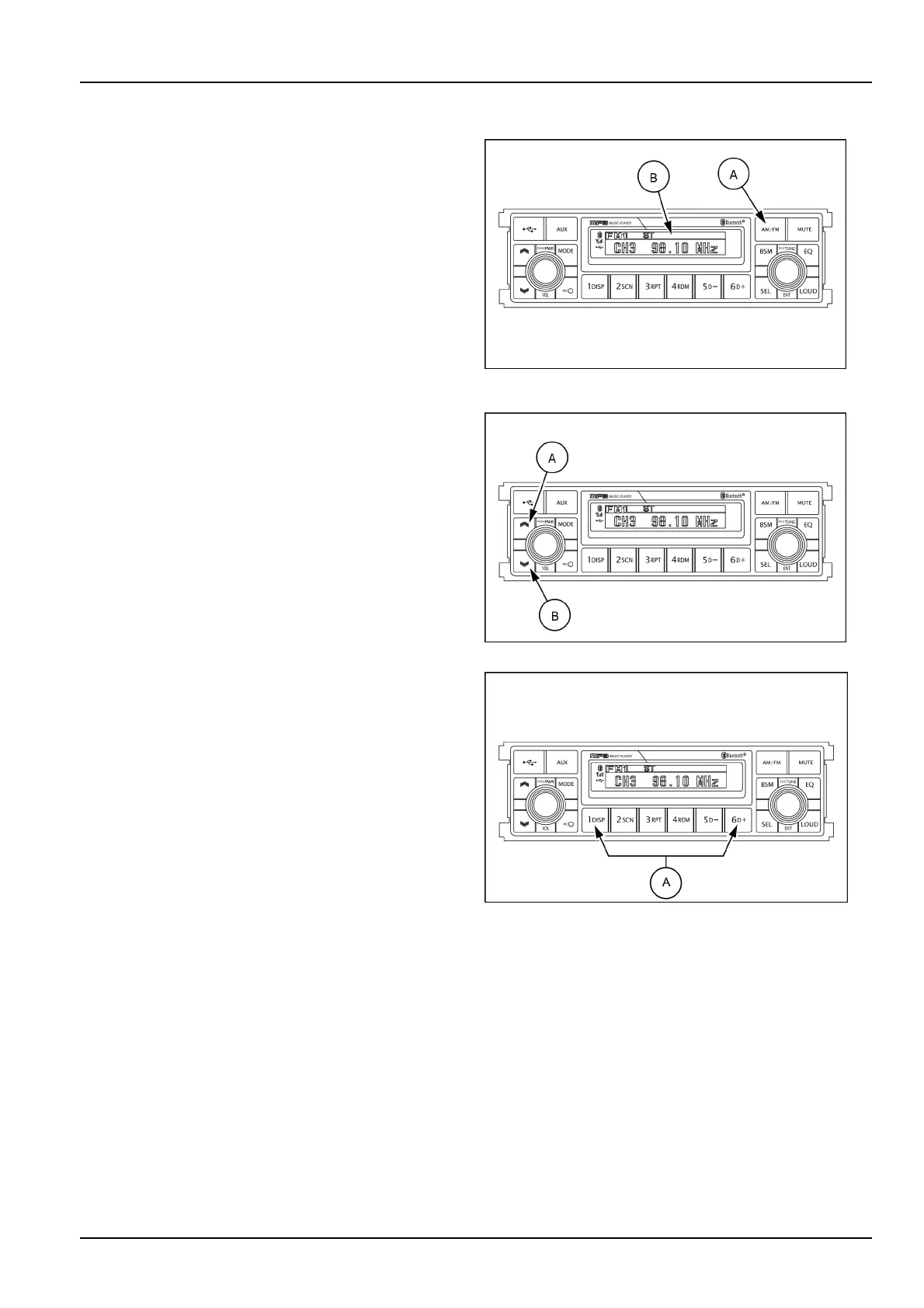
(5)AM/FMselectionbutton
Presstheselectionbutton(A)tochangetheradioband.
Eachtimetheselectionbutton(A)ispressed,theLCD
screen(B)showsthebandsasfollows:
•
FM1
•
FM2
•
FM3
•
AM
•
LW
NOTE:LWbandisonlyavailableforEuropemarket.
SMIL16MEX3084AA9
(6)UP/DOWNtuningbutton
Toautomaticallyselectaradiostation,momentarilypress
theuptuneseekbutton(A)ordowntuneseekbutton(B)
forlessthan3stosearchfortheclosestradiostation.
Tomanuallyselectaradiostation,presstheuptuneseek
button(A)ordowntuneseekbutton(B)forlongerthan
3s.Theradiofrequencywillmoveupordownstepby
stepeachtimeyoupressbutton.
SMIL16MEX3084AA10
(7)Pre-setmemorybutton
1.Pre-setmemorybutton1,DISPID3v2display
2.Pre-setmemorybutton2,SCNFilescan
3.Pre-setmemorybutton3,RPTRepeatplayselector
4.Pre-setmemorybutton4,RDMRandomplayselector
5.Pre-setmemorybutton5,D-Directorydown
6.Pre-setmemorybutton6,D+Directoryup
Pressingthesebuttons(A)shortlywillrecallyourfavorite
pre-setradiostations.
Tostoreyourfavoritestationsintoanyofthe6pre-set
memoriesineachband(AM/FM),usethefollowing
procedure:
A.TurntheradioONandselectthedesiredband.
B.Selecttherststationtobepre-setusingthemanual
up/downorautomaticseektuningcontrolbutton.
C.Pressthechosenpre-setbuttontostoreyourselected
stationintoandcontinuetoholditin.Thebeepsound
willbemomentarilyheardandthepre-setnumberwill
appearontheLCDscreenindicatingthatthestationis
nowsetintothatpre-setmemorypositionandcanbe
recalledatanytime,bypressingthatpre-setbutton.
SMIL16MEX3085AB11
3-37













 To Next Page