CASE IH PRO VISION OPERATING SYSTEM GUIDE
52
AFS Pro 1200
™
Display
HITCH / DRAFT CONTROL (continued)
Draft Controls and Hitch Adjustments (continued)
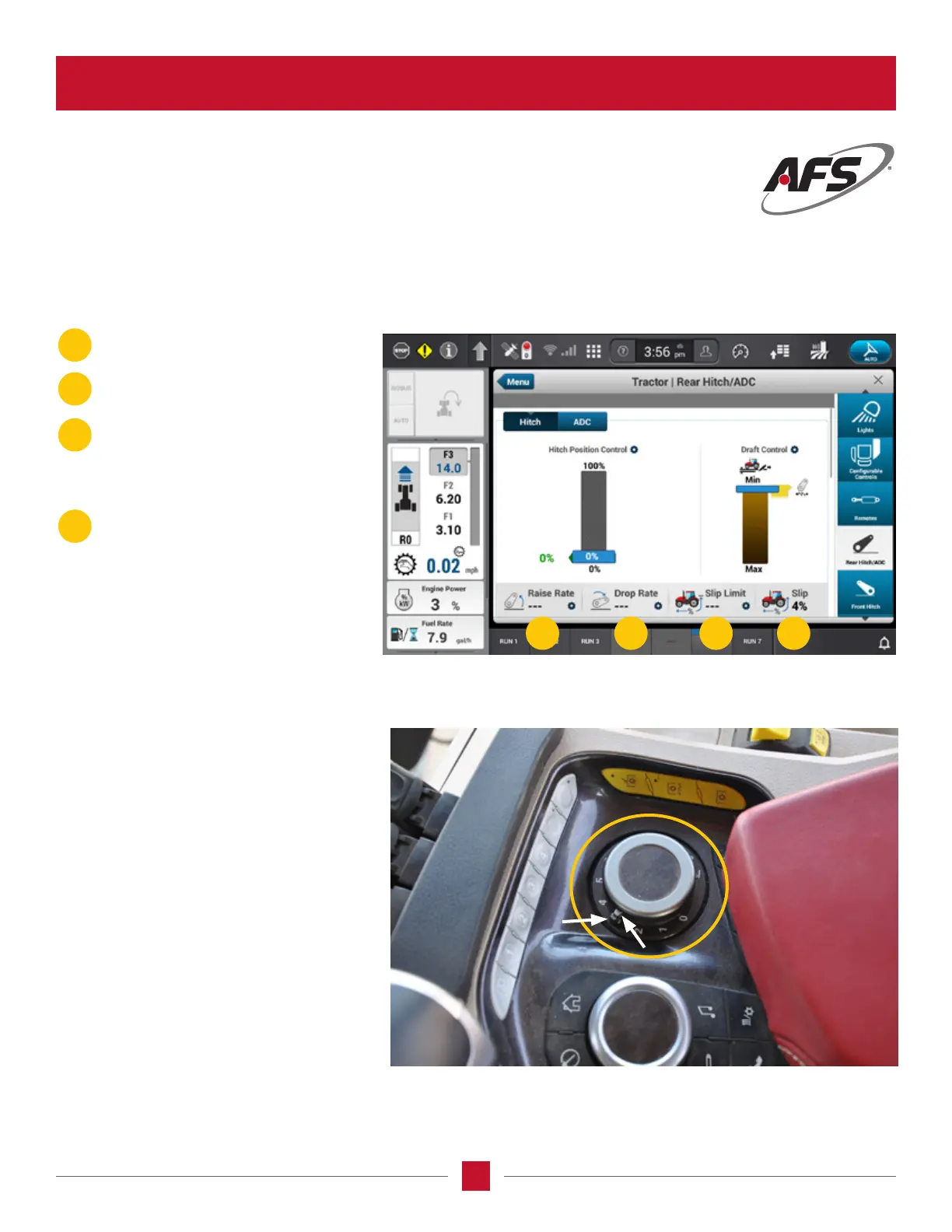
The numbers across the bottom of the screen are values set with the other hitch settings selections on the left knob.
Lower Limit Setting
The Right knob just in front of the arm rest
pad is the Rear Hitch set point adjustment.
Notice that there are two rings on this knob
that can be rotated separately. The bottom
ring sets the REAR hitch “lower Set Point”,
and the top ring is the front hitch lower set
point if the tractor is equipped with a front
hitch. Make sure that the set point using this
knob is the same or below the lower set point
the operator want the hitch to run. If this
knob is set above the desired set point the
hitch will only go down as far as the setting
of this knob.
C
D
A
B
Raise Rate – how fast the hitch
will raise.
Drop Rate – how fast the hitch
will lower.
Slip Limit – the amount of tire slippage
slowed before the hitch is commanded
to raise. This has nothing to do with draft
control as the parameters for the operation
of this function are too wide.
Slip Percentage – Actual slippage coming
from the true ground sensor.
A B C D








 To Next Page