13-14
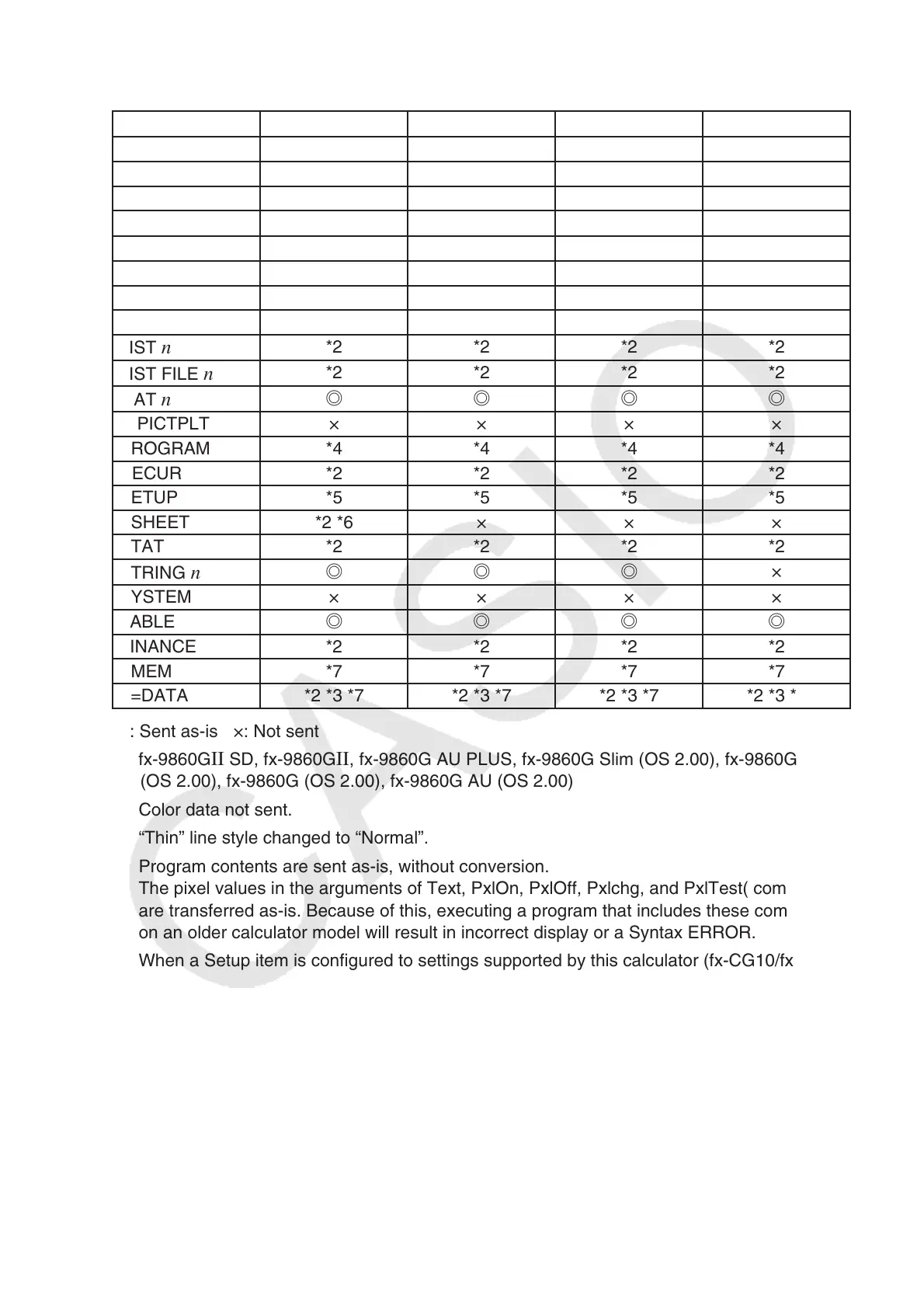
The following table shows how each type of data is handled when transferring from this
calculator (fx-CG10/fx-CG20) to an older model CASIO calculator.
Data Item *1
fx-9750G
II fx-7400GII
CFX-9850G
ALPHAMEM
◎◎◎◎
CONICS *2 *2 × *2
DYNA × × × ×
E-CON2
◎◎
××
EQUATION
◎◎◎◎
FMEM
◎◎◎◎
@GEOM × × × ×
GMEM *2 *3 *2 *3 *2 *3 *2 *3
LIST
n
*2 *2 *2 *2
LIST FILE
n
*2 *2 *2 *2
MAT
n
◎◎◎◎
@PICTPLT × × × ×
PROGRAM *4 *4 *4 *4
RECUR *2 *2 *2 *2
SETUP *5 *5 *5 *5
SSHEET *2 *6 × × ×
STAT *2 *2 *2 *2
STRING
n
◎◎◎
×
SYSTEM × × × ×
TABLE
◎◎◎◎
FINANCE *2 *2 *2 *2
VMEM *7 *7 *7 *7
Y=DATA *2 *3 *7 *2 *3 *7 *2 *3 *7 *2 *3 *7
◎: Sent as-is ×: Not sent
*1 fx-9860G
II SD, fx-9860G II , fx-9860G AU PLUS, fx-9860G Slim (OS 2.00), fx-9860G SD
(OS 2.00), fx-9860G (OS 2.00), fx-9860G AU (OS 2.00)
*2 Color data not sent.
*3 “Thin” line style changed to “Normal”.
*4 Program contents are sent as-is, without conversion.
The pixel values in the arguments of Text, PxlOn, PxlOff, Pxlchg, and PxlTest( commands
are transferred as-is. Because of this, executing a program that includes these commands
on an older calculator model will result in incorrect display or a Syntax ERROR.
*5 When a Setup item is configured to settings supported by this calculator (fx-CG10/fx-
CG20) but not supported by the receiving calculator, the receiving calculator’s setting is set
to its default value. If “Thin” is selected for the fx-CG10/fx-CG20 “Sketch Line” Setup item,
for example, the setting will be changed to “Normal” on the receiving calculator. Setup
items that are supported by this calculator (fx-CG10/fx-CG20) but not by the receiving
calculator are not transferred.
*6 Conditional formatting data is not sent.
*7 The V-Window dot value is recalculated in accordance with the number of screen dots of
the receiving calculator.















 To Next Page