16
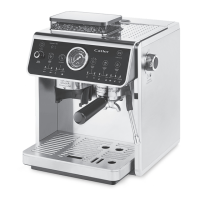
THE FIRST USE OF THE COFFEE MACHINE ES 910
FLUSHING THE HOT WATER DISPENSING JET
1. Direct the water dispensing jet into the bowl/mug.
2. Press the button repeatedly and select the hot water dispensing. The “PRESSURE HOT
WATER” indicator lamp lights up.
3. Press the button to start dispensing hot water through the jet.
4. Wait until the water stops owing.
5. Wipe the hot water dispensing jet with adry cloth.
NOTE:
About 350 to 400 ml of hot water ows out during the hot water dispensing. It is
therefore important that the bowl is large enough.
FLUSHING THE STEAM JET
1. Direct the steam jet into the bowl/mug or into the hole in the grid.
2. Press the
button repeatedly until the “HOT WATER” indicator lamp lights up to indicate
hot water is being dispensed.
3. Turn the steam/hot water dispensing control to position to start dispensing hot
water.
4. Allow the water to ow through the jet for about 10 seconds and then switch the steam/
hot water dispensing control to position “0”. The water dispensing will stop.
5. Wipe the steam jet with adry cloth.
6. Pour out the contents of the bowl.
7. Remove the drip tray and pour out any contents. Rinse with clean water, wipe dry and
replace in the coee machine.


 To Next Page