18
COFFEE GRINDING
If you need your adjusted preset grinding time to remain in memory, proceed as follows:
1. After adjusting the grinding time (step 3. above), simultaneously press and hold the
and
buttons for approximately 2 seconds.
2. The coee machine beeps briey and “GS” ashes briey twice on the display.
This indicates that the adjusted grinding time has remained stored in the coee
machine'smemory.
RESTORING THE ORIGINAL DEFAULT GRINDING TIME
If you need to restore the original default grinding time, proceed as follows:
1. While the coee machine is on, press and hold the
and buttons simultaneously.
2. The coee machine beeps briey and “rG” ashes twice briey on the display. This
indicates that the original default grinding time has been restored.
IMPORTANT:
– When the coee bean hopper is not inserted or is inserted incorrectly, the display
shows “P1” and ashort beep sounds.
– If the continuous operation of the grinder is longer than 3 minutes, the safety fuse
is activated to protect the grinder from damage and the system limits the normal
operation of the grinder to 6 minutes. The display will show “P4”. Allow the grinder
to cool down. After 6 minutes, normal operation resumes and the error message
“P4” disappears from the display.
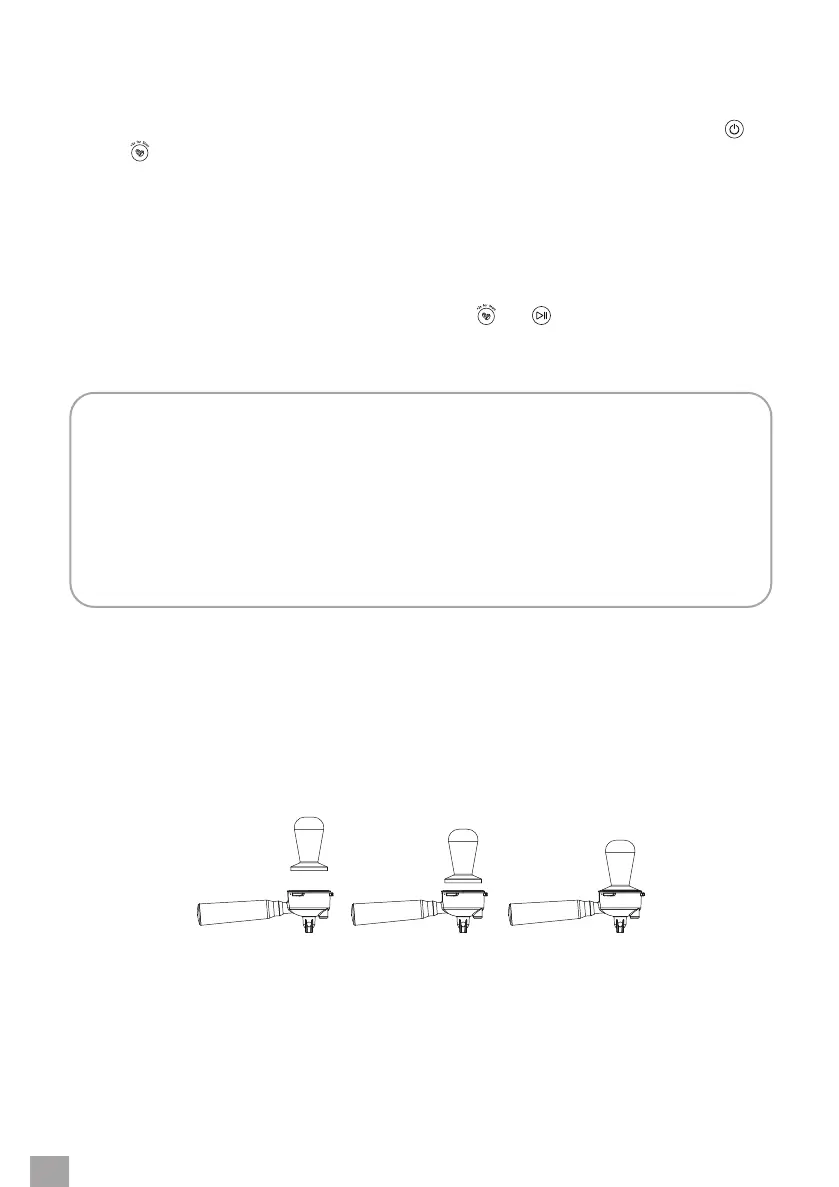
COFFEE TAMPING
1. Carefully remove the handle from the holder when you have nished grinding.
2. Slightly tap the bottom of the handle on the edge of the table or worktop to allow the
ground coee to sit in the strainer.
3. Place the handle on aat surface. Tamp the ground coee in the strainer evenly with the
tamper. Apply constant pressure (about 12 kg) to the tamper to evenly tamp the coee.
4. Clean the edges of the basket thoroughly of any ground coee residue.


 To Next Page