3.4.2 Reset Control
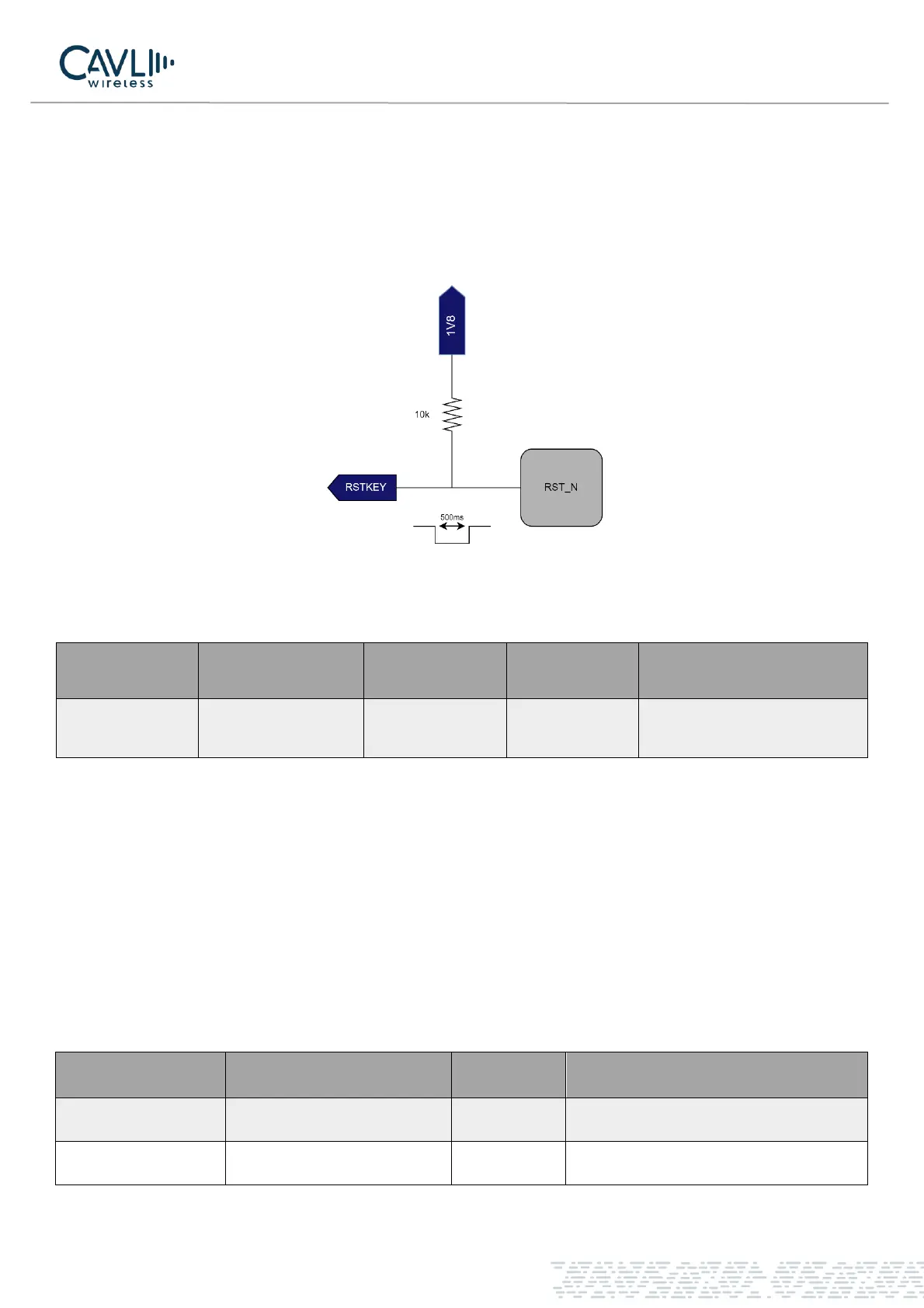
The C16QS module Pin 17
th
is a reset pin. The application detects that the module is abnormal. When the
software does not respond, the module can be reset. Pull the pin low for 100-600ms to reset the module. The
RESET pin is sensitive to interference. A 10nF to 0.1uF capacitor can be installed near the signal for signal
filtering. Keep away from RF interference signals when routing.
Figure 6 Reset reference circuit
Table 3-6 RESET pin parameters
The C16QS module supports AT command reset, and the AT command is AT+TRB to restart the module.
Detailed instructions can be found in the C16QS AT Command Set Manual.
3.5 USB Interface
The C16QS module USB interface supports USB2.0 high-speed protocol, only in slave mode, and does not
support USB charging mode. USB input and output traces must comply with the USB2.0 feature. The input
power supply of USB_VBUS is 3.3V - 5V. AT interfacing and Ethernet via USB is possible in Cavli C16QS
module. The USB interface is defined as follows:
Table 3-7 USB interface pin definition



 To Next Page