18
TIG WELDING WITH SPOT-WELD
FUNCTION ON
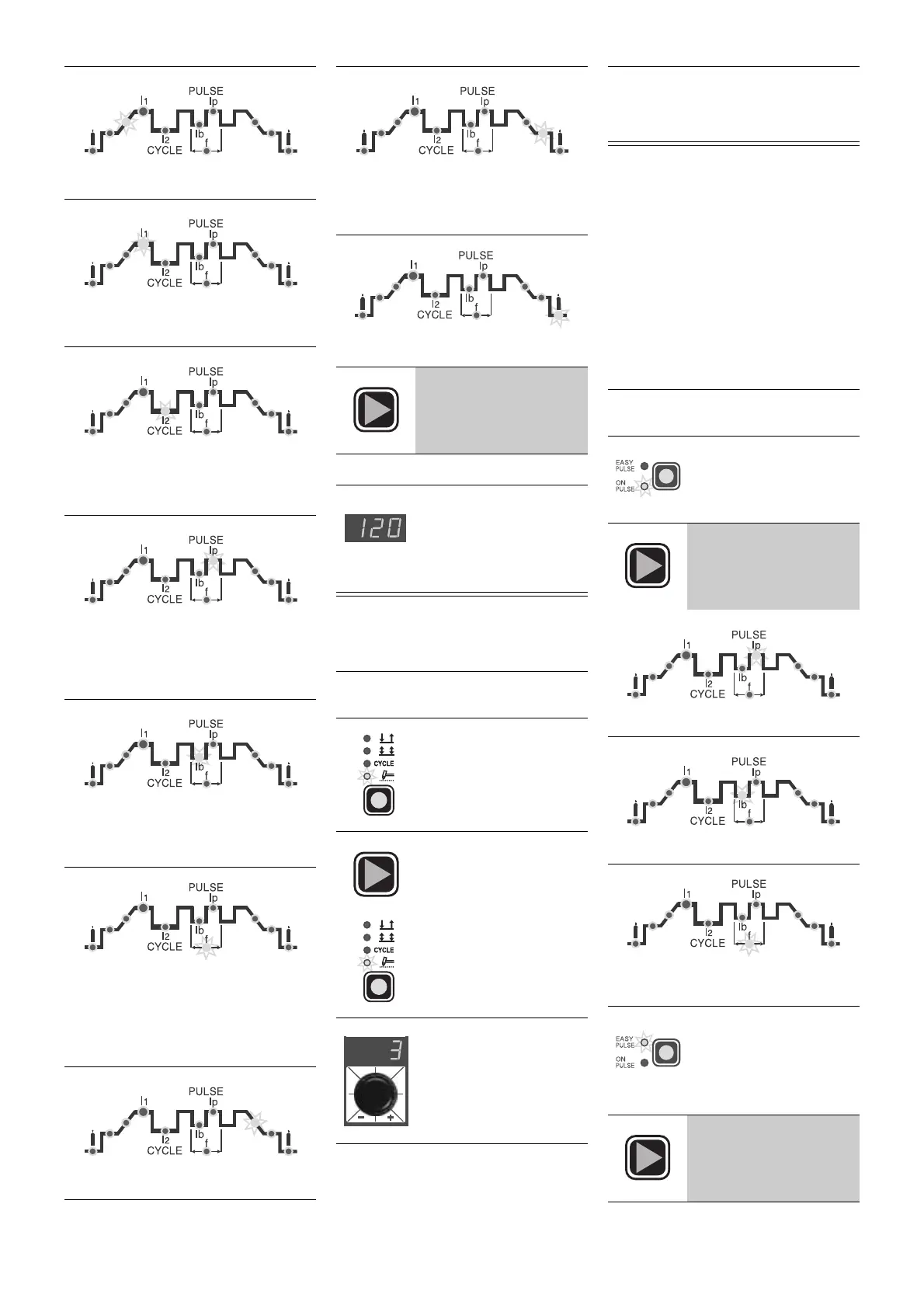
PULSATING TIG WELD
Pulsating TIG welding can be done in
two ways with
MATRIX 250 HF
:
•
ON PULSE
Pulsating TIG weld with manually set
weld parameters;
•
EASY PULSE
Pulsating TIG weld with weld parame-
ters set in synergy.
NOTE:
Pulsation is automatically cut off
while the current is on INITIAL and
FINAL.
SLOPE UP time (0 ÷ 5 sec)
PRINCIPAL weld CURRENT
I
1
(5 ÷ 250
A)
CYCLE CURRENT I2(5 ÷ 250 A)
WARNING:
programmable only with
CYCLE
function on
PEAK CURRENT
I
p
(5 ÷ 250 A)
WARNING:
programmable only with
ON PULSE
or
EASY PULSE
functions
on
BASIC CURRENT
I
b
(5 ÷ 125 A)
WARNING:
only programmable with
ON PULSE
or
EASY PULSE
on
PULSATION FREQUENCY
f
(0,5 ÷ 500
Hz)
WARNING:
programmable only with
ON PULSE
or
EASY PULSE
functions
on
SLOPE-DOWN time (0 ÷ 8 sec)
FINAL weld CURRENT (5 ÷ 250 A)
WARNING:
only programmable with 4
STROKE
or
CYCLE
functions on
POST-GAS time (0,5 ÷ 25 sec)
5)
Keep pressing the
SET
key for about 1 second
to leave the weld para-
meter setting phase
6)
TIG weld as desired
NOTE:
The display will vis-
ualize the current value
used for welding if the
GREEN LED
I
1
stays on
continuously during weld-
ing
1)
Start up the welder by turning the
main switch to position
I
2)
Press the "weld mode"
button and set to
SPOT-WELD
position
3)
Press the
SET
button
until the corresponding
led starts flashing
4)
Turn the knob to set to
desired SPOT-WELD
TIME (0,5 ÷ 5 sec)
5)
Now continue in the same way as
for normal TIG welding, setting the
various parameters as indicated in
the
TIG WELD
procedures
1)
Start up the welder by turning the
main switch to position
I
2)
Press the "pulsation"
button until the desired
function is working
3)
Set the following pulsa-
tion parameters by
pressing the
SET
but-
ton repeatedly:
PEAK CURRENT
I
p
(5 ÷ 125 A)
BASIC CURRENT
I
b
(5 ÷ 250 A)
PULSATION FREQUENCY
f
(0,5 ÷ 500
Hz)
NOTE:
setting the value of
a parameter (usually
I
p
)
while
EASY PULSE
is
working, will give the val-
ues of the other parame-
ters (
I
b
,
f
) in synergy
Keep pressing the
SET
key for about 1 second to
leave the weld parameter
setting phase













 To Next Page