Vectra Genisys® Therapy System
44
OPERATION
Refer to pages 32 through 35 for
electrode selection, preparing patient, and
securing electrodes.
GENERAL ELECTROTHERAPY WAVEFORM SET UP
The following information is an example of step by step set up for the Electrotherapy waveforms. All waveforms in the Vectra Genisys
Therapy System are set up and edited in the same basic fashion. The following set up instructions use Interferential Waveform.
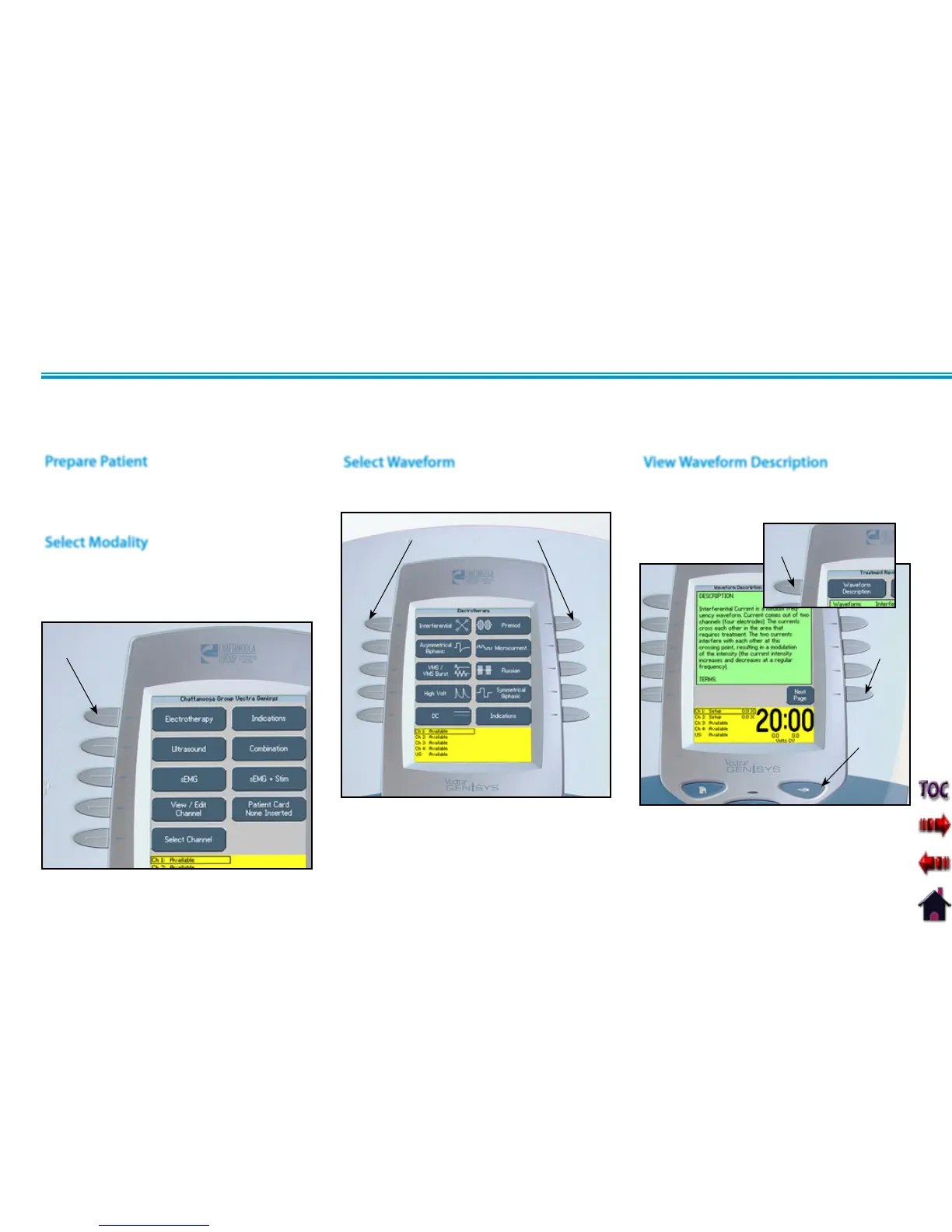
Press the Electrotherapy button on the
Home screen.
Press button beside the desired waveform
from the listing on the screen.
Press the Waveform Description button
to view text explaining the waveform
rationale.
Refer to Specifications section of this
manual for all available waveforms on the
Vectra Genisys Therapy System.
Press the Next Page button to view
additional text. Press the Back button to
return to the Treatment Review screen.
ELECTROTHERAPY
BUTTON
Select Modality
Select Waveform
PRESS DESIRED WAVEFORM BUTTON
Prepare Patient
View Waveform Description
WAVEFORM DESCRIPTION
BUTTON
NEXT
PAGE
BUTTON
BACK
BUTTON






 To Next Page