Vectra Genisys® Therapy System
54
OPERATION
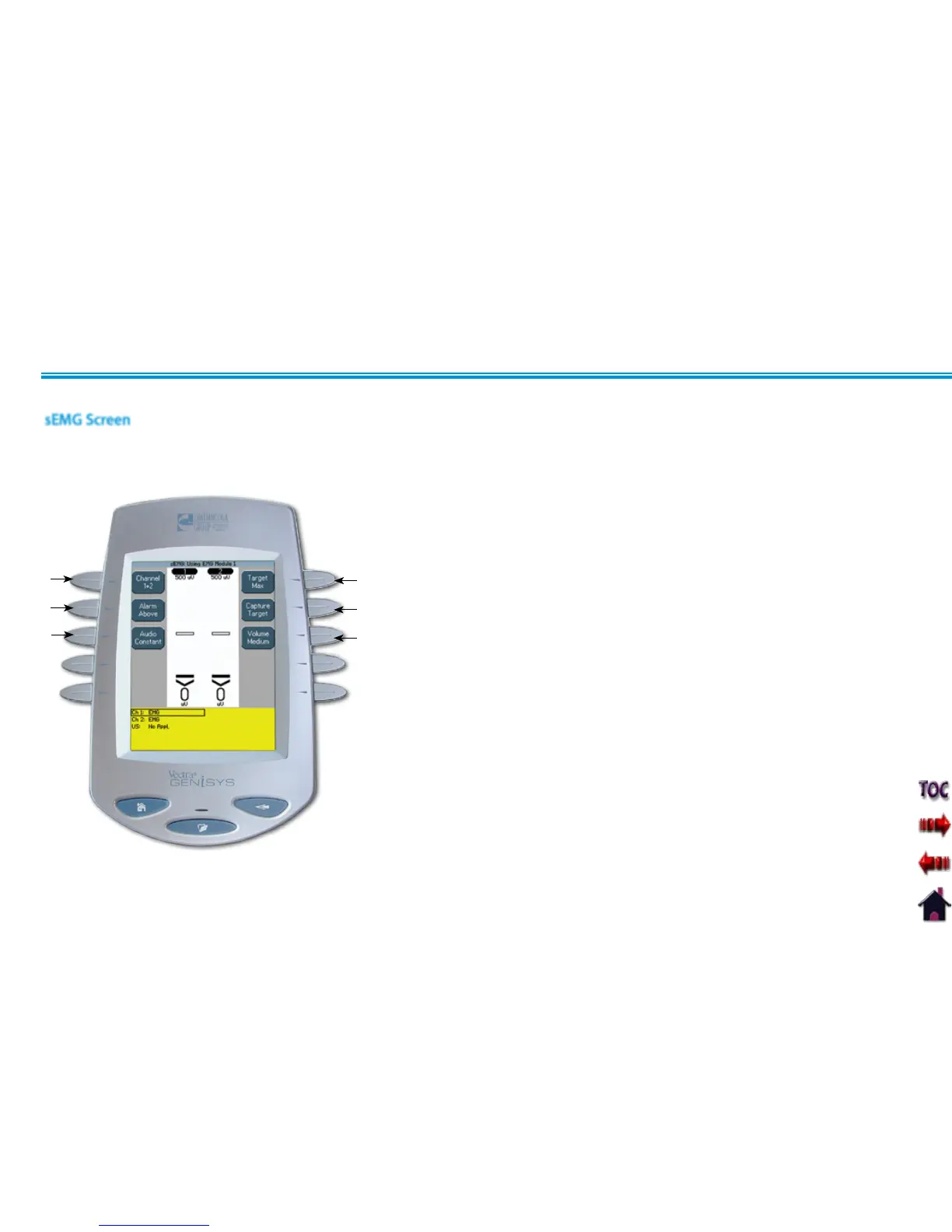
Channel1.
Select Channel 1, Channel 2, or Channel 1+2. Channel 1+2 is the Default Unit
Setting.
Target2.
Select Average, Max, or Manual Target. Max Target is the Default Unit Setting.
Alarm3.
Set Alarm to sound Above, Below, or at Target. Above Target is the Default Unit
Setting.
Capture Target4.
Captures target value while patient is performing a series of muscle contractions.
Audio5.
Allows selection of Constant, Pulsed, or Dynamic audio types. Constant is the
Default Unit Setting.
Volume6.
Set volume level to Low, Medium, High, or Off. Medium is the Default Unit Setting.
1
3
5
2
4
6
The Vectra Genisys sEMG screen affords access to all of the sEMG parameters and functions. The area surrounding the screen has 10 parameter
modification buttons. However, only six are used for the sEMG modality. Below is a general description of each of the sEMG parameter
buttons. Each sEMG parameter button is explained in greater detail in the following pages of this section.
sEMG THERAPY SET UP (CONTINUED)
sEMG Screen











 To Next Page