Vectra Genisys® Therapy System
56
OPERATION
sEMG THERAPY SET UP (CONTINUED)
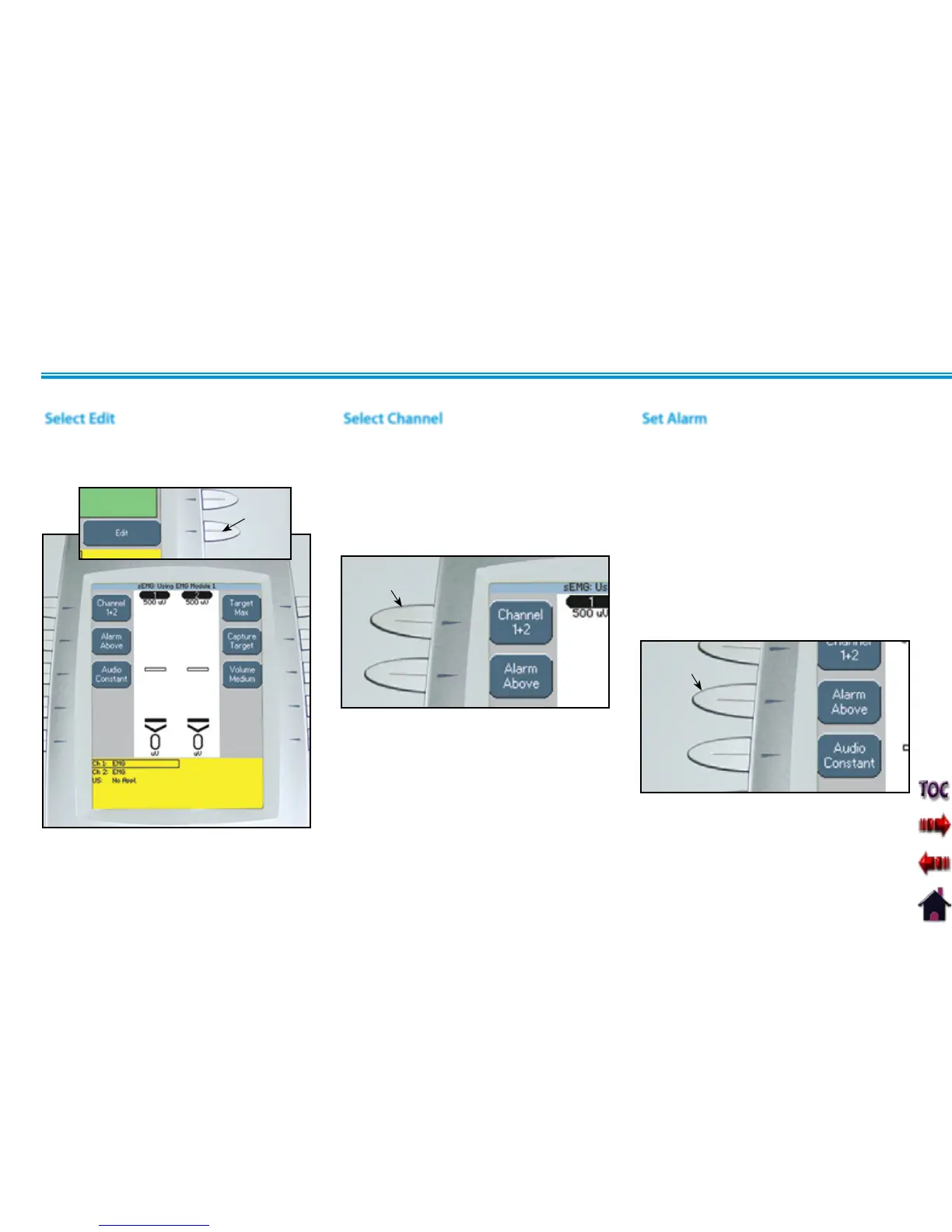
Select Edit
Press the Edit button on the Treatment
Review screen to edit sEMG parameters as
prescribed.
EDIT
BUTTON
Select Channel
Press the Channel Button until the
prescribed channel is displayed in the icon.
Therapy System
Available selections are 1, 2, or 1+2.
Channel 3/4 Electrotherapy Module
Available selections are 3, 4, or 3+4.
CHANNEL
BUTTON
Set Alarm
Set the alarm trigger in relation to the
target by pressing the Alarm button until
the desired selection is displayed in the
Alarm icon.
The available selections are:
Above- Alarm sounds when a muscle
contraction surpasses the target.
Target- Alarm sounds when a muscle
contraction reaches the target.
Below- Alarm sounds when a muscle
contraction is below the target.
NOTE: A maximum of two channels
may be used to administer sEMG
Therapy. Either channels 1+2 or 3+4.
sEMG will not function as a four
channel modality.
ALARM
BUTTON
NOTE: If Volume is Off, no alarm will be
heard.











 To Next Page