Vectra Genisys® Therapy System
71
OPERATION
NOTE: See page 50 for Head Warming
feature instructions.
NOTE: To edit parameters from the Home
screen, see page 48 for selecting
channel instructions.
The channel parameters may be changed during a treatment session without pausing or stopping the treatment. The following
information provides instructions for changing Combination Treatment Electrotherapy Channel and Ultrasound parameters during a
treatment session.
ADJUSTING COMBINATION PARAMETERS DURING TREATMENT
Edit Waveform Parameters
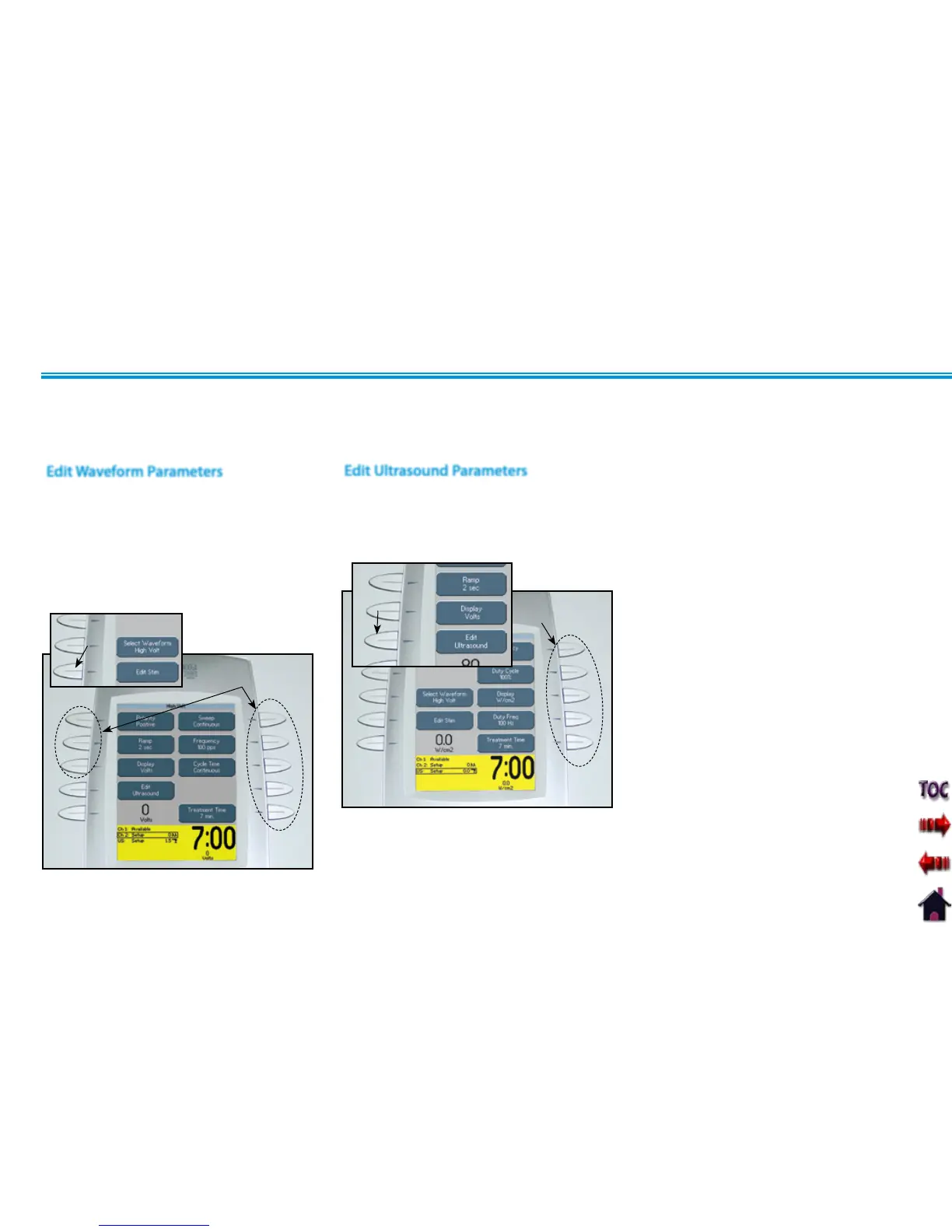
Press the Edit Stim button to edit the
parameters of the waveform selected.
Press the corresponding button to edit
each parameter as prescribed.
Rotate the Intensity Knob to increase or
decrease waveform intensity as prescribed.
EDIT STIM
BUTTON
PARAMETER
BUTTONS
Press the Edit Ultrasound button.
Press the corresponding button to edit
the desired Ultrasound parameter as
prescribed.
Edit Ultrasound Parameters
PARAMETER
BUTTONS
EDIT
ULTRASOUND
BUTTON











 To Next Page