Programmable AC Source 61601/61602/61603/61604 User’s Manual
3-12
the formula if F>1000Hz : Vref (pk-pk, V) × F (Vref, Hz) < 10000 VHz
2. Because of the bandwidth limitation of AC source, the output may
distortion. Especially when external V reference consists of high
3.6.3 POWER ON STATUS
The AC source allows the user to set the status of the output when power is switched on.
The user can set POWER ON STATUS on CONF functional list (see 3.6). After setting, the
user should save them before powering off (see 3.8.2).
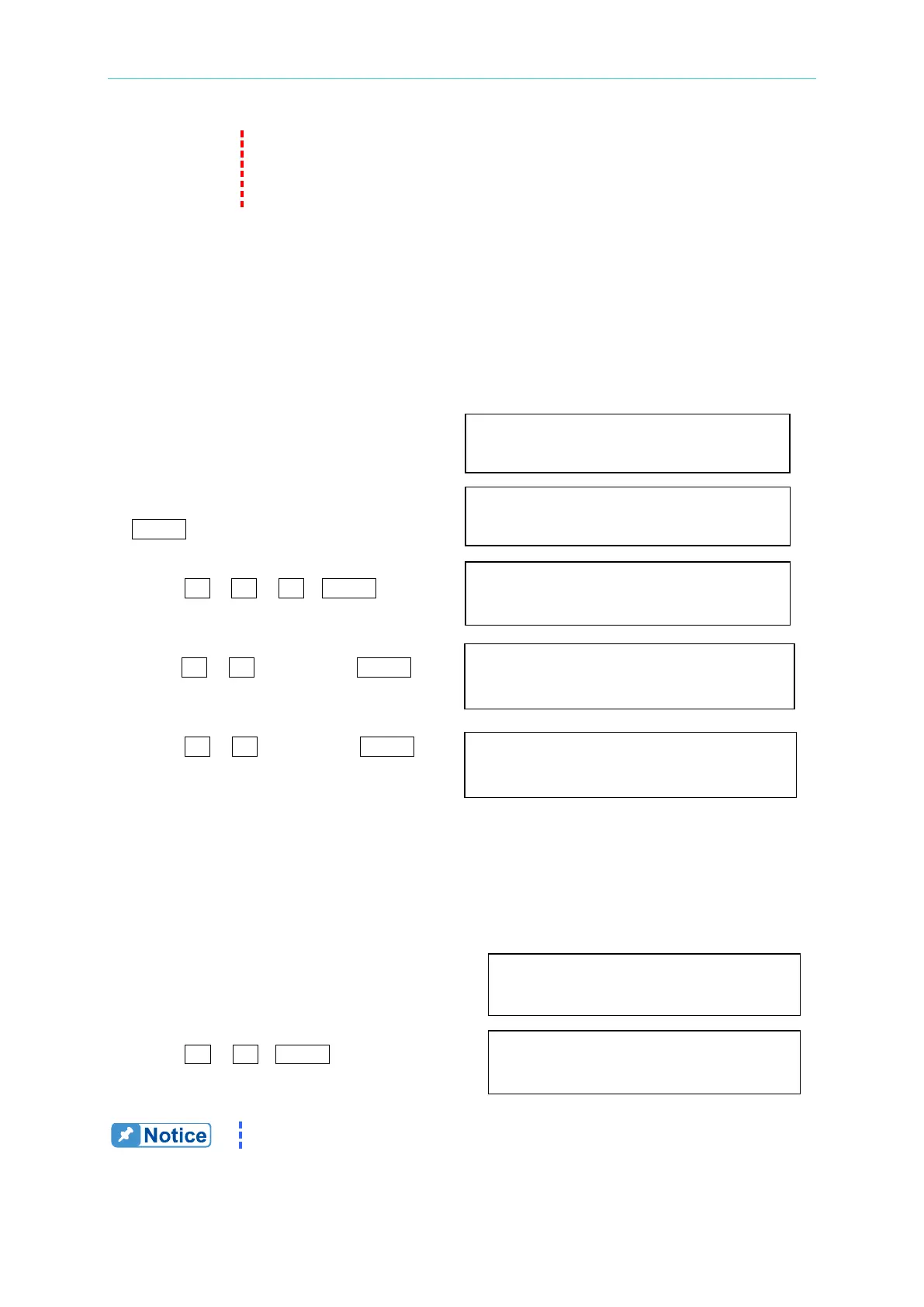
To set the output is on, as 120 Vac, 50Hz, 10Vdc when power-on.
1. Move the cursor to the line of “POWER POWER ON STATUS : output = OFF_
ON STATUS : output =”.
2. Turn RPG to set output ON, then press POWER ON STATUS : output = ON
ENTER.
3. Press 1 , 2 , 0 , ENTER to Vac = 120.0 F=60.0_ Vdc = 0.0
set Vac=120.
4. Press 5 , 0 , then press ENTER Vac = 120.0 F=50.0 Vdc = 0.0
to set F=50.
5. Press 1 , 0 , then press ENTER
to set Vdc=10. Vac = 120.0 F=50.0 Vdc = 10.0
3.6.4 GPIB Address, RS-232C (with GPIB)
The AC source offers the mode of remote operation too. The user can set them on CONF
functional list (see 3.6). For details please refer to Chapter 7. Prior to remote operation the
user has to set the GPIB address 10 as below:
1. Move the cursor to the command ADDR = 30_
line of GPIB address.
2. Press 1 , 0 , ENTER to set address 10. ADDR = 10
Addressing space ranges from 1 to 30.
The AC source offers another remote operation through the RS-232C bus. Communication



 To Next Page