31
32
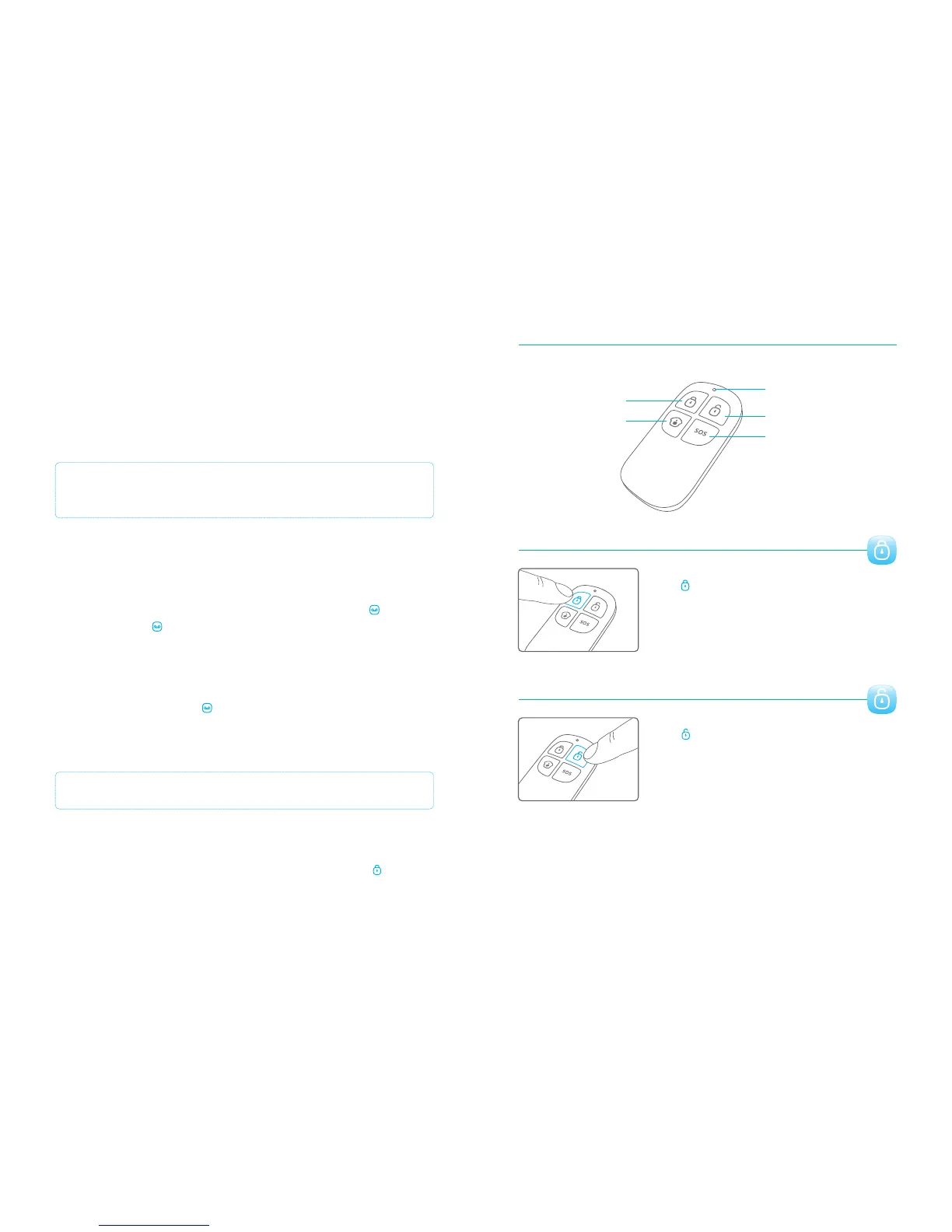
Remote control overview
LED Indicator
Disarm
Arm
Home mode
SOS button
Arm
Press to arm the alarm system. The LED indicator
will light up and the siren will beep once to confirm the
alarm system is armed.
Remote control
Disarm
Press to disarm the alarm system. The LED indicator
will light up and the siren will beep twice to confirm the
alarm system is disarmed.
Arm & Disarm by free phone call
Arming the alarm system can be done by calling the SIM card telephone number in
the control panel. When you hear the dialling tone, hang up. You will be called back by
the same number. Do not answer but decline the call. The alarm will be armed.
Disarming the alarm system can be done by calling the SIM card telephone number.
Keep hanging until the system disconnects by itself. The alarm system will not call you
back and the alarm system is disarmed.
IMPORTANT: To arm or disarm the alarm system, make sure voicemail is
disabled on the SIM card of the alarm system.
Connect (new) wireless accessories & RFID tags
Connect new wireless sensors
The included sensors are paired with the control panel by default. If you want to pair
new sensors, follow these instructions: Enter the password and press the button on
the control panel. The button lights up. Now you can pair a sensor by triggering it.
When you hear a beep from the control panel the sensor is paired successfully. If you
hear the control panel beep twice the sensor has already been paired before.
Connect new RFID tags
Enter the password and press the button on the control panel. The button lights up.
Now you can hold a RFID tag in front of the blue circle on the control panel. When you
hear a beep from the control panel the RFID tag is paired successfully. If you hear the
control panel beep twice the RFID tag has already been paired before.
Connect and delete wireless sirens
This siren is an extra accessory. Press the connect button on the alarm unit for 0.5
seconds. Siren beeps once and its LED starts to flash. Now press the arm button on
the control panel. You will hear a single beep when paired successfully.
Hold the connect button on the wireless siren, a beep is heard means the connection
between wireless siren and control panel is deleted.
IMPORTANT: The RFID tag does only function when the control panel is connected to AC.
PIR-900 Wireless PIR Motion Detector
1.
2.
3.
1.
2.
3.
IMPORTANT: When single zone group is selected, the sensor will always be in
the normal group. It is not possible to place it in the home group.
3 Years
Warranty



 To Next Page