2-20 Installation
5150 Service Aggregation Switch Hardware Installation and Start-up Manual
009-3222-001 Standard Revision H
Copyright
©
2012-2015 Ciena
®
Corporation July 2015
Procedure 2-6
To Install an AC Power Supply
You will require two AC power supply modules in the 5150. Because the
power supplies are redundant, you will be able to replace an AC power supply
while the unit is operating. The remaining AC power supply will compensate
to maintain uninterrupted system operation.
The breaker on the power input should be installed as per the National
Electrical Code guidelines, and a 15 Amp breaker should be sufficient.
Step Action
1 Remove the power supply modules from the packaging and inspect them for
damage.
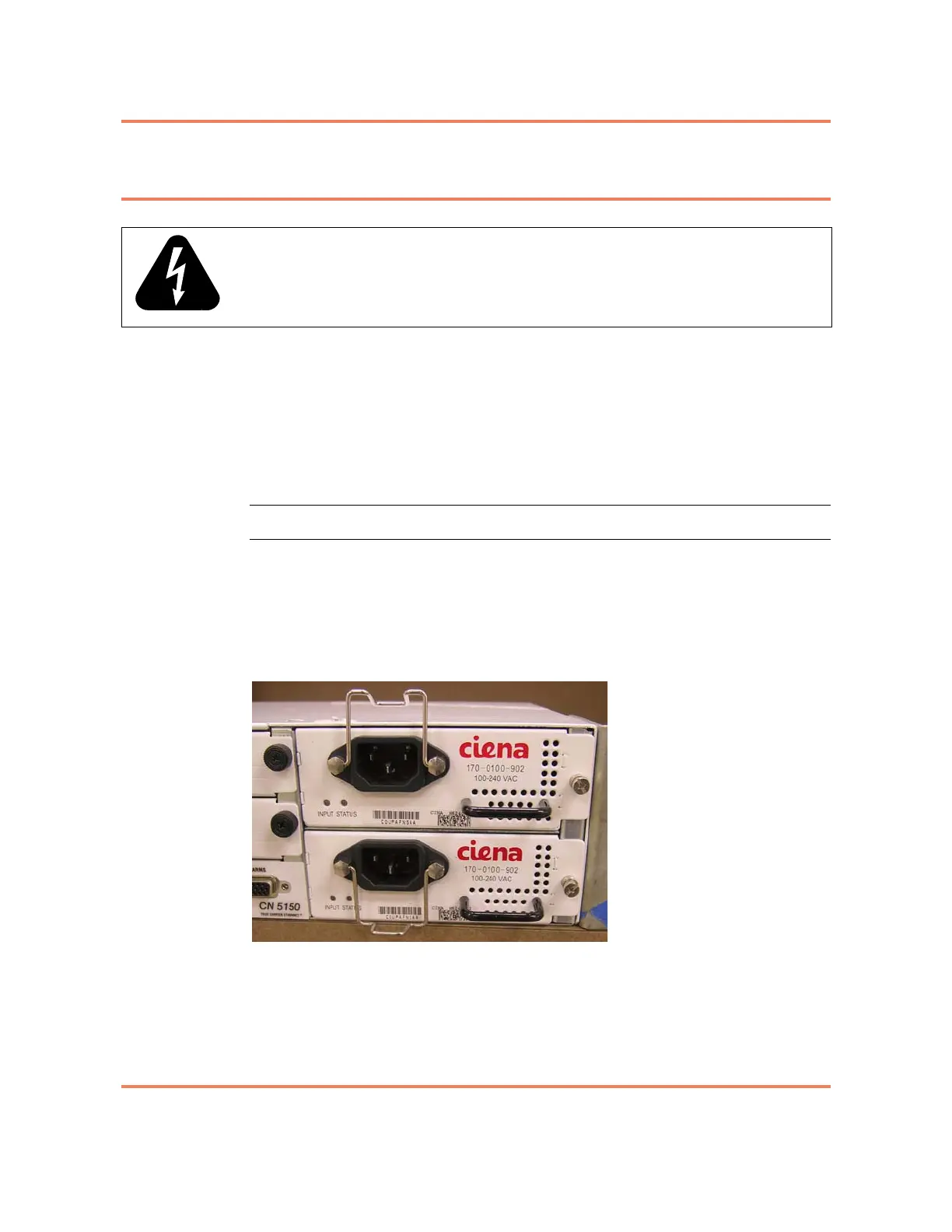
2 Slide one power supply module into slot PS A and the second into PS B. See
Figure 2-4.
Figure 2-4
Installed AC Power Supply modules
3 Using a Phillips screwdriver, secure the modules in place using the captive
hold down screw on the right of the module.
4 Install the power cord retention clip by pinching it slightly and threading the
wire posts through the two nuts on either side of the power receptacle on the
faceplate of the power supply.
WARNING: The AC socket outlet shall be installed near the equipment and
shall be easily accessible.



 To Next Page