CHAPTER 1
Your Phone
• Your Cisco IP Conference Phone 8832 , on page 1
• Phones Supported in this Document, on page 2
• New and Changed Features, on page 3
• Phone Setup, on page 8
• Sign into Your Extension from Another Phone (Extension Mobility), on page 14
• Sign in to a Phone as a Guest, on page 14
• Set the Profile Rule on the Phone, on page 15
• Phone Web Page, on page 15
• Speed-Dial Numbers, on page 16
• Cisco IP Conference Phone 8832 Buttons and Hardware, on page 17
• Energy Savings, on page 21
• Additional Help and Information, on page 22
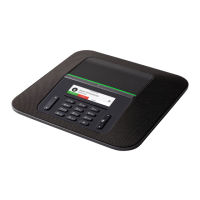
Your Cisco IP Conference Phone 8832
The Cisco IP Conference Phone 8832 Multiplatform Phones provide high-definition (HD) audio performance
and 360-degree coverage for medium to large conference rooms and executive offices. The conference phone
has sensitive microphones that let you speak in a normal voice and be clearly heard from up to 10 feet (2.1
m) away.
Cisco IP Conference Phone 8832 Multiplatform Phone User Guide
1







 To Next Page