However the ‘next’ product ID details displayed after each test will
depend on the Product Number options selected. See product
number options.
• Download, New Test
Configure – Highlight this to select Download Options (sends test
results to a choice Printer, PC or Z-modem medium).
This will allow user to download the test results to any of the above
options before proceeding to next test.
Format:
This allows user to select the date convention to be used
(i.e. DD/MM/YYYY or MM/DD/YYYY)
R
o
(REF 283A954)
This allows the user to define the thermal printer to be used with the
Hal. Option selected must match with the printer connected especially
for Barcodes printing. See Accessories at Main Menu.
P
assw
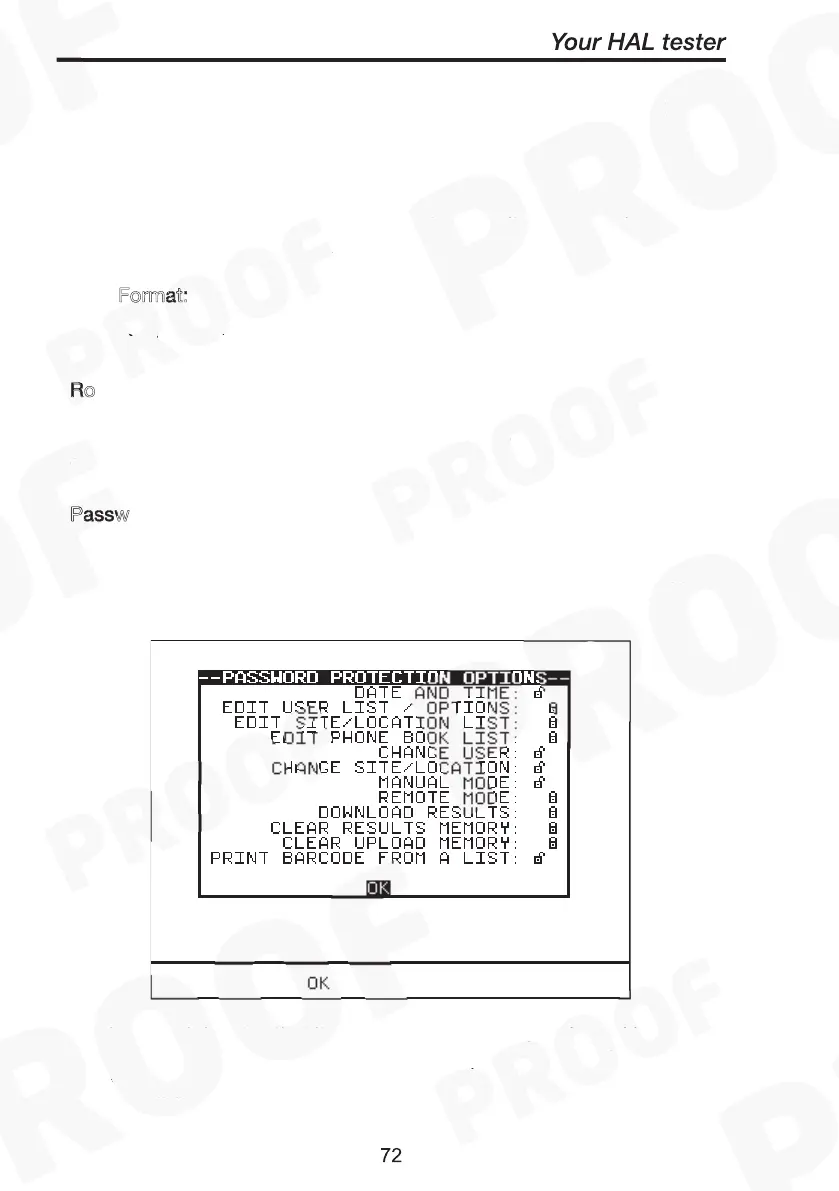
This allows the user to password protect a list of selectable options. An
existing password must be set-up before this option can be used. To
select option highlight the field, press Green to effect ‘lock or unlock’ of
password protection on the field options. Press OK to save format.
Date Format:
Roll Printer:
Password Protection Options
‘Locked’ field denotes that it will be password protected. Invoking any
of those settings/options editor menu will required password to
access.
‘Unlocked’ field denotes otherwise.
Date Format:
Roll Printer:
Password Protection Options



 To Next Page