Chapter 5: Maintenance and troubleshooting
98-148232-E Troubleshooting 105
Status signalling
Means of signalling
The EXPLORER 540 system provides two methods for signalling the status of the system.
• LED between the cable glands.
• Messages shown in the web interface.
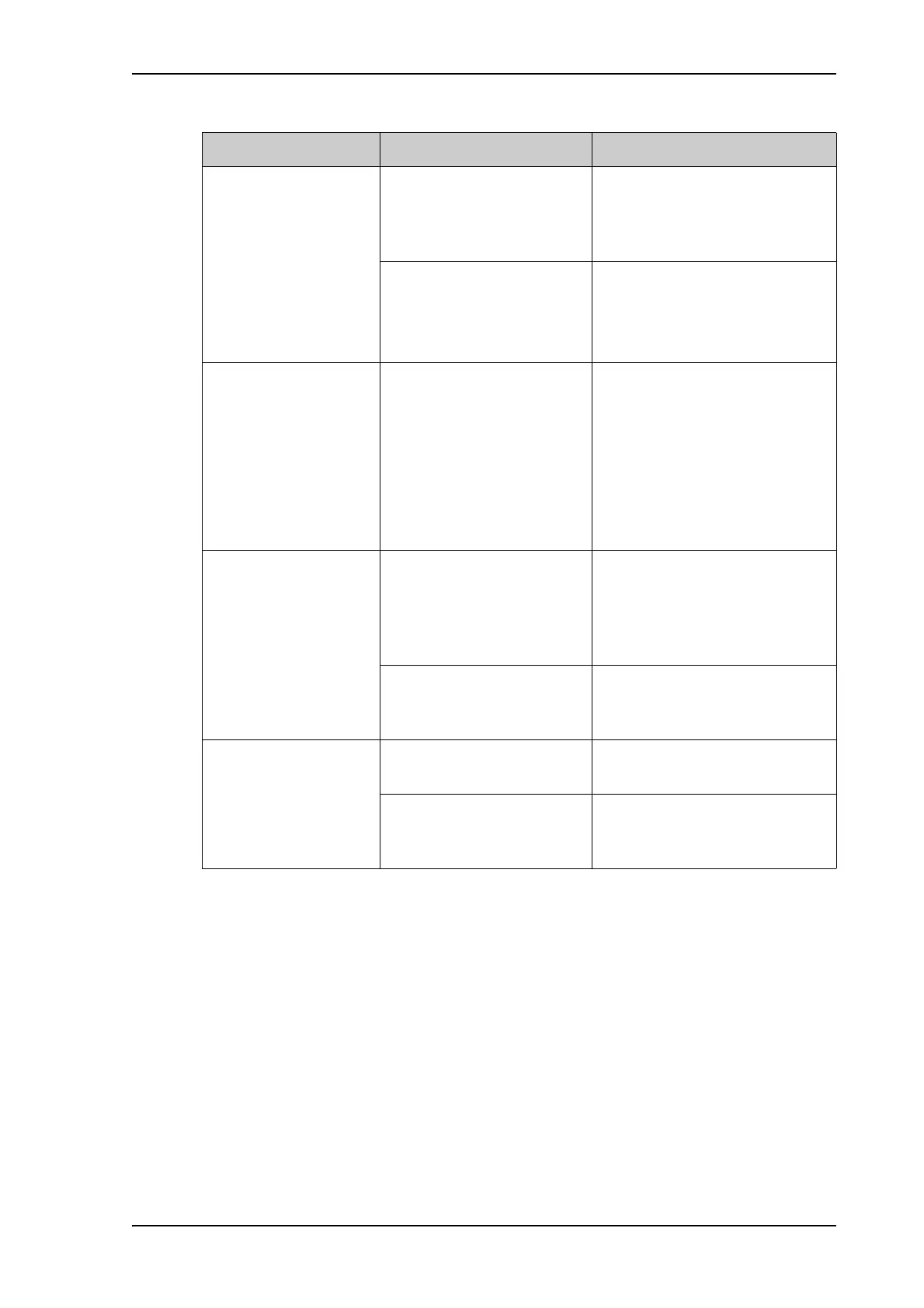
No signal or weak signal
from the BGAN satellite.
The view to the satellite is
blocked.
Make sure the EXPLORER 540 has
a clear view to the satellite. Be
aware that window glass may
reduce the signal level.
The antenna is pointed in the
wrong direction.
Check that the antenna is pointed
according to the position data.
Adjust the position to the highest
possible signal strength.
Connection to the
Internet cannot be
established.
The signal strength is too low. Check that the antenna is pointed
according to the position data.
Adjust the position to the highest
signal strength you can obtain.
As a rule of thumb, you should
have a a signal strength of
45 dBHz or more to be able to
make a call or data session.
The web interface
cannot be accessed.
The browser is configured to
use a proxy server.
For Microsoft Internet Explorer,
select Tools > Internet Options
> Connections > LAN Settings
and uncheck Use a proxy server
for your LAN.
You have entered a wrong IP
address.
Check the IP address and re-enter
it. The default IP address is
192.168.0.1.
A LAN connection
cannot be established.
The cable is not properly
connected.
Connect the cable.
The cable type is not correct. Use Ethernet Min. Cat 5 Solid
copper wire, STP. Max. length:
100 m.
Problem Possible cause Remedy



 To Next Page