Chapter 2: To get started
98-148232-E Installation process 14
2. Unscrew two of the long screws from the pole mount
kit to leave one side open for the pole.
3. Place the pole mount kit with the EXPLORER 540
around the pole as shown.
4. Remount the two remaining long screws. Do not
tighten the screws completely until you have pointed
the antenna.
BGAN or cellular network
The EXPLORER 540 is a BGAN terminal. However, if you have purchased the EXPLORER 540 LTE
modem option, you can use the cellular network when it is available, with BGAN as backup. See
Optional: To use a cellular network (dual mode) on page 7.
To use the BGAN network, you must first point the antenna in the direction of the satellite and
find the best possible signal strength. For fixed installation you only have to do this once. See
the next sections for details.
Pointing
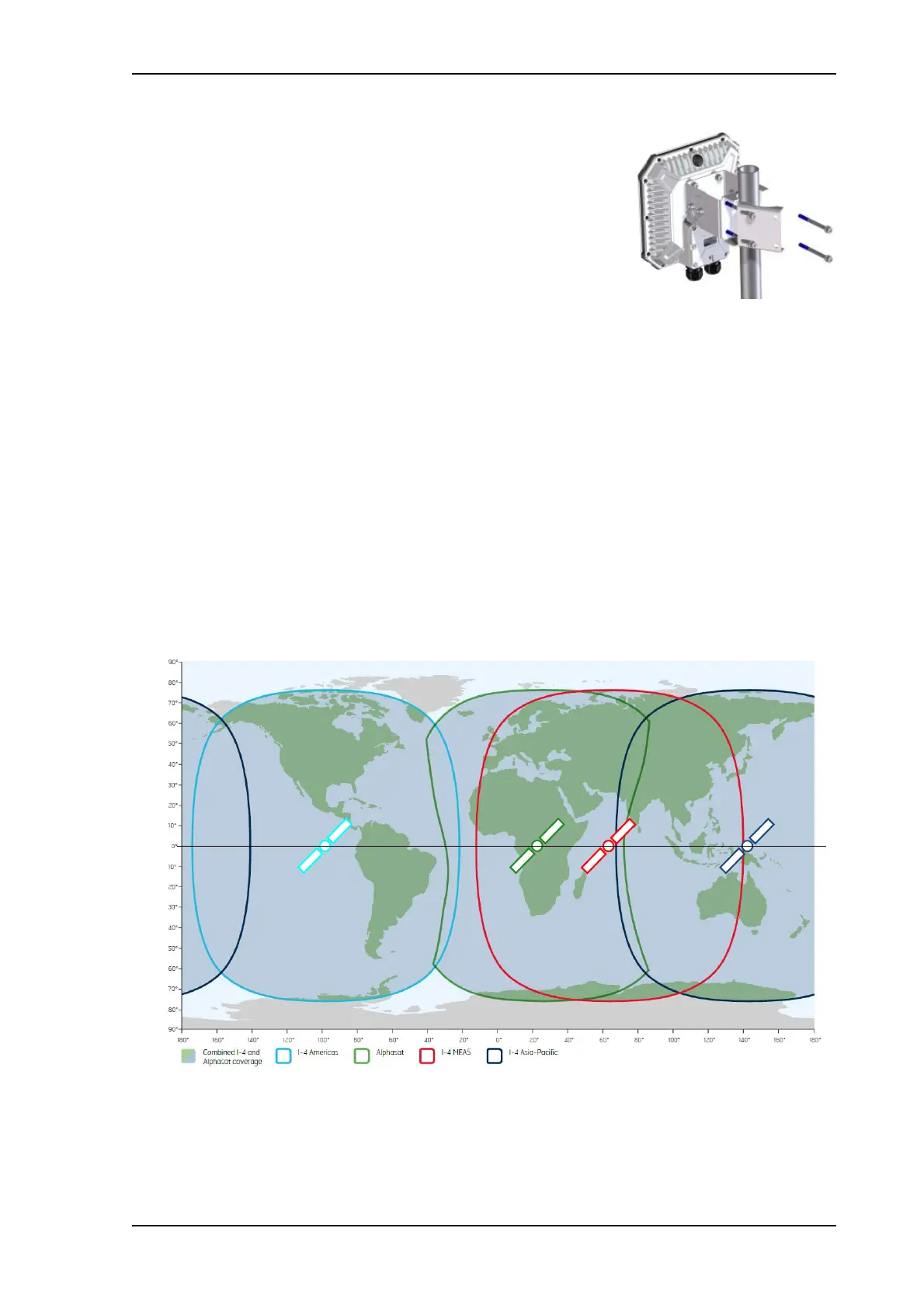
Before pointing the antenna you can use the coverage map below to find your approximate
location in relation to the satellites. Pointing is part of the Installation procedure described in
the next section.
The Inmarsat satellites are positioned above the equator, at the centre of each “footprint”.



 To Next Page