Modular Matrix Switcher
Comm-tec Srl 10 www.comm-tec.it
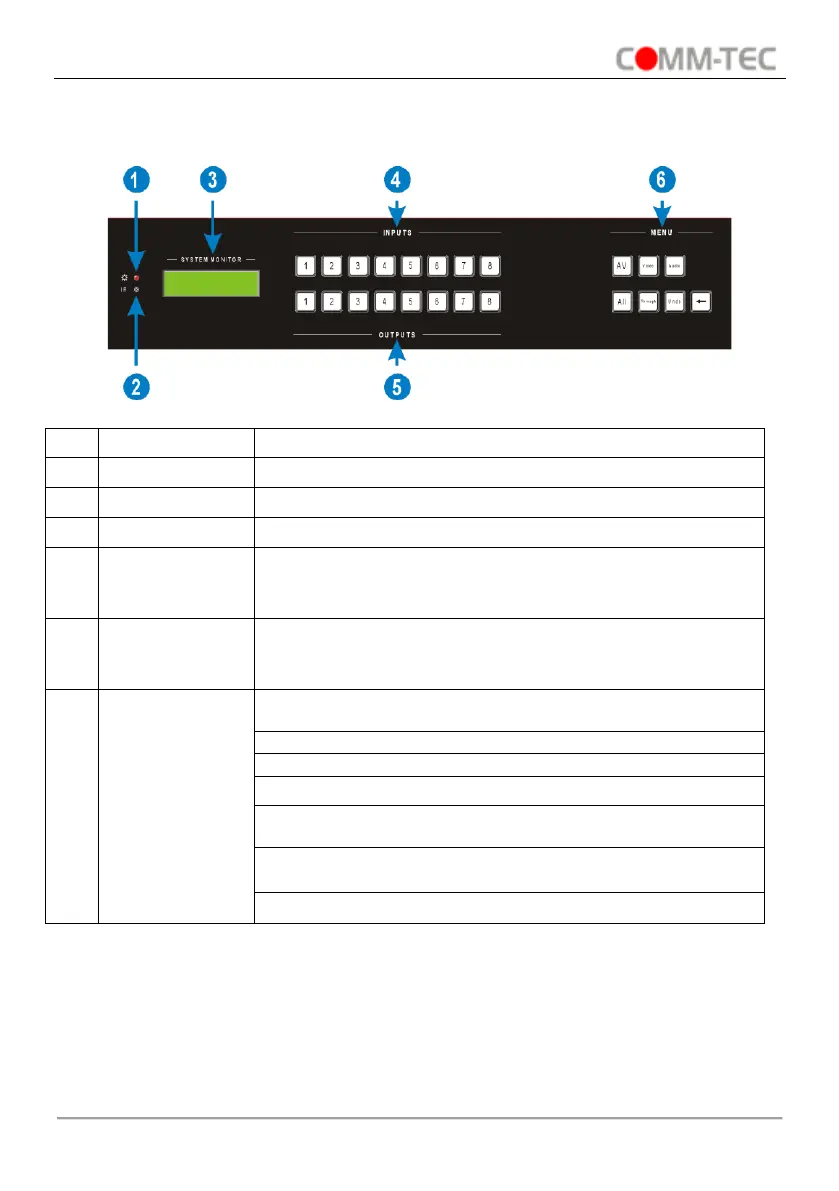
2. Panel Description
2.1. Matrix Front Panel
Built-in IR sensor to receive IR signal sent from IR remote.
The LED illuminates red when power is applied.
Shows real-time operation status.
Back-lit buttons for input selection, ranges from 1~ 8,
correspond to 1~8 sources on input signal cards (counting
from left to right, top to bottom).
Back-lit buttons for output selection, ranges from 1~ 8,
correspond to 1~8 displays on output signal cards (counting
from left to right, top to bottom).
AV: Switch AV signal from AV signal card& audio signal from
audio card synchronously.
VIDEO: Switch AV signal from AV signal card only.
AUDIO: Switch audio signal from audio card only.
ALL: Select all input or output channels.
THROUGH: Switch the signals directly to the corresponding
output channels.
UNDO: Undo button, to resume to the status before the
command just performed.
←: Backspace button, to backspace the last press.


 To Next Page