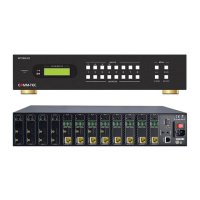
Modular Matrix Switcher
Comm-tec Srl 28 www.comm-tec.it
4. Button Control
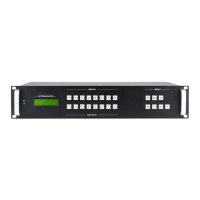
The matrix can be rapidly controlled with its front panel buttons. Here is a brief operation
guide.
Format: “Input Channel” + “Switch Mode” +“Output Channel”
Note:
● “Switch Mode”:
✓ AV: Switch AV signal from AV signal card and audio signal from audio card
synchronously.
✓ Video: Switch AV signal from AV signal card.
✓ Audio: Switch audio signal from audio card.
● “Input Channel”: Fill with the number of input channel to be controlled.
● “Output Channel”: Fill with the number of output channels to be controlled. Press “All” to
select all the outputs.
● The input/output channels on the rear panel are counting from left to right, top to
bottom.
● The input delay time between two numbers of every input and output channel must be
less than 5 seconds; otherwise the operation will be cancelled.
Example:
● To switch input 1 to output 1, press input “1”, output “1”.
● To switch signals from input 1 to all output channels, press buttons in this order: “1”,
“All”.
Functional Buttons:
● UNDO: Return to the previous status
Example: Input 6 is connecting with output 6, press input “6” + “AV”+ output 4 to change
the connection. Press “Undo” to enable input 6 to reconnect with output 6.
● : If press buttons “1”, “AV”, “2”, “” in order, then “2” will be canceled.
● THROUGH: Get straight I/O connection, e.g. input 1-> output 1, input 2-> output 2.
Press “Input Channel” + ”Through”
Example: If you press buttons “ALL”, “THROUGH” in order, then the result will be like input
1→ output 1, input 2→output 2, input 3→output 3 … input 8→output 8.


 To Next Page