Envelope
Number
Instrument Attack
0
Piano
0
1
Accordion
12
2
Calliope 0
3 Drum
0
4
Flute
9
5
Guitar
0
6
Harpsichord
0
7
Organ
0
8
Trum pet
8
9
Xylophone
0
Decay
Sustain
Release
W ave
form Width
9 0
0
2
1536
0
12 0 1
0
25 0 0
5 5 0 3
4 4
0 0
9
2
1 1
9
0 0
2 512
9 9
0 2 2048
9
4
1
2 512
9 0
0 0
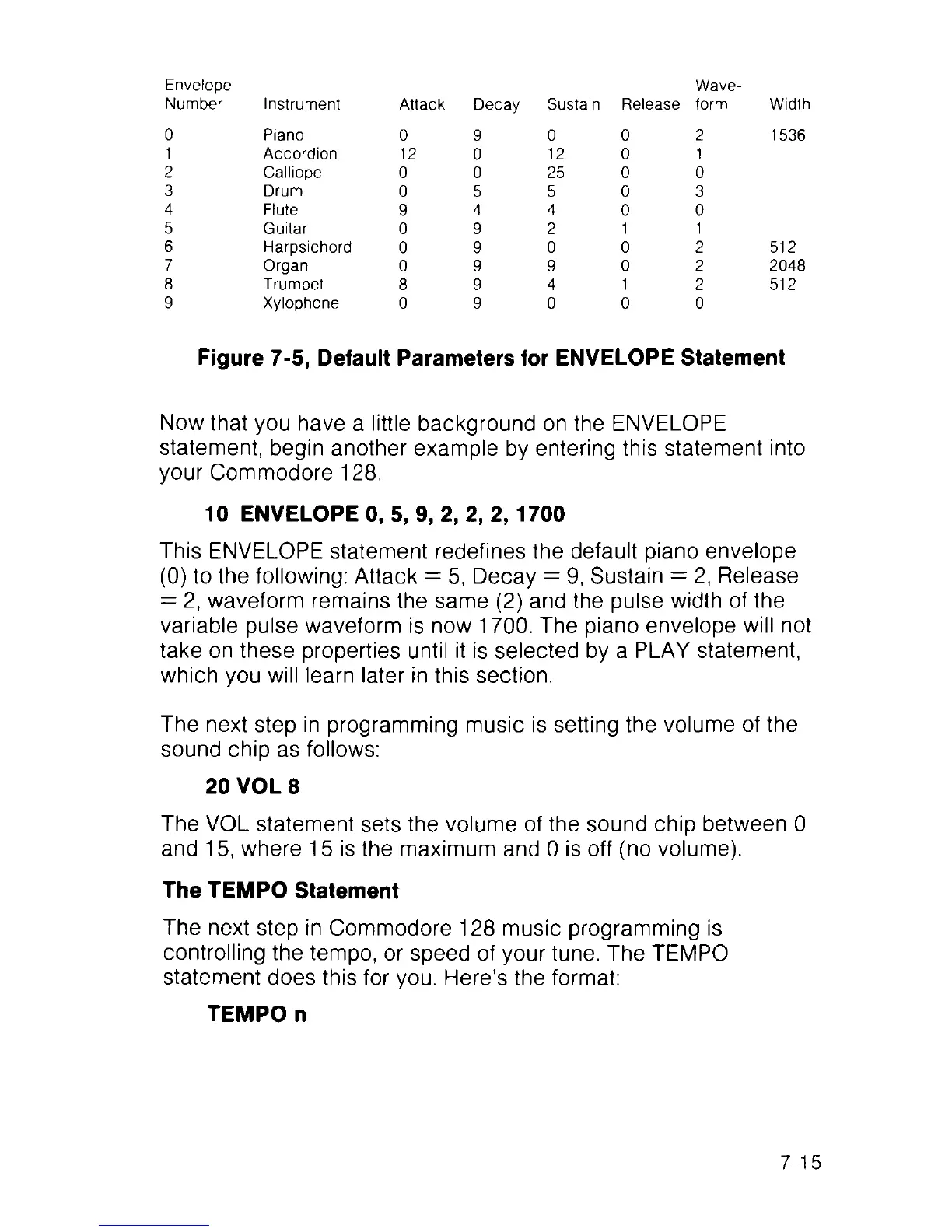
Figure 7-5, Default Parameters for ENVELOPE Statement
Now that you have a little background on the ENVELOPE
statement, begin another example by entering this statement into
your Commodore 128.
10 ENVELOPE 0, 5, 9, 2, 2, 2,1700
This ENVELOPE statement redefines the default piano envelope
(0) to the following: Attack = 5, Decay = 9, Sustain = 2, Release
= 2, waveform remains the same (2) and the pulse width of the
variable pulse waveform is now 1700. The piano envelope will not
take on these properties until it is selected by a PLAY statement,
which you will learn later in this section.
The next step in programming music is setting the volume of the
sound chip as follows:
20 VOL 8
The VOL statement sets the volume of the sound chip between 0
and 15, where 15 is the maximum and 0 is off (no volume).
The TEMPO Statement
The next step in Commodore 128 music programming is
controlling the tempo, or speed of your tune. The TEMPO
statement does this for you. Here’s the format:
TEMPO n
7-15



 To Next Page