The new line 45 turns off the low-pass filter and enables the
band-pass filter. Press RUN/STOP and RESTORE and RUN your
sound program again. Notice the difference between the low-
pass and band-pass filters. Change line 45 again to:
45 FILTER 1200, 0,0,1,10
Reset the sound chip and RUN your example program again.
Notice the difference between the high-pass filter and the low-
pass and band-pass filters. Experiment with different cutoff
frequencies, resonance levels and filters to perfect the music and
sound in your own programs.
Tying Your Music Program Together
Your first musical program is complete. Now you can program
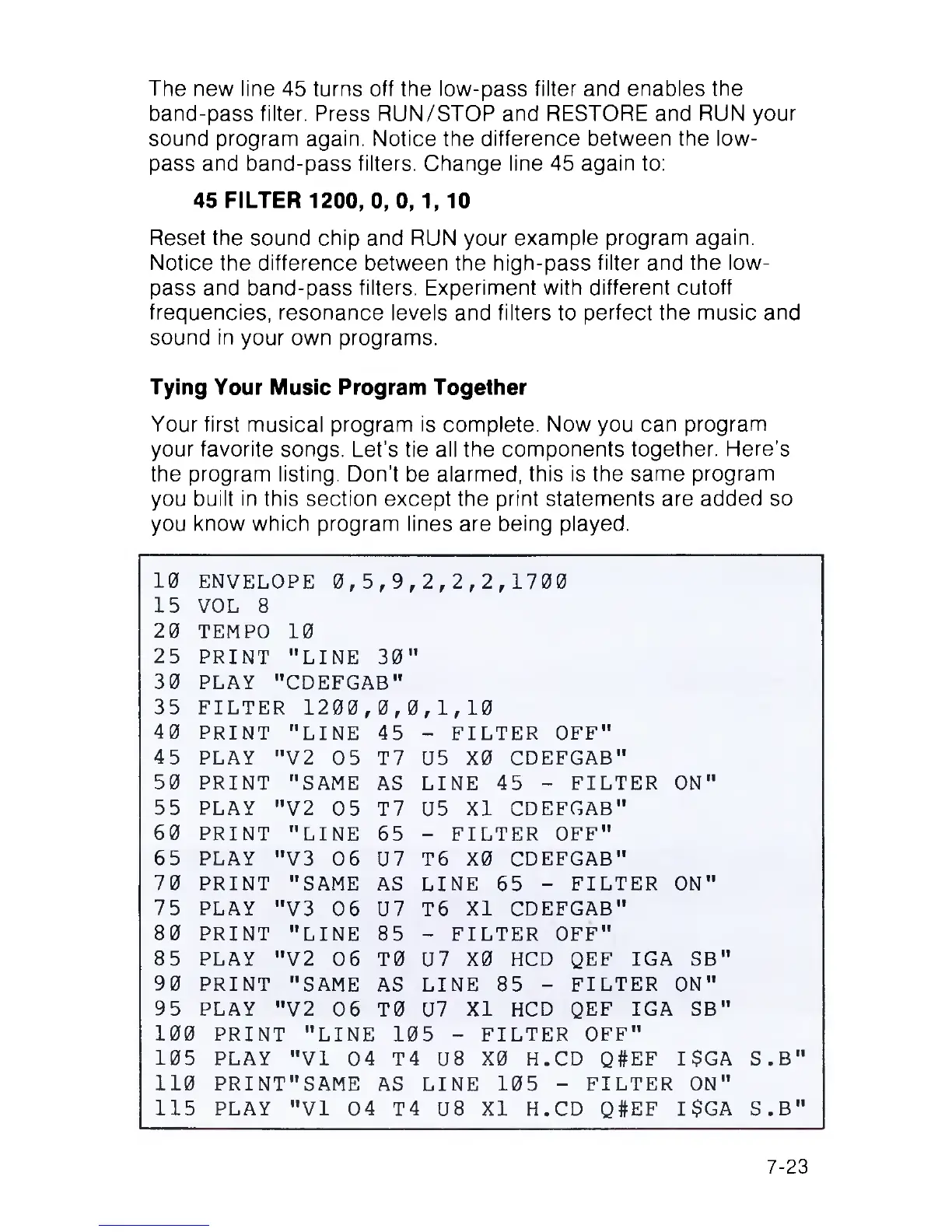
your favorite songs. Let’s tie all the components together. Here’s
the program listing. Don’t be alarmed, this is the same program
you built in this section except the print statements are added so
you know which program lines are being played.
10
ENVELOPE 0,5
,9
,2,
2,2,1700
15
VOL 8
20
TEMPO 10
25
PRINT "LINE
30
II
30
PLAY "CDEFGAB"
35 FILTER 1200,
0,
0,1 ,10
40
PRINT "LINE
45
-
FILTER OFF"
45 PLAY "V2 05
T7
U5
X0 CDEFGAB"
50
PRINT "SAME
AS
LINE 45 - FILTER
ON"
55 PLAY "V2 05
T7 U5
XI CDEFGAB"
60
PRINT "LINE
65
-
FILTER OFF"
65
PLAY "V3 06
U7 T6 X0 CDEFGAB"
70
PRINT "SAME
AS LINE 65 - FILTER
ON"
75
PLAY "V3 06
U7 T6
XI CDEFGAB"
80
PRINT "LINE
85
-
FILTER OFF"
85 PLAY "V2 06
T0 U7
X0 HCD QEF IGA SB"
90
PRINT "SAME
AS
LINE 85 - FILTER
ON"
95 PLAY "V2 06
T0 U7
XI HCD QEF IGA SB"
100
PRINT "LINE
105
- FILTER OFF"
105
PLAY "VI 04
T4 U8 X0 H .CD Q#EF I $GA S
.B"
110
PRINT"SAME AS
LINE 105 - FILTER ON"
115
PLAY "VI 04 T4 U8 XI H .CD Q#EF
I $GA S
.B"
7-23



 To Next Page