n A D
S
R wf pw
instrument
ENVELOPE
0, 0, 9, 0,
0,
2, 1536 piano
ENVELOPE
1,
12,
0,
12,
0,
1 accordion
ENVELOPE 2,
0, 0,
15,
0,
0
calliope
ENVELOPE
3, 0, 5, 5, 0,
3
drum
ENVELOPE
4,
9,
4, 4,
0, 0
flute
ENVELOPE
5, 0, 9,
2, 1, 1
guitar
ENVELOPE 6,
0,
9, 0,
0, 2,
512 harpsichord
ENVELOPE
7,
0, 9, 9,
0,
2, 2048 organ
ENVELOPE 8,
8,
9,
4, 1, 2, 512 trumpet
ENVELOPE
9, 0,
9, 0,
0,
0
xylophone
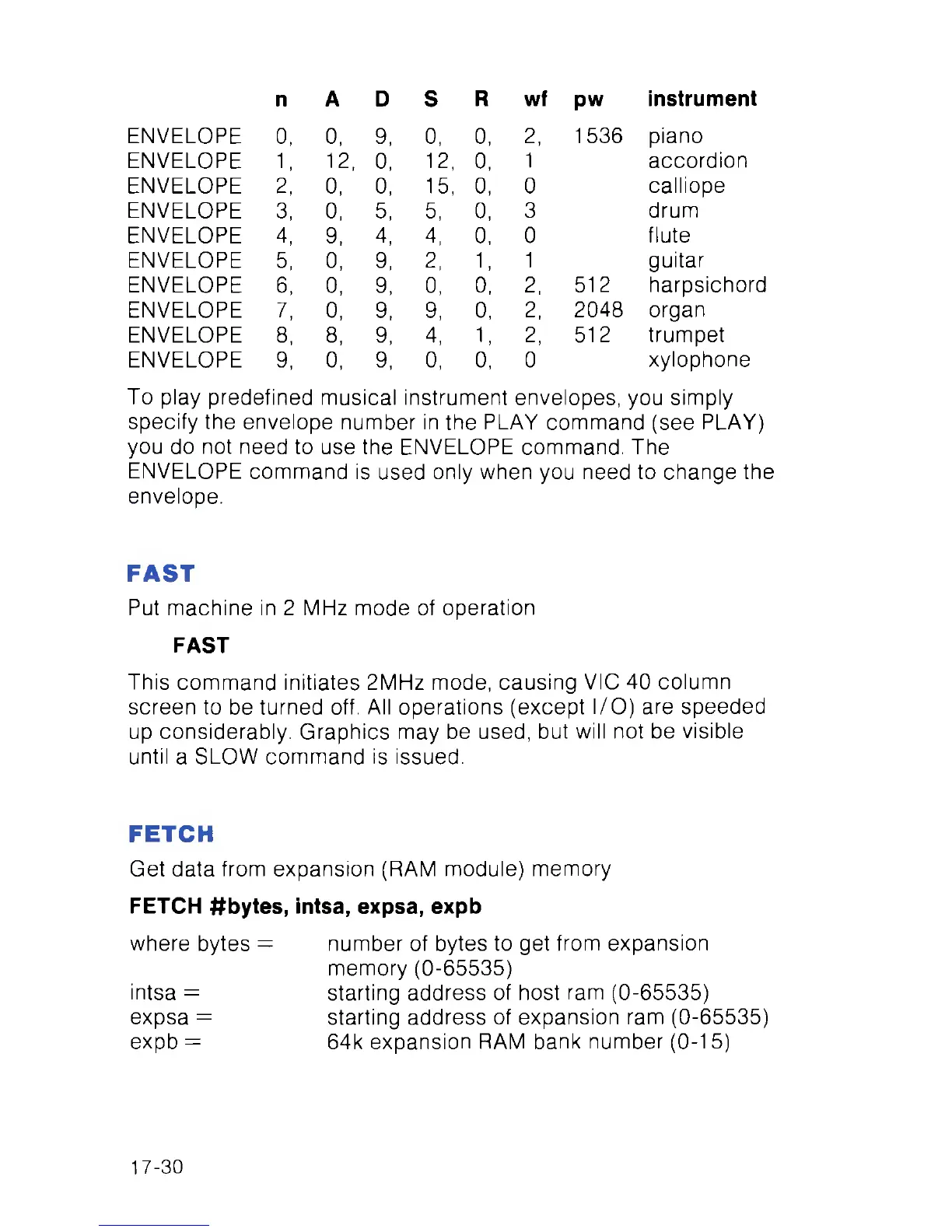
To play predefined musical instrument envelopes, you simply
specify the envelope number in the PLAY command (see PLAY)
you do not need to use the ENVELOPE command. The
ENVELOPE command is used only when you need to change the
envelope.
FAST
Put machine in 2 MHz mode of operation
FAST
This command initiates 2MHz mode, causing VIC 40 column
screen to be turned off. All operations (except I/O) are speeded
up considerably. Graphics may be used, but will not be visible
until a SLOW command is issued.
FETCH
Get data from expansion (RAM module) memory
FETCH #bytes, intsa, expsa, expb
where bytes = number of bytes to get from expansion
memory (0-65535)
intsa = starting address of host ram (0-65535)
expsa = starting address of expansion ram (0-65535)
expb = 64k expansion RAM bank number (0-15)
17-30



 To Next Page