eight on the top row of the main keyboard. Notice that the cursor
changes color according to the numbered key you pressed. All
the succeeding characters are displayed in the color you
selected. Hold down the Commodore key and press a numbered
key between one and eight, and eight additional colors are
displayed on the screen.
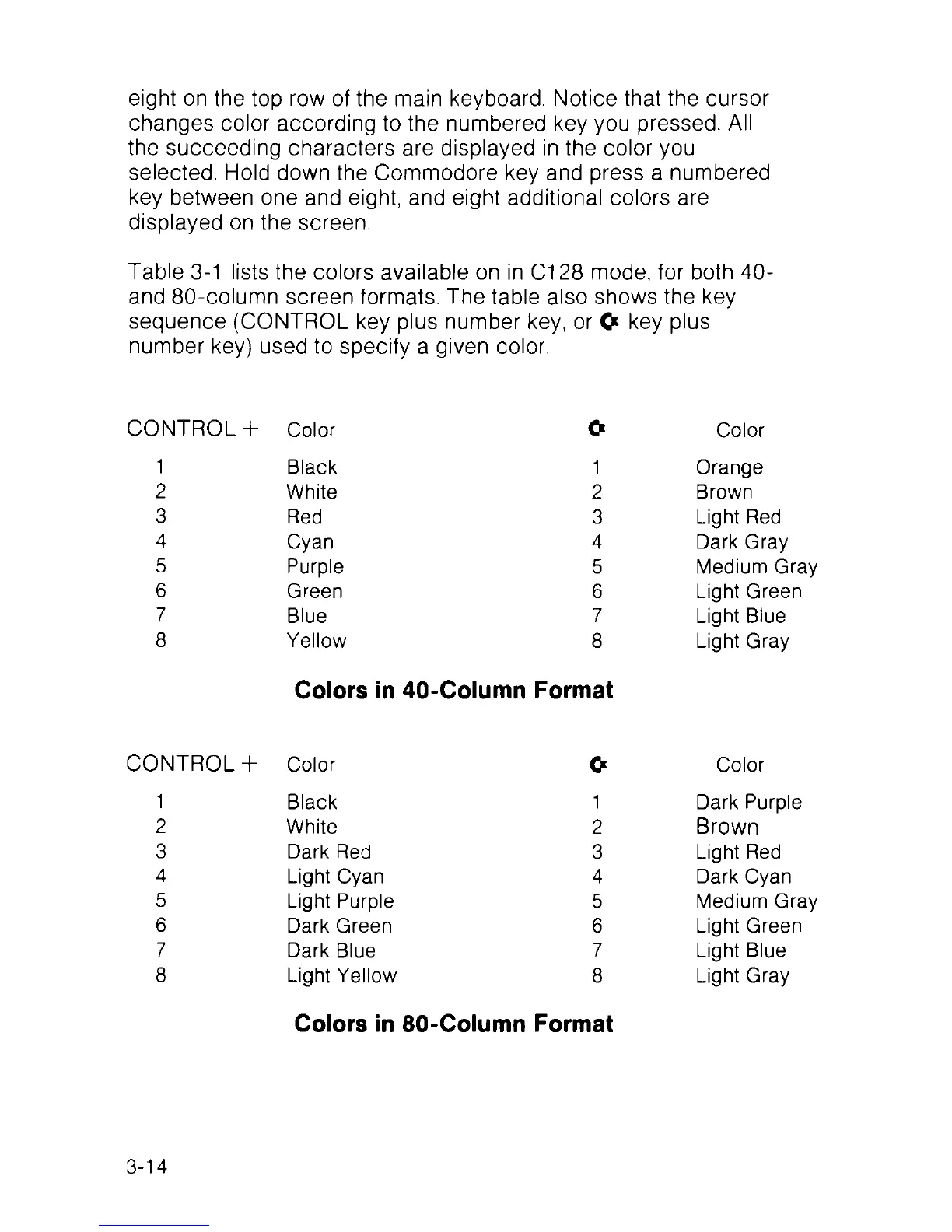
Table 3-1 lists the colors available on in C128 mode, for both 40-
and 80-column screen formats. The table also shows the key
sequence (CONTROL key plus number key, or O key plus
number key) used to specify a given color.
C O N TR O L+
Color
O
Color
1
Black 1
Orange
2
White 2
Brown
3
Red 3 Light Red
4
Cyan
4 Dark Gray
5
Purple 5
Medium Gray
6
Green 6 Light Green
7
Blue
7
Light Blue
8
Yellow 8 Light Gray
Colors in 40-Column Format
C O N TR O L+ Color
O
Color
1
Black
1
Dark Purple
2
White 2
Brown
3
Dark Red
3 Light Red
4
Light Cyan 4 Dark Cyan
5
Light Purple
5 Medium Gray
6
Dark Green 6
Light Green
7
Dark Blue
7 Light Blue
8
Light Yellow 8 Light Gray
Colors in 80-Column Format
3-14



 To Next Page