EasyManua.ls Logo

Commodore 128 - Page 400

Commodore 128
448 pages
Print Icon
To Next Page IconTo Next Page
To Previous Page IconTo Previous Page
Loading...
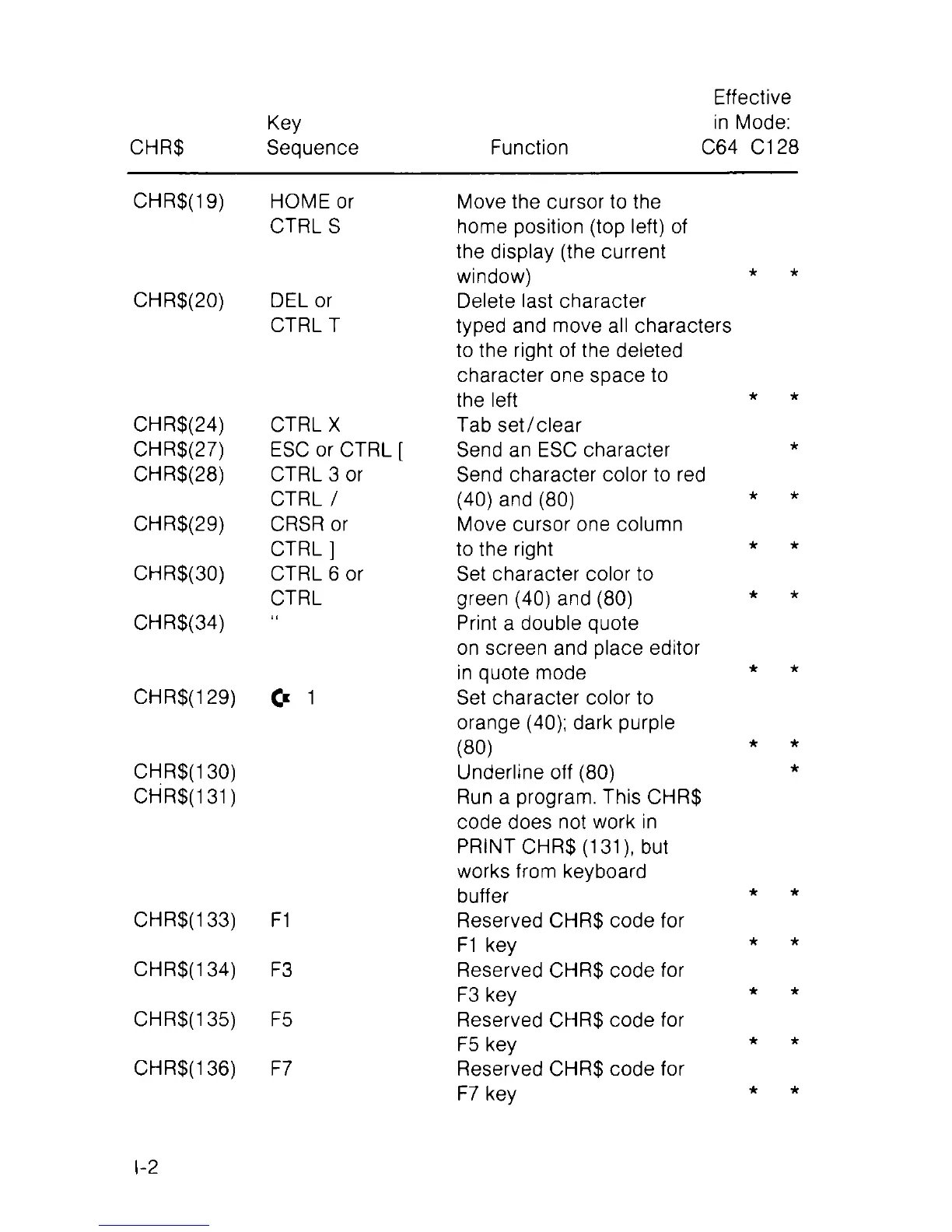
CHR$
Key
Sequence
Function
Effective
in Mode:
C64 C128
CHR$(19)
HOME or
Move the cursor to the
CTRLS home position (top left) of
the display (the current
window) *
CHR$(20) DEL or
Delete last character
CTRL T
typed and move all characters
to the right of the deleted
character one space to
the left *
CHR$(24) CTRL X
Tab set/clear
CHR$(27)
ESC or CTRL [
Send an ESC character
CHR$(28) CTRL 3 or
Send character color to red
CTRL /
(40) and (80) *
CHR$(29)
CRSR or
Move cursor one column
CTRL ]
to the right *
CHR$(30) CTRL 6 or Set character color to
CTRL
green (40) and (80) *
CHR$(34)
Print a double quote
on screen and place editor
in quote mode *
CHR$(129)
C* 1
Set character color to
orange (40); dark purple
(80)
CHR$(130)
Underline off (80)
CHR$(131 )
Run a program. This CHR$
code does not work in
PRINT CHR$ (131), but
works from keyboard
buffer *
CHR$(133)
F1
Reserved CHR$ code for
F1 key *
CHR$(134)
F3
Reserved CHR$ code for
F3 key *
CHR$(135)
F5
Reserved CHR$ code for
F5 key *
CHR$(136) F7
Reserved CHR$ code for
F7 key *
I-2

Table of Contents

Other manuals for Commodore 128

Related product manuals