SinoGNSS
○
R
T300 User Guide
26
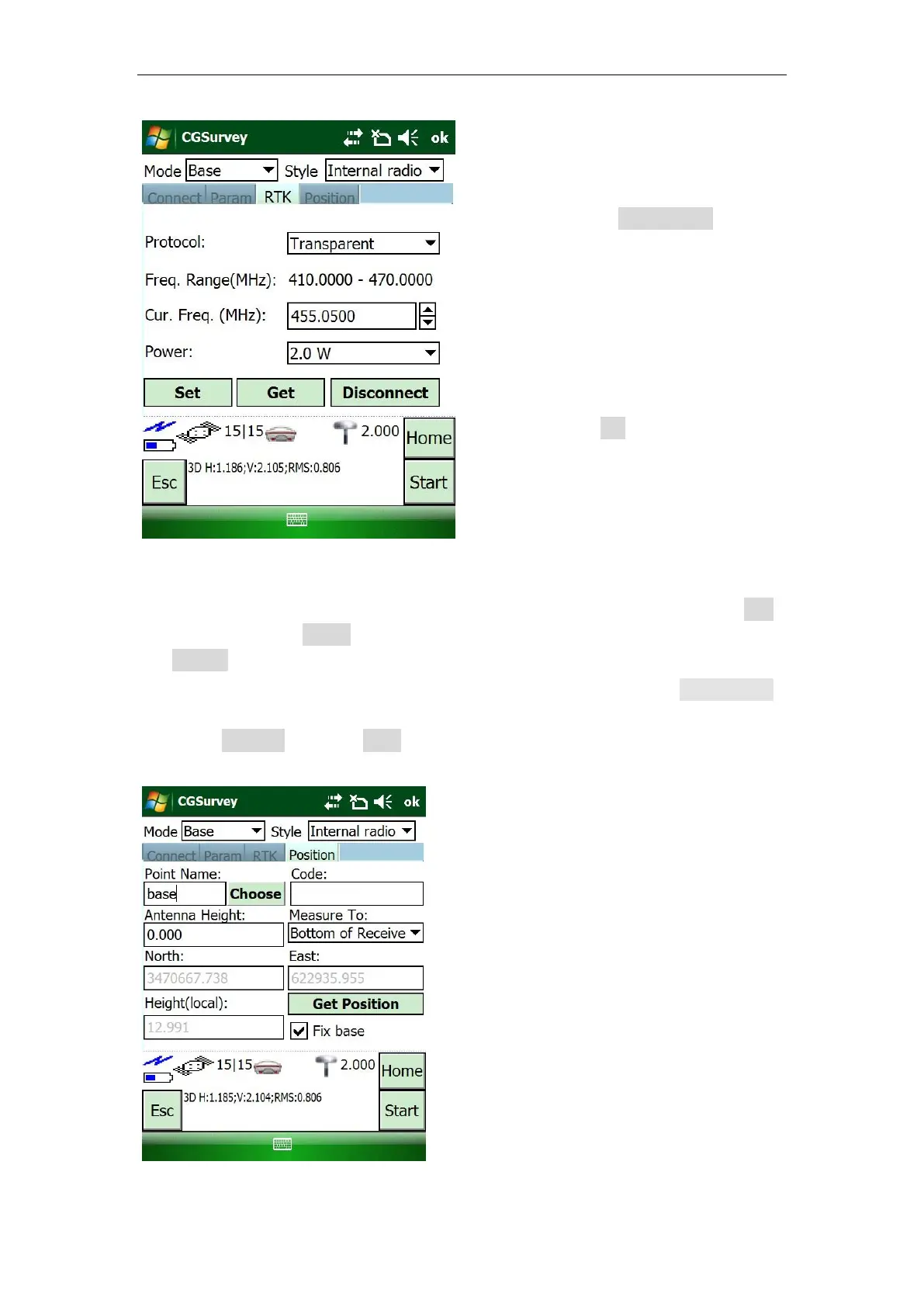
For Position tab, you can:
Start Base from a known point: 1) Enter the coordinates of known point in Edit
(main menu) -> Points (check Control Point); 2) Input Point Name and click
Choose to select the known point.
Start base from an unknown point: Enter the Point Name and click Get Position
to get the current coordinates as the base station.
Check Fix Base, and click Start to complete the configuration.
RTK:
Select Transparent as Protocol
(transmitting & receiving mode)
Set proper frequency and Power
Tip: If you use external antenna in
internal radio mode, you’d better set
Power as 2.0 W.
Click Set
To input antenna height, three measuring
ways are introduced:
Bottom of Receiver: measure from
the bottom of receiver to the control
point.
Phase center: measure from the
phase center of receiver to the
control point.
Notch of Receiver: measure from the
mark of receiver to the control point.



 To Next Page