ComNav T300 + CGSurvey User Guide
11
3.3 Button and LED Operations
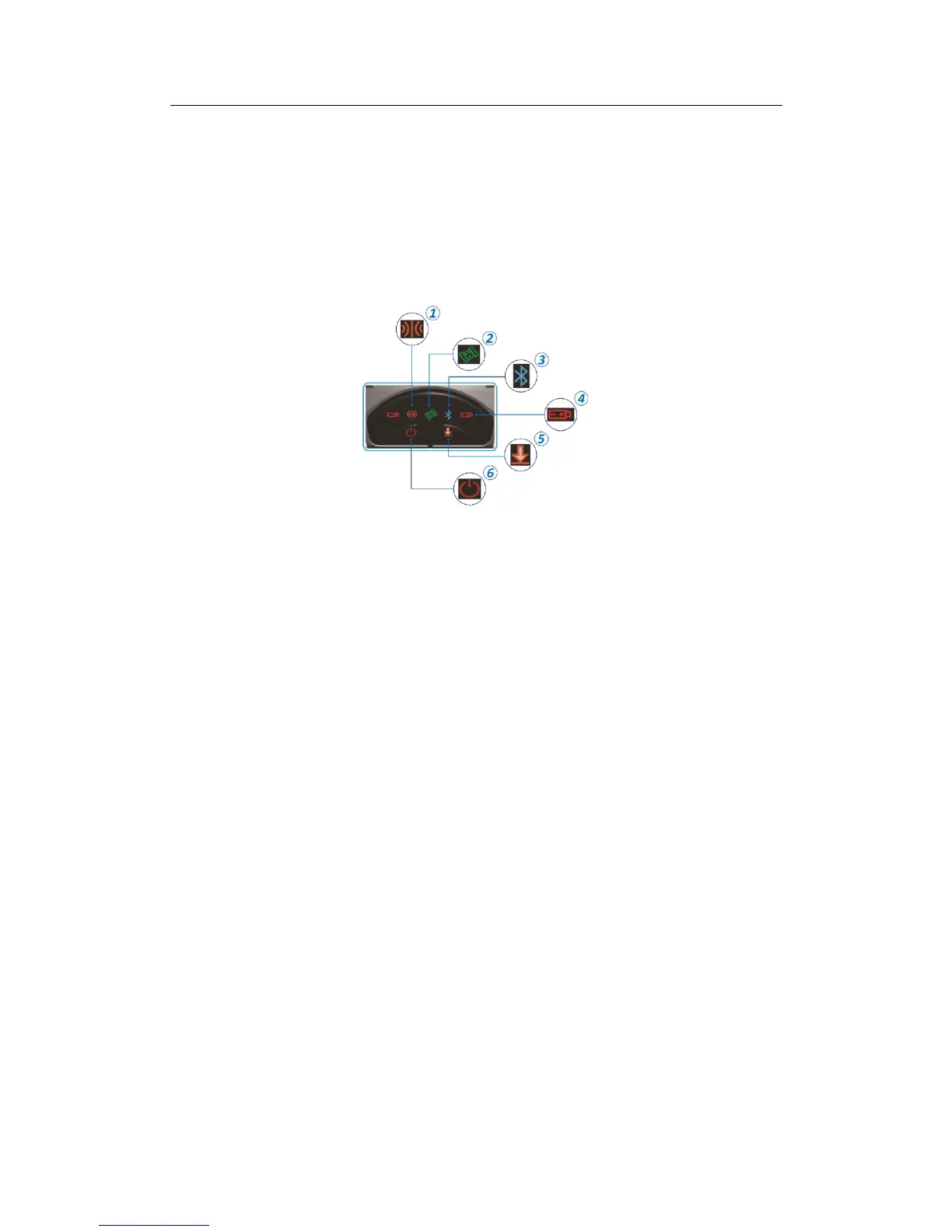
The LEDs on the front panel indicate receiver working status. Generally, a lit or
slowly flashing indicates normal operation, and an unlit LED indicates that no
operation is occurring. On the front panel, the LEDs stand for power, radio, satellite,
Bluetooth, Data logging/downloading respectively. The following items define each
possible LED state:
Differential LED:
As a Base station: the differential LED flashes once per second when transmit
differential data.
As a Rover station: the differential LED flashes when getting differential data from
Base station or Network.
Satellite LED:
It will flash several times every 5 seconds, which means how many satellites locked
by the receiver.
Bluetooth LED:
The LED indicator flashes when controller or PC is connected with the T300 receiver
via Bluetooth.
Battery LED:
The indicator shows T300 GNSS receiver is on or off.
All the two battery LEDs will be on if you use the external power supply and only one
is on if you use the internal batteries. The buzzer will alarm if the power is going to
be run out.
Data logging:
The data logging button only flashes under the following situations:
A. In the static mode
The interval of flashing shows the sample interval of collecting data.
B. RTK mode



 To Next Page