ComNav T300 + CGSurvey User Guide
26
power consumption can be reached 5-6 watt, so we strongly suggest to use
the external power source to supply power to base station.)
Controller kit with software installed
Tripod and tribrach
5.2.1 Radio Mode Setting-Up
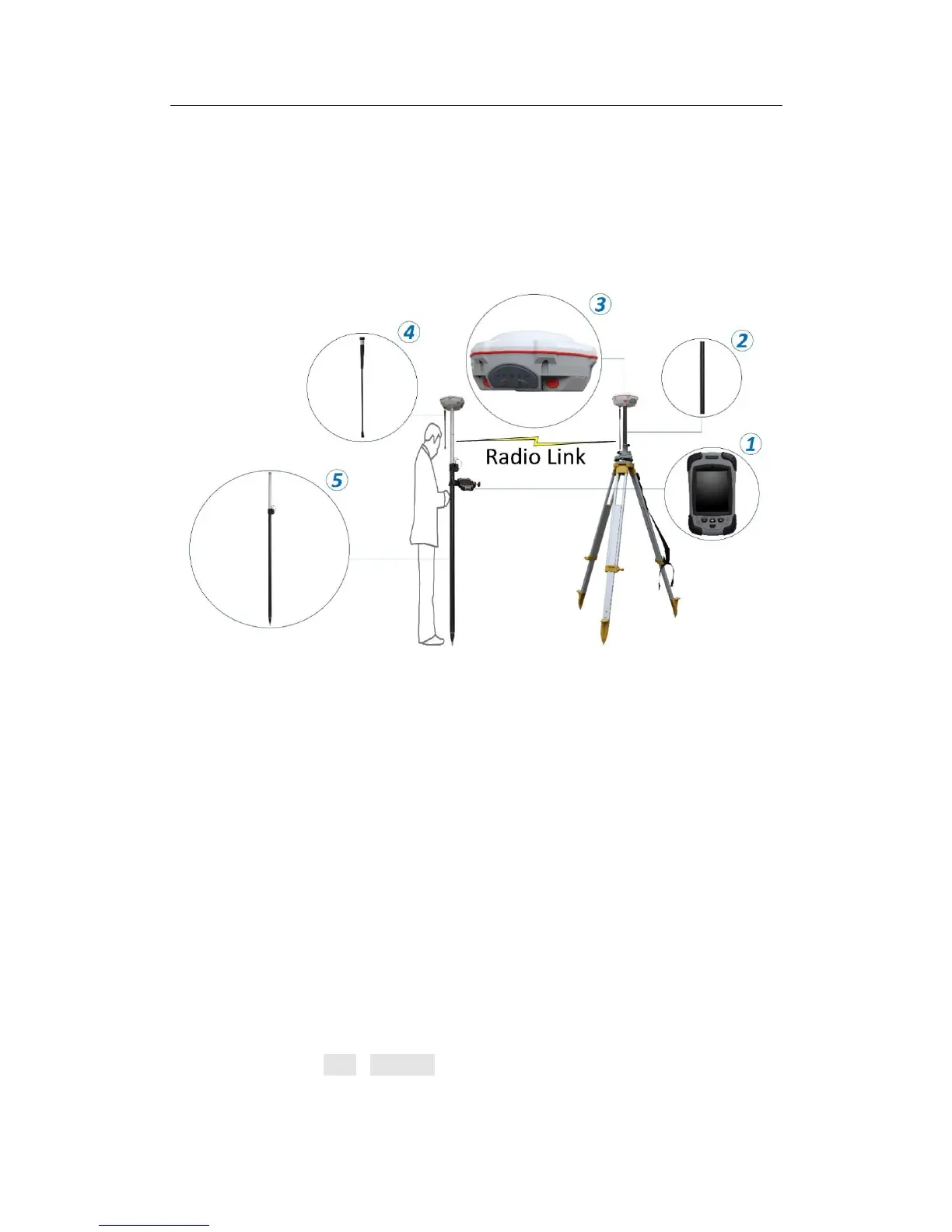
The hardware connection information of the radio mode is as follows:
Base station components: ③T300 ②Extension bar ④Whip Antenna
Connection relation in Base part: whip antenna is connected to TNC connector;
extension bar is connected to fixing socket under T300; extension bar, tribrach and
tripod are connected from top to bottom.
Rover components: ③T300 ④Whip Antenna ⑤Range Pole ① Controller and
bracket.
Connection relation in Rover part: whip antenna is connected to UHF connector
under T300; range pole is connected to fixing socket under T300; controller is
mounted on range pole by a bracket support; controller and T300 communicate by
Bluetooth.
5.2.2 Start Base Station by CGSurvey
First, run CGSurvey, Files->New Job, input the project name and choose a Datum
(see chapter 7.2 Creating Coordinate System ).



 To Next Page