70 - Managing the DeviceMaster LT
DeviceMaster LT User Guide: 2000586 Rev. B
Updating Firmware Across WANs (Windows)
Updating Firmware Across WANs (Windows)
You can use this procedure to update SocketServer with PortVision DX using a
TFTP server. If you have a TFTP server installed, skip to
Step 2.
This procedure is also recommended in cases
where SocketServer fails to load
using convention methods.
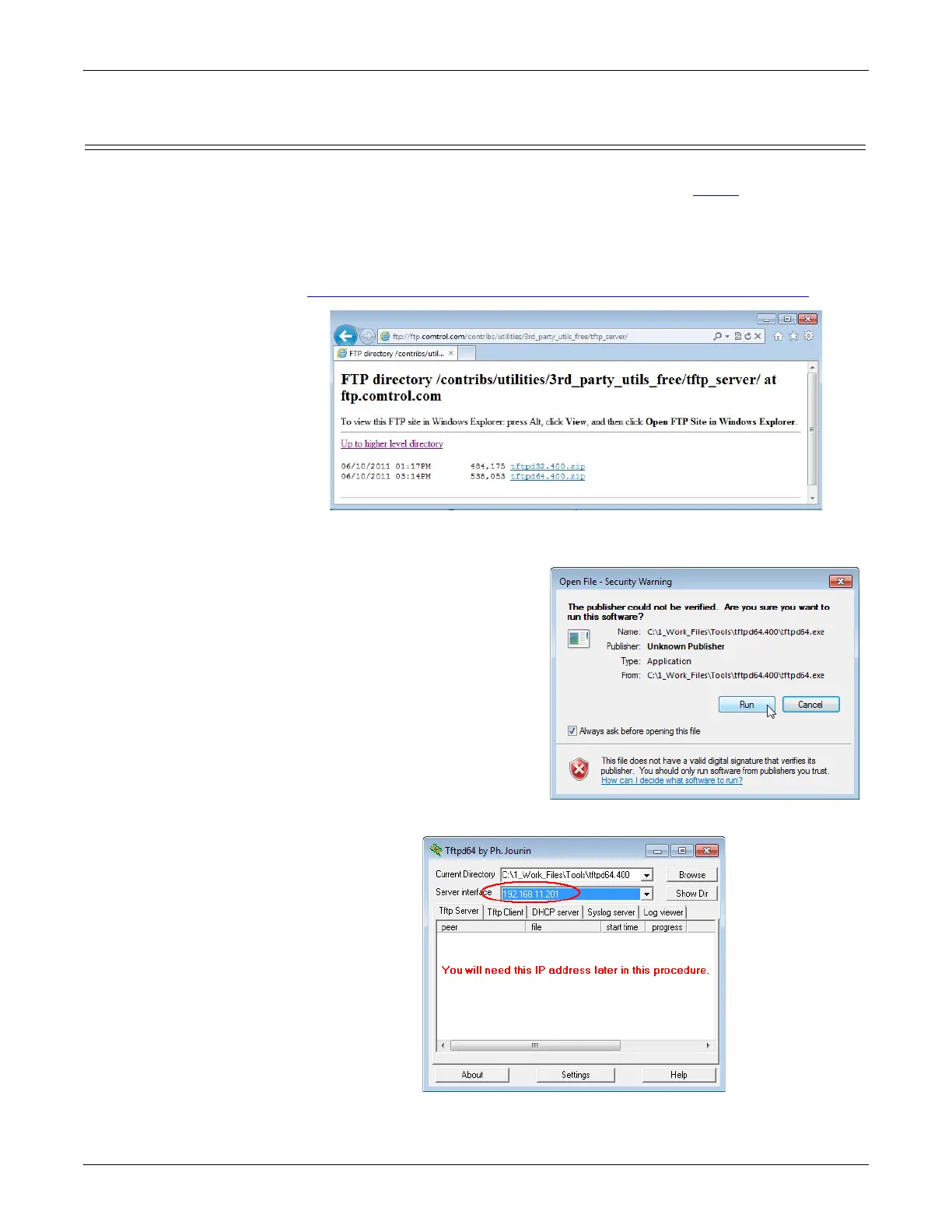
1. If you do not have a TFTP server, you
can download the appropriate one for
your Windows operating system from the Comtrol ftp site.
ftp://ftp.comtrol.com/contribs/utilities/3rd_party_utils_free/tftp_server
Note: Depending on your Windows operating system, you may need to respond
to a Security Warning popup.
a. Unzip the tftp server that
you downloaded to your
host system in a location
that you can easily find.
b. Execute the tf
tp.64.exe (or
tftp32.exe) file.
c. Click Run.
d. Depending on yo
ur
ope
rating system, you ma
y
ne
ed to click Unblock, if
you
receive a W
i
ndows Security
Alert popu
p.
The Tftpd application
opens:



 To Next Page