5User Instructions for Control Panel M 2.2 User Manual
22
5100606_CFD5000 T - CM2.2_User Manual_T_EN_2023_E
Description of Access levels
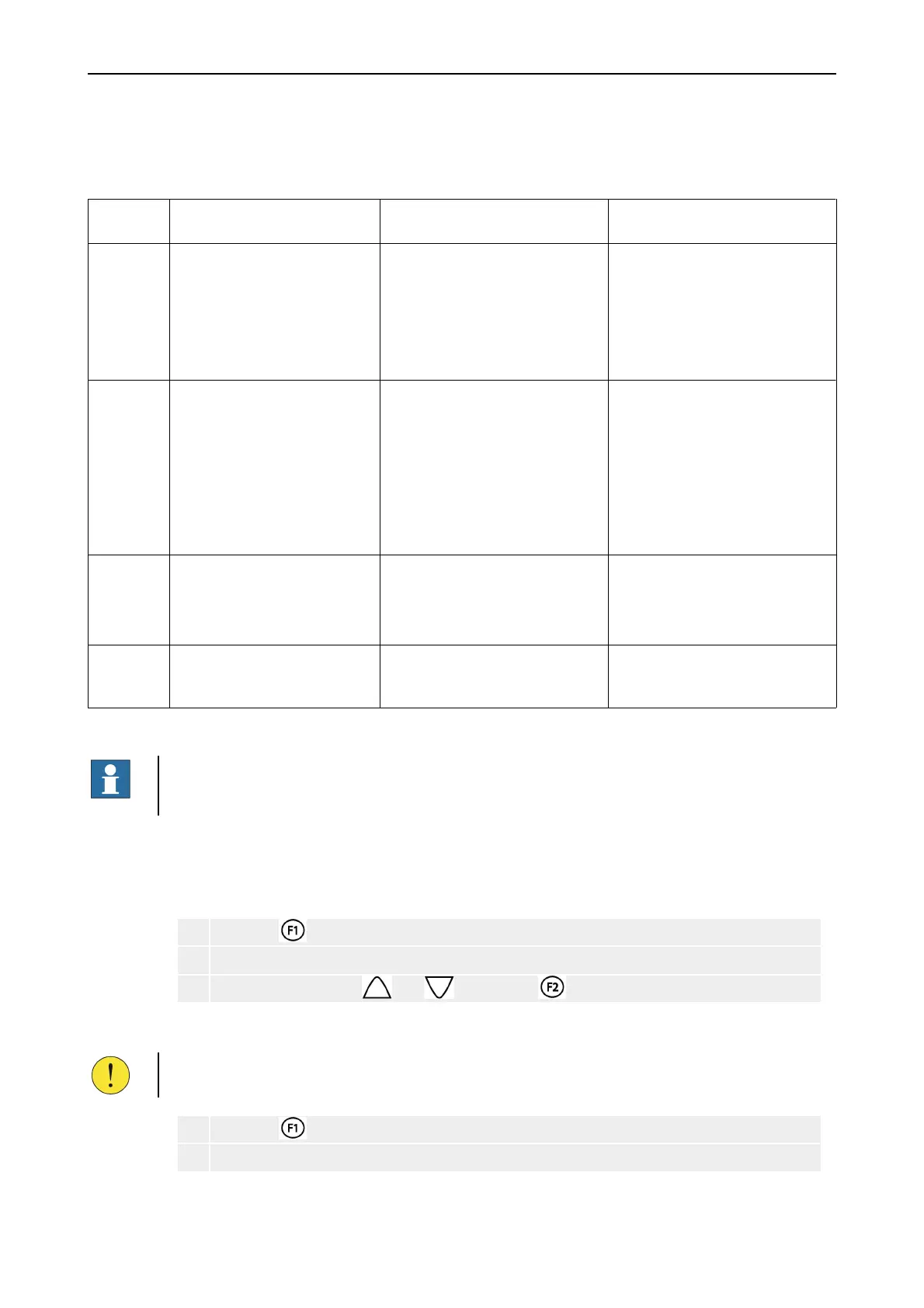
There are different access levels as shown in the following table:
Table 10. Access levels
Access
level
Procedure to enter level User Permissions
2 Staff access level
None.
General personnel. Only viewing of fire or fault
alarms.
•
Fire alarms have priority over
fault alarms.
•
Possibility to mute local
buzzer.
2B Operator access level
Enter access code for level 2B
via menu/login.
Personnel trained and authorised to
operate the system in case of fire or
maintenance.
Same permissions as level 2, plus
these additional permissions:
•
Access to the menu system
•
List status for alarms and
disablements
•
Reset and muting of alarms
•
Make disablements
3 Power User access level
Enter access code for level 3 via
menu/login.
Personnel trained and authorised to
make changes to the configured
system.
Same permissions as level 2B, plus
these additional permissions:
•
Possibility to make changes to
the configured system
4 Service access level
Enter access code for level 4 via
menu/login.
Only authorised service personnel
trained by an authorised service
organisation.
All functions available, including
advanced service options.
Custom Specific Restrictions
NOTE!
Permissions on the different access levels can in some cases vary depending on
programmed custom specific restrictions.
5.3 Setting Time and Date
Set Time
1 Press the key to enter the menu system.
2 Select Menu » 5 Settings » 1 Set Time
3 Set time by using the and keys. Press to accept.
Set Date
CAUTION!
Do not change the system date when disablements are present.
1 Press the key to enter the menu system.
2 Select Menu » 5 Settings » 2 Set Date



 To Next Page