Kangaroo™ Console | 6
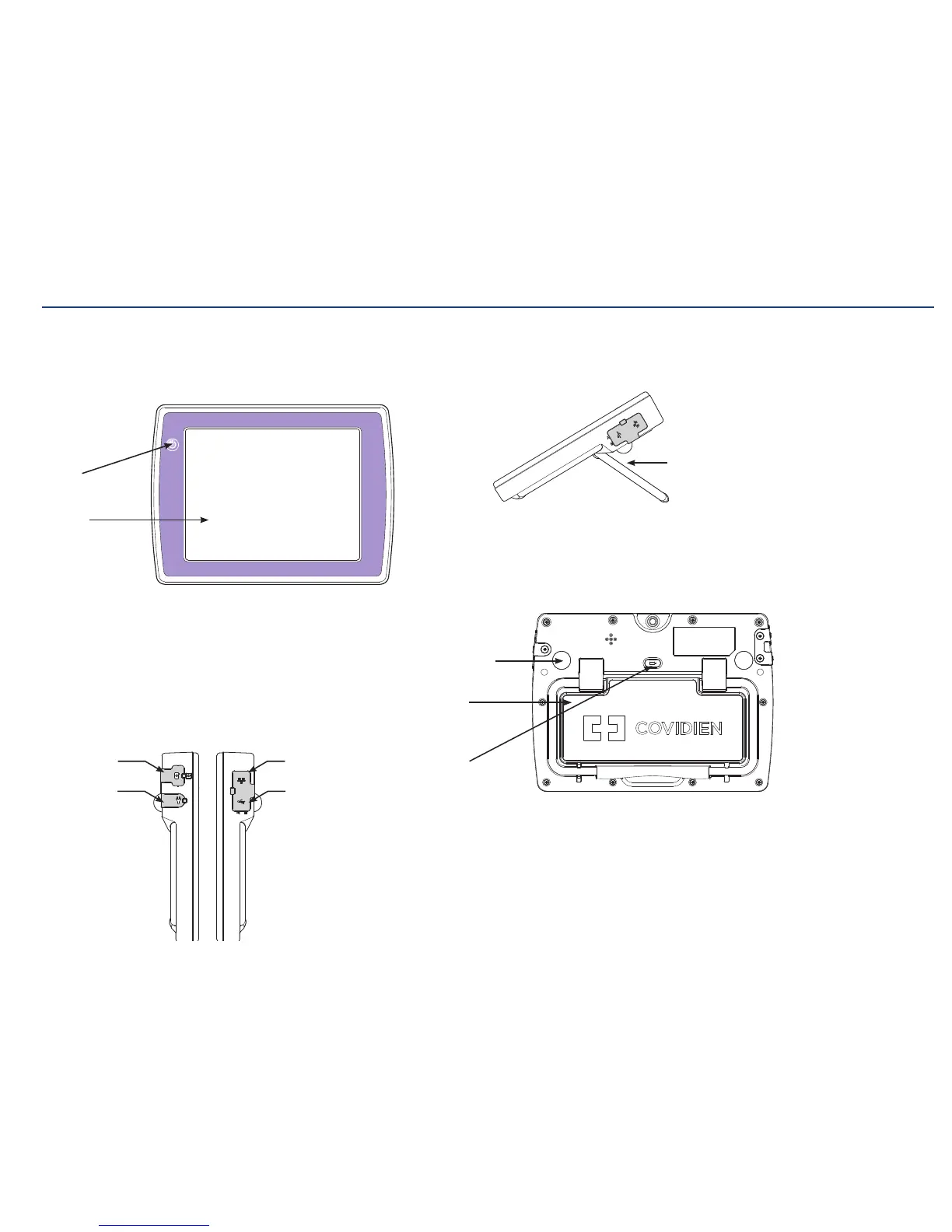
Console and battery:
The console has a full-color touch screen that displays a real time image as the
feeding tube travels through the patient during the placement procedure. Images can
be captured, stored, and annotated on the console.
Power
On/Off
Rechargeable
battery
Rubber
console feet
Touch
screen
Kickstand
for use on
flat surface
Battery
release
button
Ethernet port
(non-functional)
Interface
cable port
USB ports
Power cord
connector
Section I: System Overview
Mounting clamp:
The mounting clamp can be attached to the back of the console and is easily
removable. For information on attaching, using, and removing the mounting clamp,
see section regarding assembly.
Image capture:
The console has security features to help protect the information from being accessed
by other people. The device requires a login name and password to use the system.
Stored images can be exported as .bmp or .jpg files onto a USB flash drive and added
to a patient’s file. Images are password-protected for security and privacy purposes.
The USB ports are also used for software updates to the system.
Kickstand:
The console can be used on a tabletop or mounted on a pole or cart. A built-in
kickstand props the console up at an ideal viewing angle when on a flatsurface.
Rechargeable battery:
A replaceable, rechargeable Li-Ion battery is included. The console recharges when
the power adapter is plugged in to an AC outlet, or by using the battery charger
(optional accessory).



 To Next Page