EasyManua.ls Logo

CPS ECB200KTL/US-800 - Page 29

Default Icon
135 pages
Print Icon
To Next Page IconTo Next Page
To Previous Page IconTo Previous Page
Loading...
Electrical Installation
28 / 135
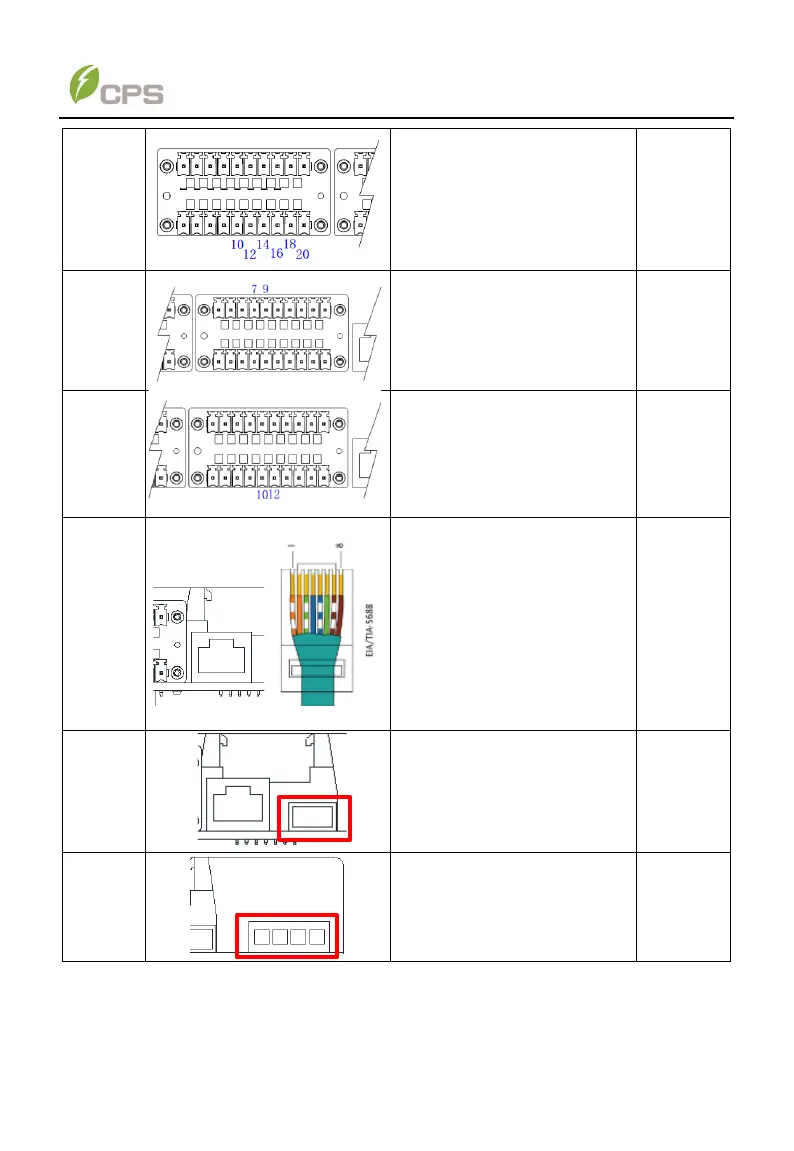
Input
node
10--INPUT-COM1
12--INPUT-State1
14--INPUT-COM2
16--INPUT-State2
18--INPUT-COM3
20--INPUT-State3
Reserved
24V Input
7-- GND
9--24V
Reserved
for ext.
power
supply
Input
node
10--INPUT-COM4
12--INPUT-State4
Reserved
Ethernet
port
(RJ45)
No
Color
Func.
1
White-orange
TP
2
Orange
TN
3
White-green
N.C.
4
Blue
N.C.
5
White-blue
N.C.
6
Green
N.C.
7
White-brown
RP
8
Brown
RN
Connect
with EMS
USB port
Firmware upgrade and
fault wave records export
Connect
with USB
cable
Output
dry node
NA
Reserved
for service
The wiring methods of communication cables:
1. Loosen all the six fastening screws on the communication cover and take off the
communication cover.