Page 20
STEPPING BACK THROUGH THE MENUS
If you are in a Menu location, eg the “USER” Data Entry field, and you wish to step back one stage to the previous
Sub-Menu, you need to press the <PROG> button.
Each time the <PROG> button is pressed the display will step back to the previous stage (remembering where you
were before) until you get back to the Main-Menu.
For example if you were in the “KEYPADS” Main-Menu, then pressed <ENTER> to get to the “AREAS” Sub-Menu for
keypads, then pressed <ENTER> again to get to the “AREAS” Data Entry-Menu for keypads, you could now press
the <PROG> button once and it would take you back to the “KEYPADS/AREAS” Sub-Menu. Pressing <PROG>
again will take you back to the “KEYPADS” Main-Menu, and pressing <PROG> one more time will return you back to
the default “USERS” Main-Menu.
If you get back to the “USERS” menu and press the <PROG> button once more the display will go to the
program exit menu. If you press <ENTER> when at this point the panel will leave program mode. If you don’t wish to
leave program mode you can press the <PROG> button again to return to the “USERS” menu.
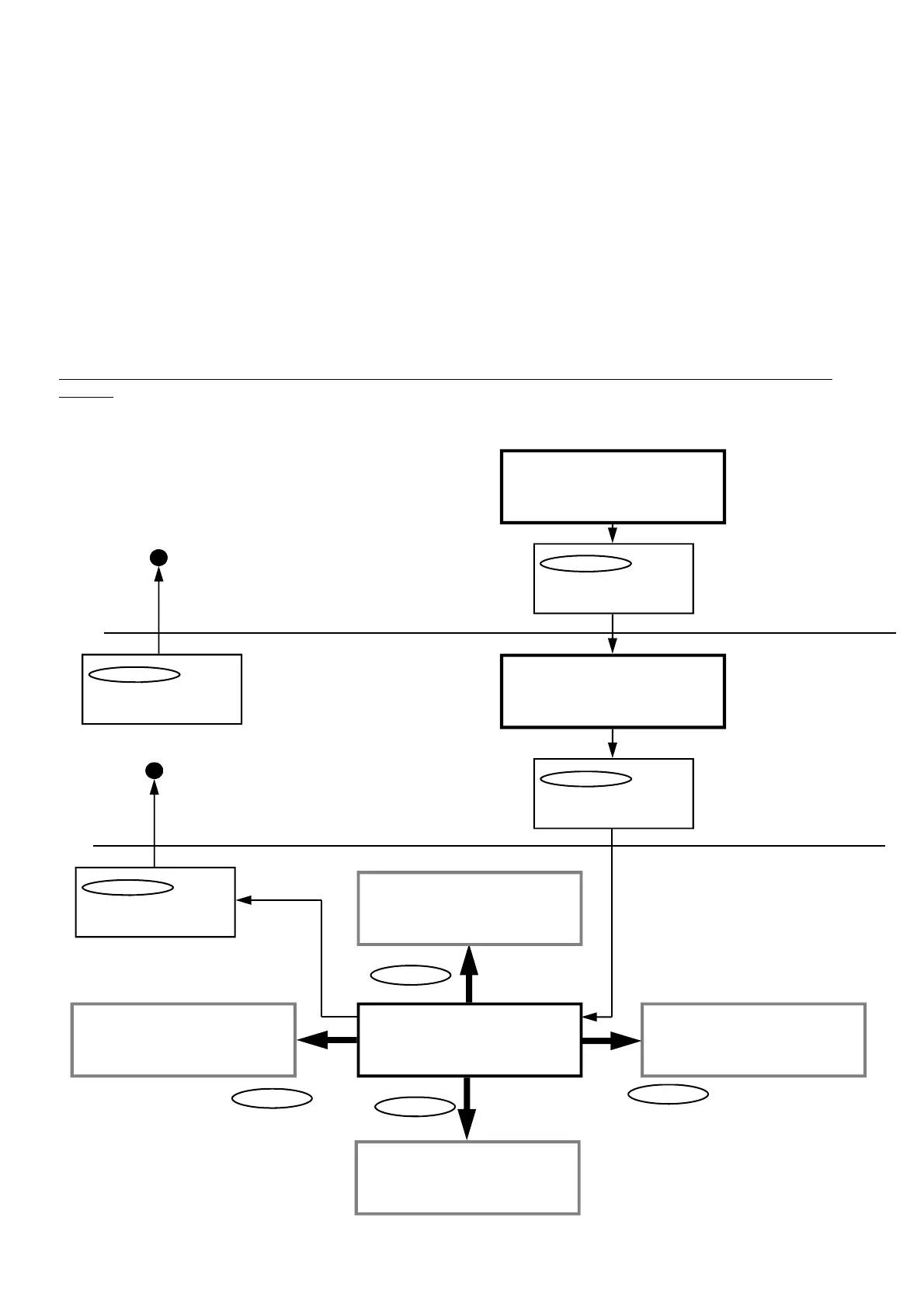
The flowchart below indicates the program menu steps using the “ARROW” , “ENTER” & “PROG” Buttons on the
keypad.
Ç orÈ Arrows will Cycle
through Main-Menus
MAIN-MENU
SUB-MENU
Ç orÈ Arrows will Cycle
through Sub-Menus
DATA ENTRY-MENU
USER 1 CODE
123 (Data)
USER 2000 CODE
— (Data)
USER 2 CODE
— (Data)
USER 1 ACCESS OPT
- - - - - - - - (Data)
LEARN RADIO USER 1
-ENTER- TO LEARN
ÇÈÅÆ Arrows can be used in the Data-
Menu fields. See below for details.
PROGRAM Button
Leaves Sub-Menu and
goes back to Main-Menu
PROGRAM Button
Leaves Data-Mode and
goes back to Sub-Menu
USERS (Main-Menu Heading)
_
USERS (Main-Menu Heading)
CODES (Sub-Menu Heading)
ENTER Button
To access Sub-Menu
ENTER Button
To access Data-Menu
Ç Arrow
ÅArrow
È Arrow
Arrow Æ



 To Next Page