33
2.8.2 Data and event logging
The data log records gas levels for all sensors and has capacity for 45,000 logs (125hrs @10 sec
intervals). Threshold levels can be set using Portables Pro, extending log capabilities. The data log
interval is set as part of the Gas-Pro conguration and can be adjusted using Portables Pro.
Event logging records signicant events occurring during Gas-Pro operation.
Events include:
• On
• Conguration change
• User Acknowledgements
• Time change/set
• Alarm 1
• STWA
• Zero
• Gas Test
• Log upload (data/event)
• PEC Peaks
The event log has a capacity of at least 1000 events.
2.8.3 Bump/Pump functionality
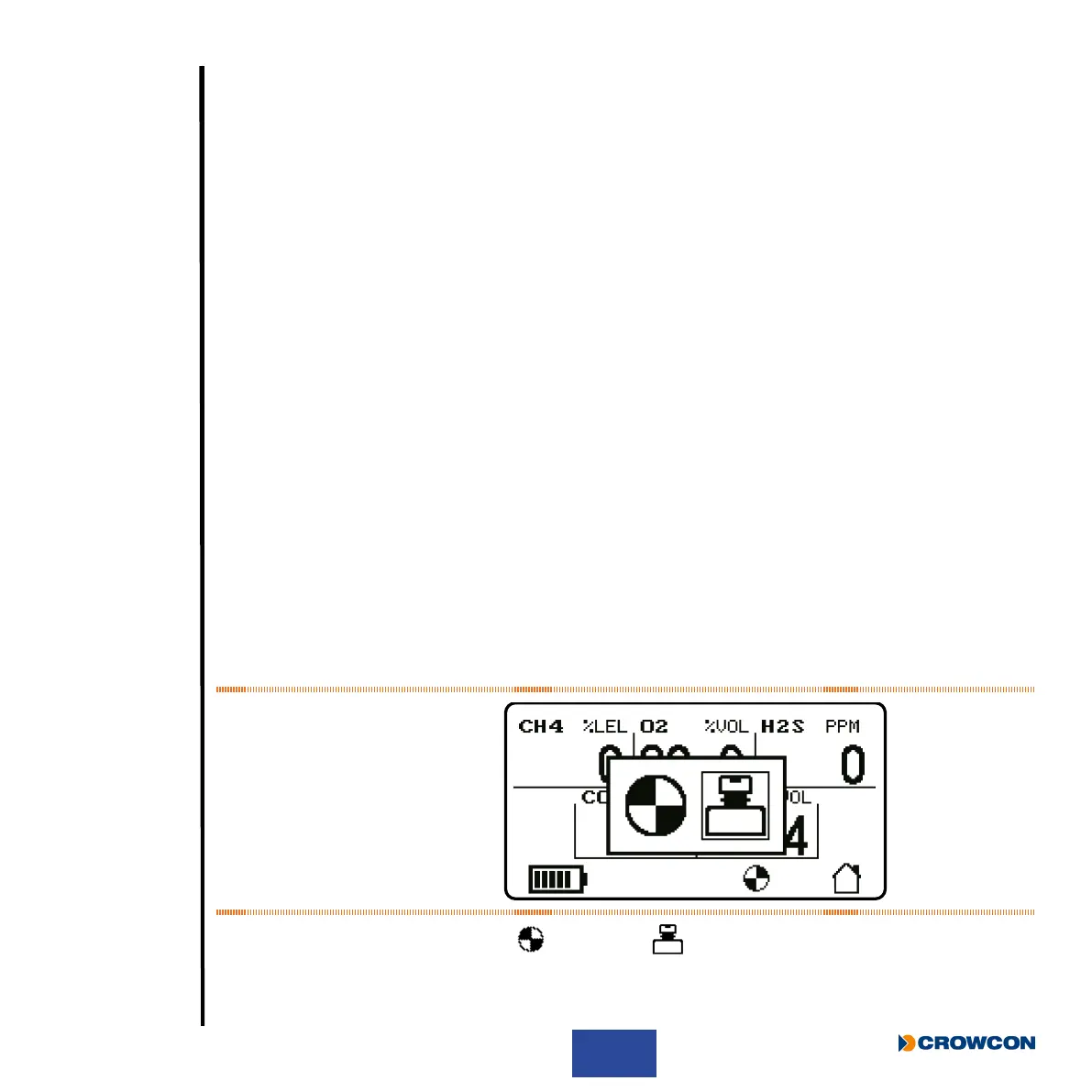
If the Gas-Pro is congured for Bump/Pump functionality, then by placing the Gas-Pro in a Q-Test
module or attaching a ow plate (with the Gas-Pro home screen displayed), the Bump/Pump screen
will be displayed (see Figure 15 below).
Figure 15: Bump/Pump screen
Click the operator button to highlight
for Pump or for Bump testing and then double click to
select (see Pump test on page 20 or Speedy bump on page 39 and Smart bump on page 39
for Bump details).
• Off
• Fault
• Low battery
• Pellistor saver
• Alarm 2
• LTWA
• Calibration
• Zero (auto or manual)
• PEC
• User changed



 To Next Page