42
4. Icon overview
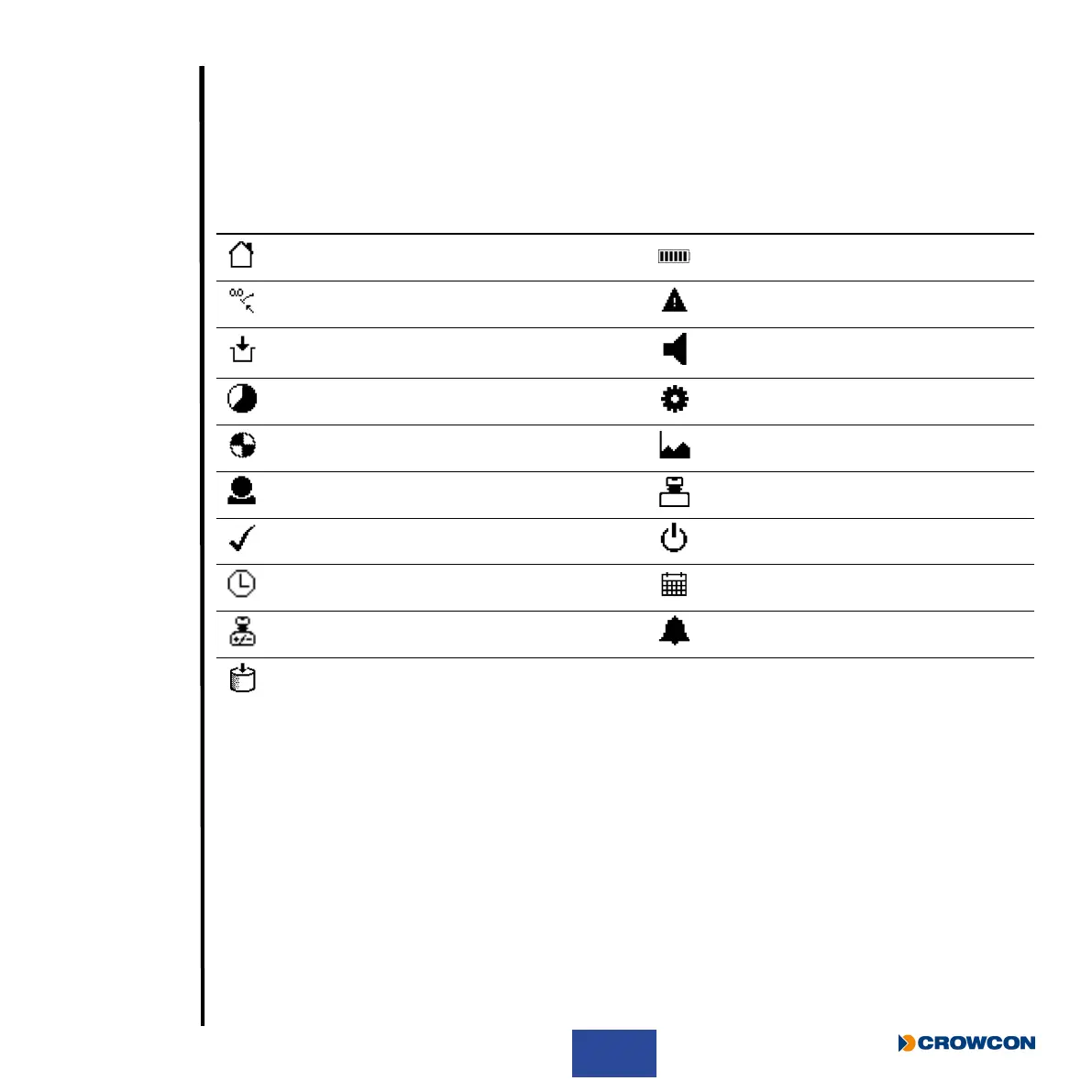
The table below details the icons shown during regular operation as well as warning messages. This
table is intended as a quick overview please refer to specic functional sections within this manual
for further details.
Icon Description Icon Description
Signies ‘home’ screen Indicates ‘Battery’ information
Indicates ‘Zero’ functionality Indicates a ‘Warning’ information
Indicates ‘Pre Entry Check’ (PEC)
functionality
Indicates ‘Sounder’ functionality
Indicates ‘Time Weighted Average’ (TWA) Indicates ‘Settings ‘ functionality
Indicates ‘Pump’ tment/operation Indicates ‘Peak’ functionality
Indicates specied ‘User’ Indicates a ‘Gas Test’ information
Indicates ‘Test Passed’ Indicates unit ‘Off’ functionality
Time Date
Indicates ‘Calibration’ information Indicates an ‘Alarm’
Indicates ‘Tank Check’ functionality



 To Next Page