Infotainment System
General instructions for use
Introduction
If the setup is changed, this may change the
display on the scr
een and the Infotainment
system may behave in a manner different to
that described in this manual.
Note
●
Just press a button or the screen to use
the infotainment system's functions.
●
The equipment’s software depends on
the market in question, so it is possible that
not all of the function buttons or described
functions are available. The equipment is
not faulty if a function button is missing.
●
Due to country-specific legislation, cer-
tain functions may not be available on the
screen when the vehicle is travelling above
a certain speed.
●
Using a mobile telephone inside the vehi-
cle may provoke noise in the speakers.
●
Restrictions on the use of devices using
Bluetooth
®
technology may apply in some
countries. For further information, contact
the local authorities.
●
On vehicles with ParkPilot, the audio vol-
ume is automatically lowered when reverse
gear is selected. The volume can be low-
ered in the menu Sound > Volume.
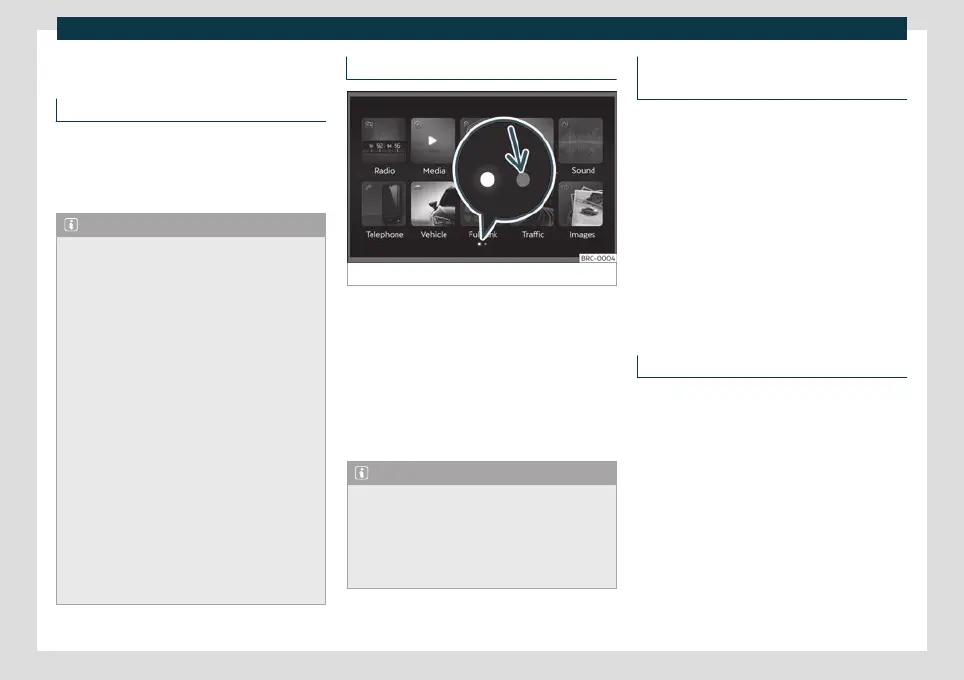
Diagram of the menus
Fig. 127
Main menu
The Infotainment system touchscreen can
be used t
o select the diff
erent main menus.
Press the Infotainment button to open the
menus summary.
The display of the touchscreen's main menu
can be switched between “grid” and “carou-
sel” and vice-versa using the menu Set-
tings > Screen
›››
page 154.
Note
Depending on the infotainment version,
there may be more icons on the second
page. In this case, to see the remaining
icons press the function button
›››
Fig. 127
(arrow) or slide your finger horizontally
across the screen.
Rotary push buttons and infotainment
buttons
Rotary/push buttons
The left rot
ary push button is the on/off
button if pressed and the volume knob if
turned.
The right rotary pushbutton is the search
button if turned and the selection button if
pressed.
Infotainment buttons
The Infotainment buttons are used by press-
ing them or pressing and holding.
Switching on and off
When the system is turned on, it starts up
with the v
olume at which it w
as turned off, as
long as it does not exceed the preset maxi-
mum start-up volume. Select Sound > Vol-
ume.
The unit will switch off automatically when
the key is removed from the ignition or when
the on/off button is pressed (depending on
the equipment fitted or the vehicle). If the
Infotainment system is switched on again, it
will switch off automatically after approxi-
mately 30 minutes (switch-off delay).
150



 To Next Page