Infotainment System
Function button: function
Navigation announcements
: To set the playback vol-
ume of audio driving recommendations.
Voice control
: To set the playback volume of voice
control.
Maximum switch-on volume
: To set the equipment's
maximum switch-on volume.
Speed-dependent volume adjustment
(GALA): To set
the extent to which the volume is adjusted de-
pending on the speed. The volume of the audio
will increase automatically as the speed of the ve-
hicle increases.
Entertainment fading when parking
: To adjust the de-
sired reduction in audio volume when ParkPilot is
active.
Entertainment fading (nav. announcements) : Adjusts
the playback volume when the navigator is speak-
ing.
Volume : To set the playback volume of audio
sources connected via the AUX-IN multimedia
jack (Low, Medium or High). Also see
›››
page 155,
Overview of screen and function buttons.
Bluetooth audio : To set the playback volume of the
audio sources connected by Bluetooth
®
(Low, Me-
dium or High). Also see
›››
page 155, Overview of
screen and function buttons.
Equaliser : To adjust the sound properties.
Function button: function
Balance - Fader
: To adjust the sound distribution. The
cursor indicates the current sound distribution in the
passenger compartment. To modify the sound distri-
bution, briefly press on the desired position in the pas-
senger compartment view or use the arrow keys for a
step-by-step modification. To centre sound distribu-
tion in the passenger compartment view, press the
central function button located between the arrows.
Sound focus
: Optimizes the sound in the passenger
compartment.
Subwoofer
*: Adjusts the volume of the subwoofer.
Touchscreen tone
: The confirmation tone when a func-
tion button is pressed is active.
No navigation announcements during calls
: During a tele-
phone conversation, audio driving recommendations
will not be given.
Adjust the playback volume of external
audio sour
ces
If y
ou need to increase the playback volume
for the external audio source, first lower the
base volume on the infotainment system.
If the sound from the connected audio
source is very low, increase the output vol-
ume on the external audio source. If this is
not enough, change the input volume to
medium
or
high
.
If the sound from the connected external
audio source is too loud or distorted, lower
the output volume on the external audio
source. If this is not enough, change the in-
put volume to medium or low.
Voice control
How it works
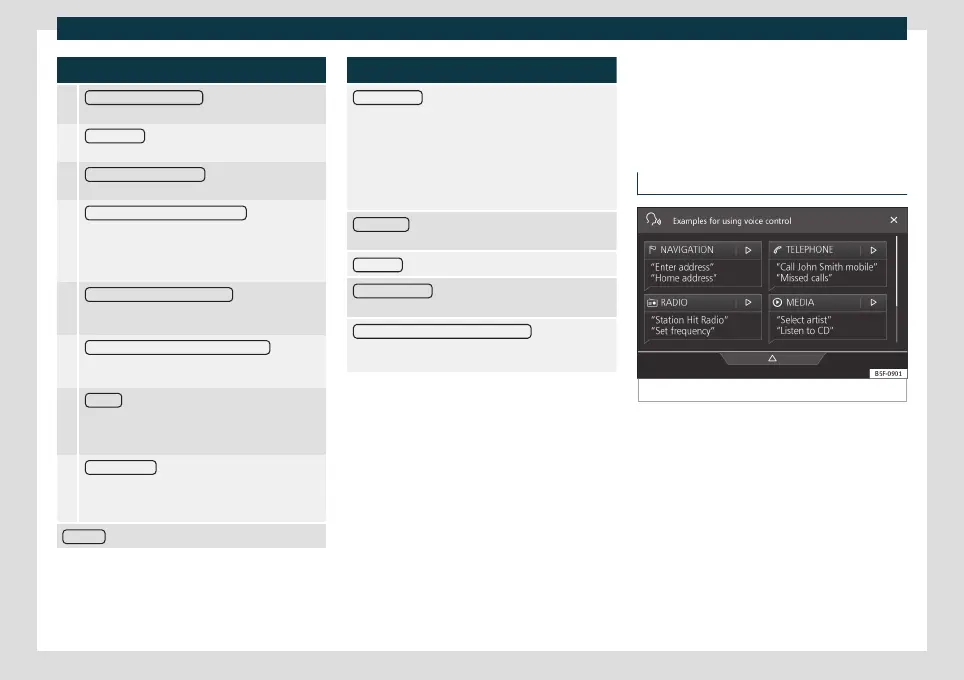
Fig. 133
Voice control: main screen
Many of the radio, media, telephone and
na
vig
ation functions can be changed by
voice commands.
The voice control of the infotainment system
will only be available for the language selec-
ted in System settings
›››
page 154.
●
Voice control settings
›››
page 159.
156



 To Next Page