Connectivity
www.cupraofficial.com, at specialised CU-
PRA dealer
s or any SEAT dealership.
Is Full Link blocked?
Fig. 134
Message on Infotainment system screen.
Your vehicle does not have Full Link, you
must pur
chase it as an accessory at y
our
specialised CUPRA dealer or any SEAT net-
work dealer
›››
Fig. 134.
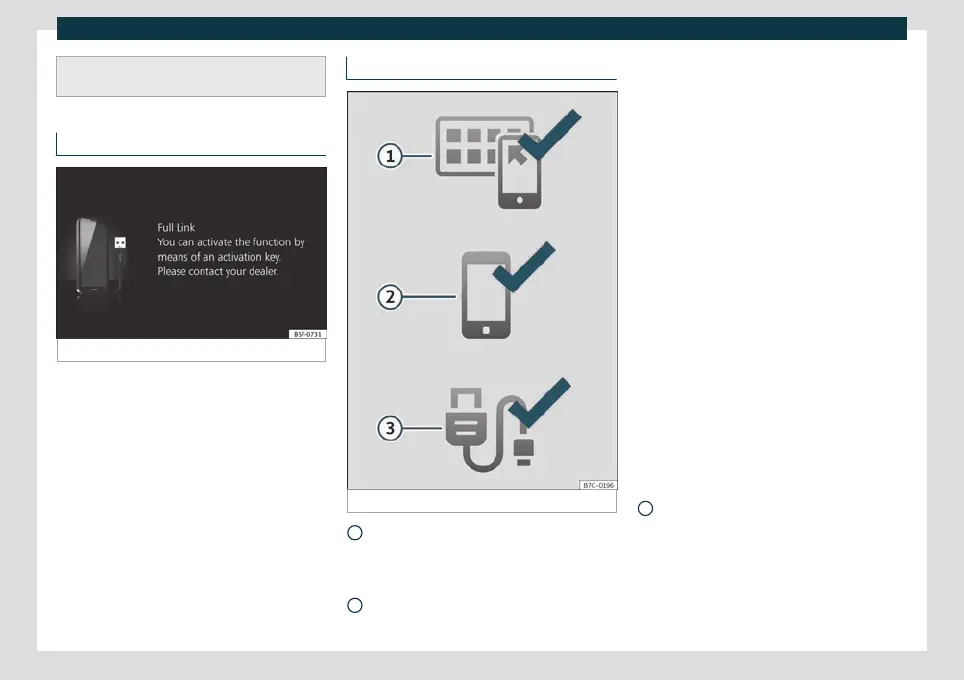
Requirements for Full Link
Fig. 135 Full Link Requirements
Full Link Activated: If y
ou do not ha
ve
Full Link in your vehicle you can acquire it
as an accessory at your Authorised Serv-
ice.
Compatible Phones. Go to the Mirror-
Link
®
, Android Auto™ or Apple CarPlay™
1
2
websites to confirm whether your phone
is compatible with the s
y
stem.
Mirror Link
–
Check smartphone compatibility:
www.mirrorlink.com/phones
–
MirrorLink
®
1.1 or higher
–
Some of the Apps certified by SEAT or
the CCC must be installed in the de-
vice.
Android Auto
–
Check smartphone compatibility. An-
droid Auto™: www.android.com/auto/
–
Android 5.0 (Lollipop) or higher
–
Install Android Auto™ app
Apple CarPlay
–
Check smartphone compatibility. Ap-
ple CarPlay™:www.apple.com/ios/car-
play
–
iPhone 5 or higher and iOS 7.1 or high-
er
–
Turn on the SIRI personal assistant (see
phone settings)
USB cable connecting car to phone:
Use the approved USB cable supplied
with the phone.
3
161



 To Next Page