Infotainment System
Opening the detailed view of a contact
●
Press the function button
›
›
›
Fig. 189 lo-
cated next to the entry on the contacts list.
All the telephone numbers are displayed in
the detailed view, and where applicable, the
address recorded for the contact in ques-
tion.
Read contact name
●
Press the function button on the de-
tailed list if you want the voice control system
to read the name of the contact.
Call a contact
●
Press the desired telephone number on
the detailed list to make the call.
●
Press the icon to edit the number be-
fore calling.
Send SMS to a contact
●
Press the function button on the de-
tailed list.
Start route guidance to a contact's ad-
dress
1)
If the contact’s address data has been saved,
route guidance can be started to the con-
tact's address.
●
Press address data in the detailed view to
start route guidance.
Note
If you edit a number before calling, it will
not be saved in the phonebook but only
used for the call.
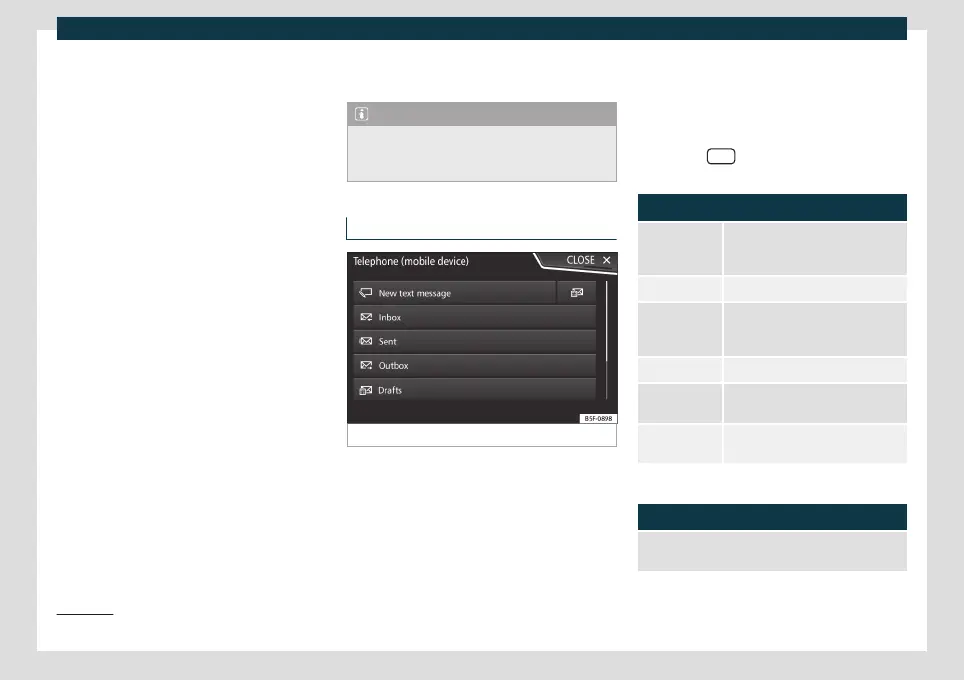
Short messages (SMS) menu
Fig. 191 Short messages (SMS) menu.
If the mobile phone connected to the HFP
pr
ofile also supports the SMS pr
ofile, a new
function button will appear in the upper left
corner of your Telephone menu, which will
allow you to receive, view and send SMS
messages through the infotainment system.
Whether or not the aforementioned func-
tions work correctly will depend on the com-
patibility of the connected mobile phone.
SMS menu function buttons
●
Press the SMS
function button from the
T
elephone
main menu.
Function button: function
New text mes-
sage
To write and send an SMS (includes
the possibility of accessing preset
text templates).
Inbox To open the received SMS folder.
Outbox To open the outbox folder. SMS
messages that have not been sent
are stored here.
Sent To open the sent SMS folder.
Drafts To select a message that has been
stored but not sent.
Send contact
details
To send the details of a contact from
the contact list.
Possible submenu function buttons
Function button: function
READ OUT
For the voice control system to
read the text of the SMS.
1)
Valid for Navi System and Navi System Plus.
220



 To Next Page