7.6
Q3x BTH
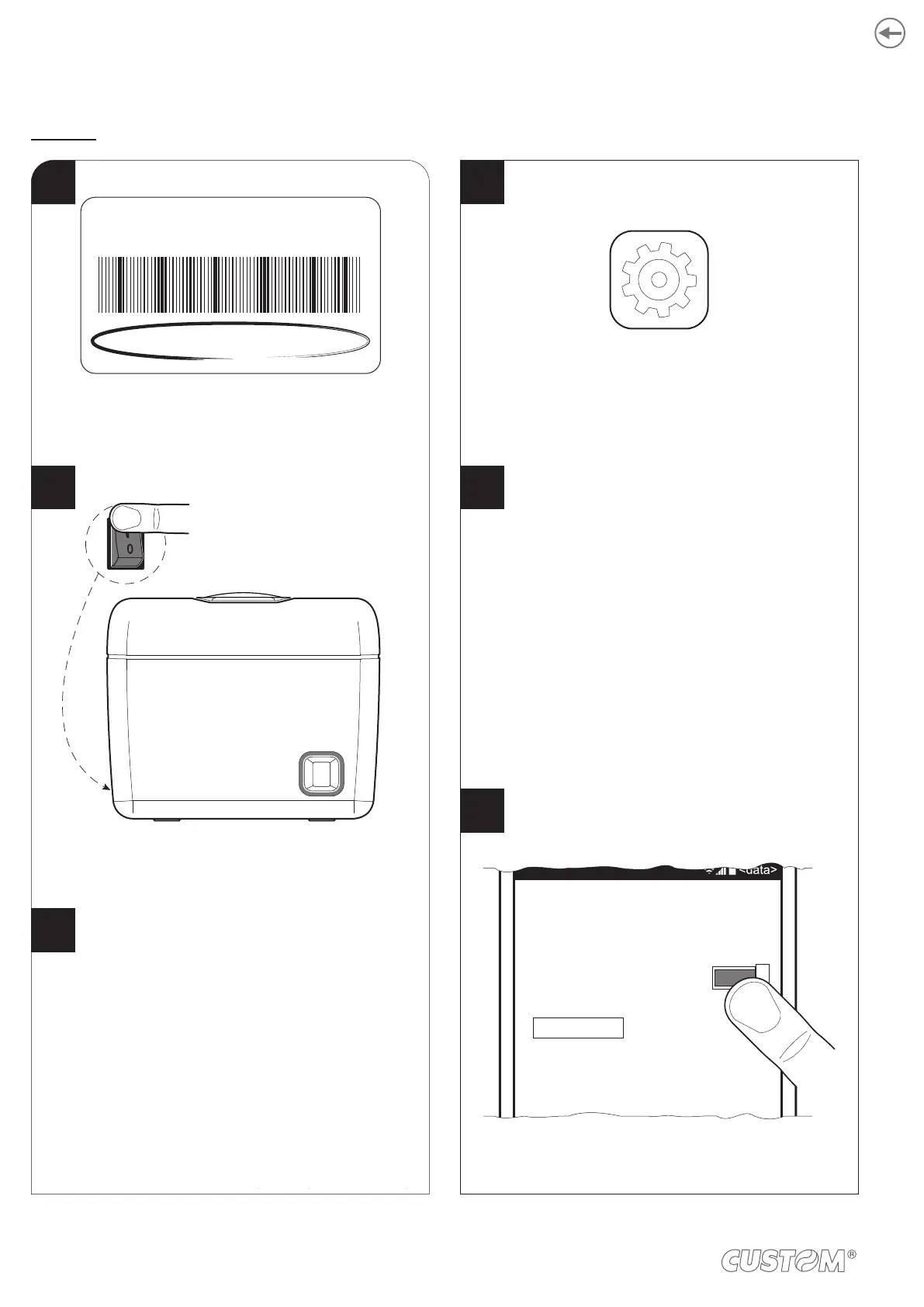
Press the Bluetooth icon.
Move the switch to ON to enable the Bluetooth
communication and start searching
for for available devices.
Press the SETTINGS icon
on the WIndows device.
Bluetooth
Bluetooth
Status
On
SETTING
advanced
XXXXXXXXXXXXXX
<serial number>
Write down the 16-digits serial number indicated
on the label of the printer (see paragraph 3.4).
Configure the parameters “Wireless” to “ON” and “BT
AutoReconnect” to “Disabled” in one of the modes
described in the previous paragraphs (see chapter 6).
Wireless.............................: ON
BT AutoReconnect.............: Disabled
Turn on the printer (see paragraph 5.1).
ON/OFF
4
1
2
3
5
6
AutoReconnect” to “Disabled” in one of the modes
described in the previous paragraphs (see
chapter 6).
Turn on the printer (see paragraph 5.1).
Write down the 16-digits serial number indicated
on the label of the printer (see paragraph 3.4).
62












 To Next Page