Dual-Speed Stackable Hub Web-based Management User’s Guide
Web-based Network Management84
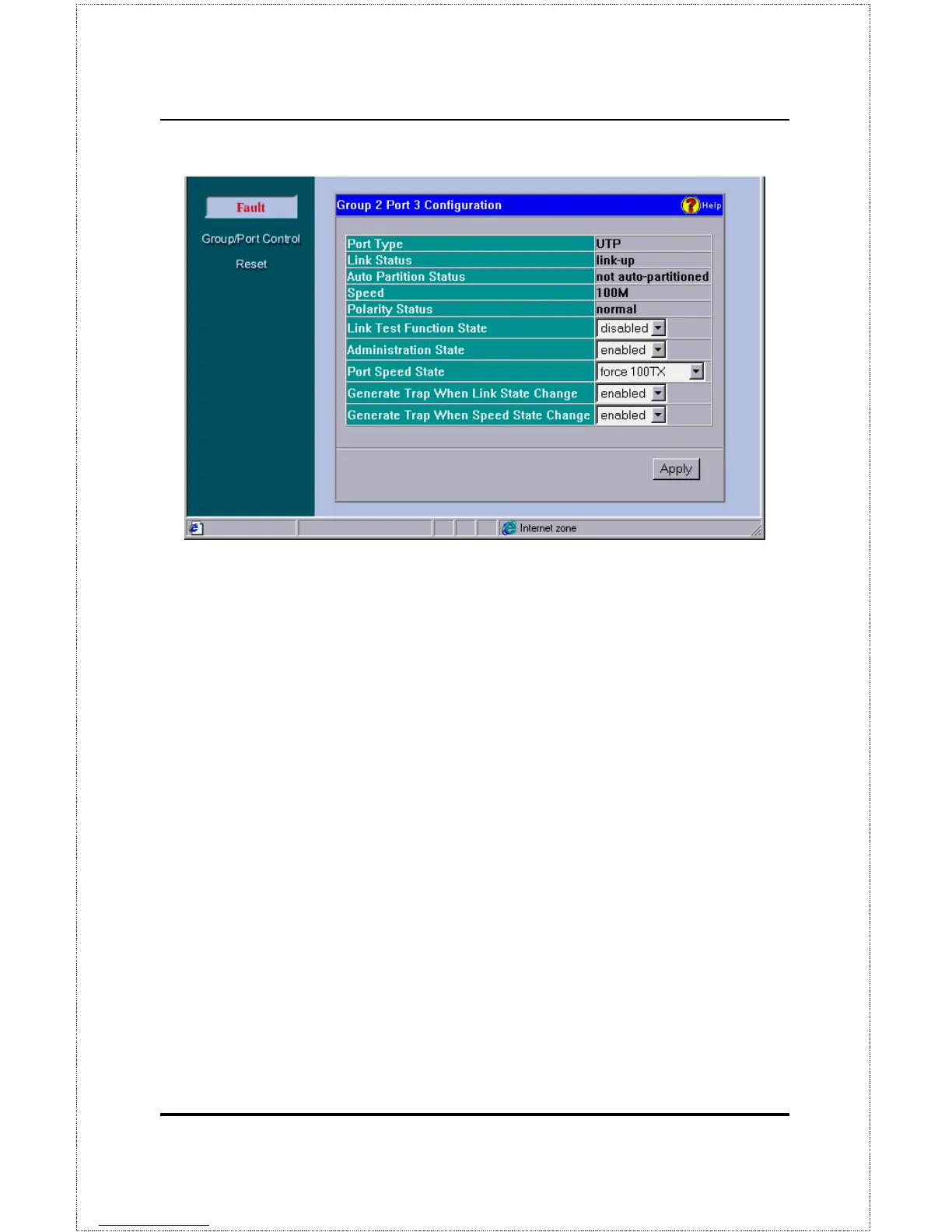
♦ Port Type
This is a is UTP port which supports both UTP and STP
cabling.
♦ Link Status
Indicates whether the port is online and working (
link up
)
or not (
link down
).
♦ Auto Partition Status
Indicates whether the port has been
auto-partitioned and taken offline or not.
♦ Speed
Indicates the port speed:
100Mbps
or
10Mbps
.
♦ Polarity Status
Indicates the polarity status:
normal
or
reversed
.
♦ Link Test Function State
Indicates whether the port link-test is
en-
abled
or
disabled
. If enabled, the port will check for link pulses, and
will only transmit if there is a good link to another station.
♦ Administration State
Indicates the port partition status, either
en-
abled
or
disabled
.
♦ Port Speed State
Indicates how the port speed is set:
Auto-
Negotiation
(NWay enabled),
10Mbps
, or
100Mbps
.



 To Next Page