ENGLISH
63
Setup of the auxiliary digitali inputs IN1, IN2, IN3, IN4
This paragraph shows the functions and possible configurations of the inputs of the control unit, connected by wireless to the device, by
means of the parameters I1, I2, I3, I4. For the electrical connections refer to the control unit manual. The inputs IN1..IN4 are all the
same and all the functions can be associated with each of them. Parameters I1, I2, I3 and I4 are used to associate the function required
to the corresponding input (IN1, IN2, IN3 and IN4.). Each function associated with the inputs is explained in greater detail below in this
paragraph. La Table 14 sums up the functions and the various configurations. The factory configurations can be seen inTable 13.
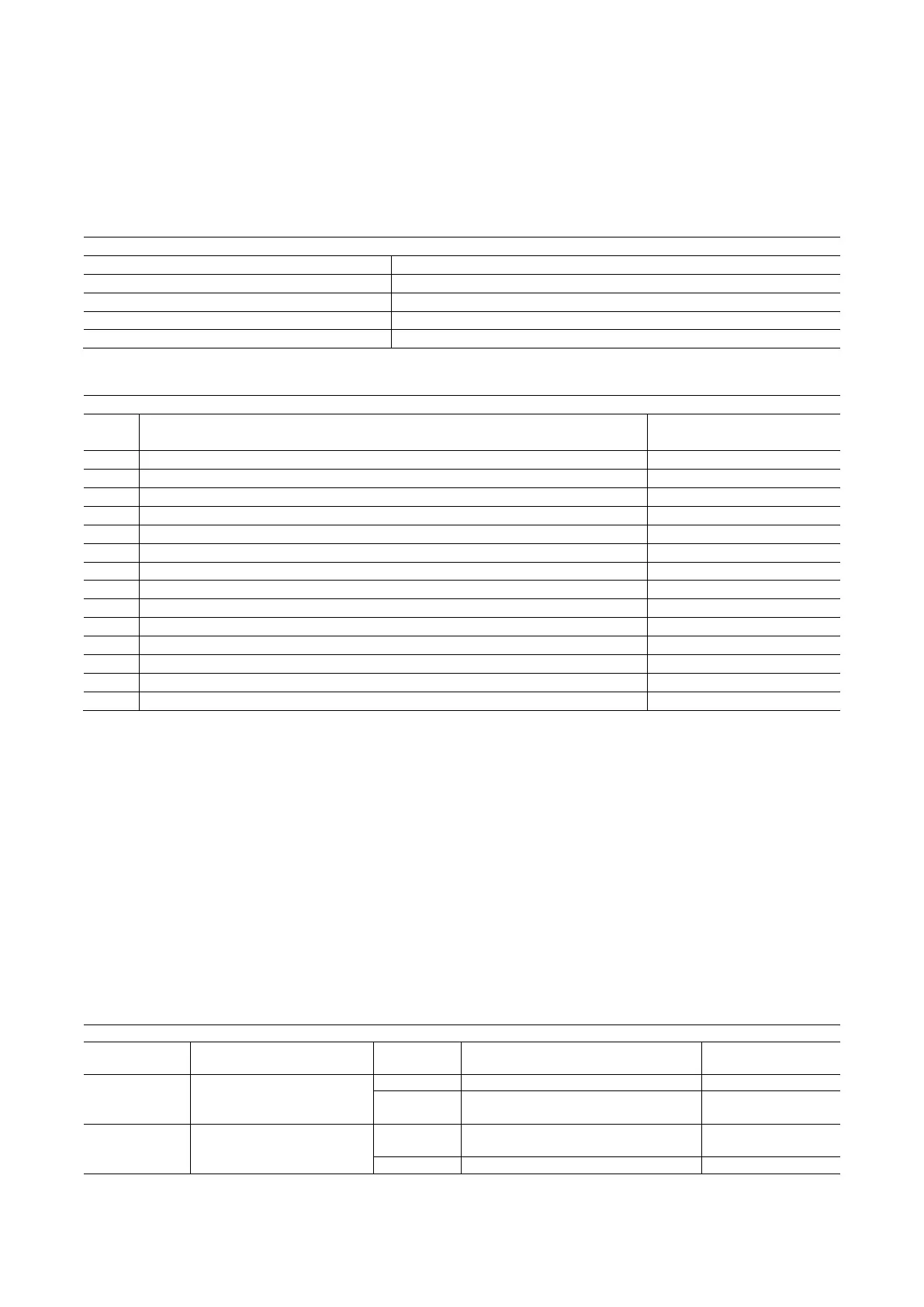
Factory configurations of the digital inputs IN1, IN2, IN3, IN4
Table 13: Factory configurations of the inputs
Table summarising the possible configurations of the digital inputs IN1, IN2, IN3, IN4 and their operation
Value Function associated to input INx
Display of the active function
associated with the input
Water lack from external float (NO)
Water lack from external float (NC)
Auxiliary setpoint Pi (NO) for the input used
Auxiliary setpoint Pi (NC) for the input used
General disabling of motor by external signal (NO)
General disabling of motor by external signal (NC)
General disabling of motor by external signal (NO) + Reset of resettable blocks
General disabling of motor by external signal (NC) + Reset of resettable blocks
Reset of resettable blocks NO
Low pressure signal input NO, automatic and manual reset
Low pressure signal input NC, automatic and manual reset
Low pressure input NO only manual reset
Low pressure input NC only manual reset
Table 14: Configurations of the digital inputs
Disabling the functions associated with the input
Setting 0 as the configuration value of an input, each function associated with the input will be disabled irrespective of the signal present
on the input terminals.
Setting external float function
The external float can be connected to any input, for the electrical connections refer to the control unit manual. The float function is
obtained setting one of the values in Table 15 on the parameter Ix, for the input to which the float has been connected.
The activation of the external float function generates the block of the system. The function is conceived for connecting the input to a
signal arriving from a float which indicates lack of water. When this function is active the float switch symbol is shown on the main page.
For the system to block and give the error signal F1, the input must be activated for at least 1 sec.
When it is in error condition F1, the input must have been deactivated for at least 30 sec before the system can be unblocked. The
behaviour of the function is summed up in Table 15.
When several float functions are configured at the same time on different inputs, the system will indicate F1 when at least one function
is activated and will remove the alarm when none is activated.
Behaviour of the external float function depending on INx and on the input
Input configuration
Operation Shown on display
1
Active with high signal on
input (NO)
Present
System block for water lack by external
float
F1
2
Active with low signal on
input (NC)
Absent
System block for water lack by external
float
F1
Table 15: External float function



 To Next Page