56
Figure 7-14
Enter the planned “IP Address”, “Subnet Mask” and “Default Gateway”. Step 2
Turn on SSH according to needs. Step 3
After SSH is on, Telnet and other debugging terminals can connect VTO, operate and
debug it.
Click “OK” to save the settings. Step 4
7.5.2 FTP Server
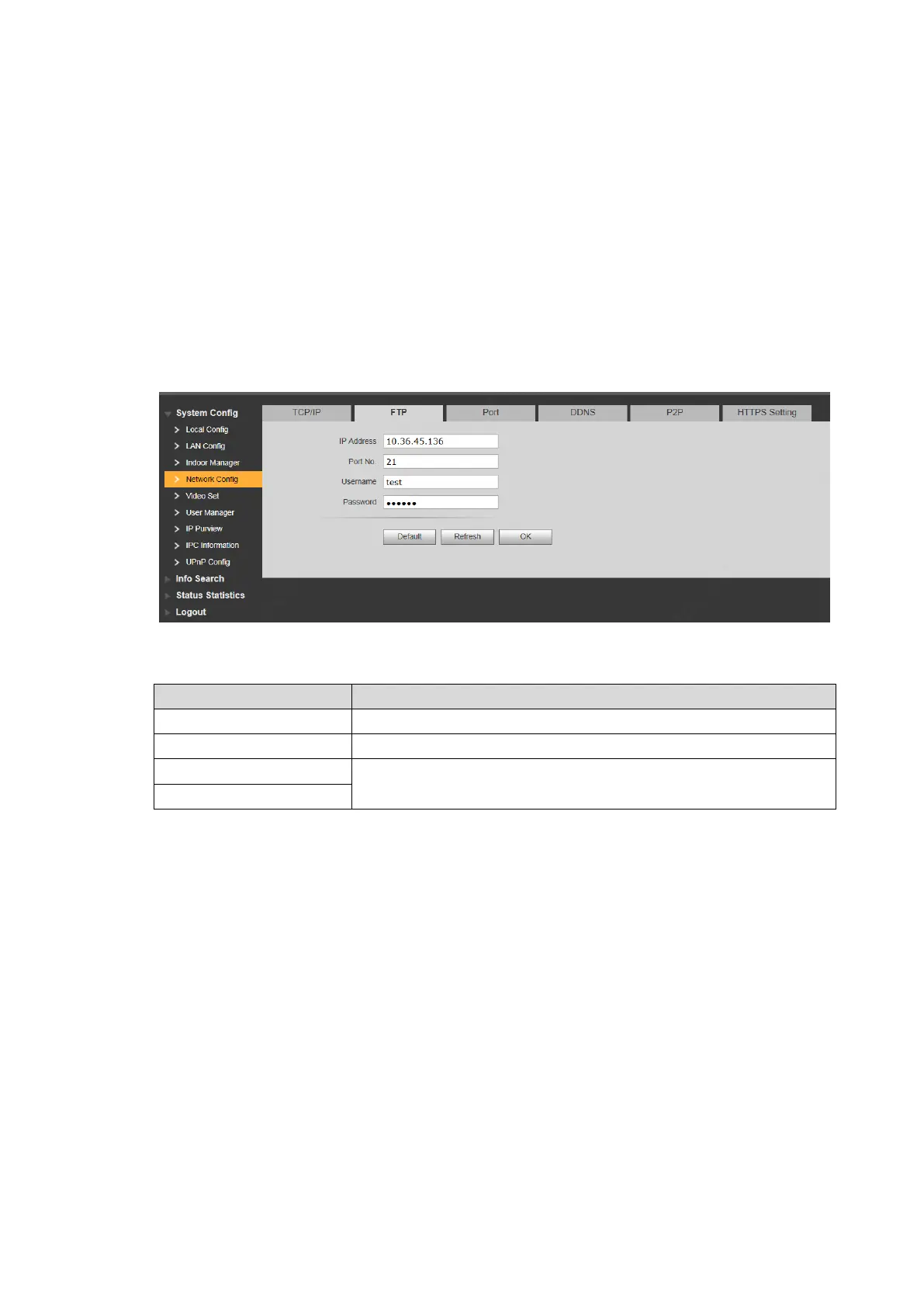
Set FTP server, so recordings and snapshots will be saved in FTP server.
Select “System Config > Network Config > FTP”. Step 1
The system displays ““FTP” interface, as shown in Figure 7-15.
Figure 7-15
Set the parameters and refer to 错误!未找到引用源。 for details. Step 2
IP address of the host to install FTP server.
Username and password to visit FTP server.
Table 7-1
Click “OK” to save the settings. Step 3
7.5.3 Port
Set the port to visit WEB interface of VTO.
Select “System Config > Network Config > Port”. Step 1
The system displays “Port” interface, as shown in Figure 7-16.


 To Next Page
 Loading...