4545
SyStem Start-up teSt
on InItIal power Start-up, the heat pump wIll dISplay code
e11,
SIgnalIng that InItIal SyStem teSt muSt Be run. follow
the Setup Screen to enter applIcatIon-unIque InformatIon. See
communIcatIng thermoStat manual for detaIled InformatIon.
NOTICE
A system test is now required to check the equipment settings
and functionality. Once selected, it checks the equipment for
approximately 10 - 15 minutes. System test may exceed 15
minutes if there is an error. Refer to the Troubleshooting sec-
tion, if error code appears.
Before starting the SYSTEM TEST, turn off the electric heater
or gas furnace.
1. Ensure the thermostat is installed.
2. Apply power to outdoor and indoor units.
3. Start-up.
After the application information is entered,
the initial system test must be run.
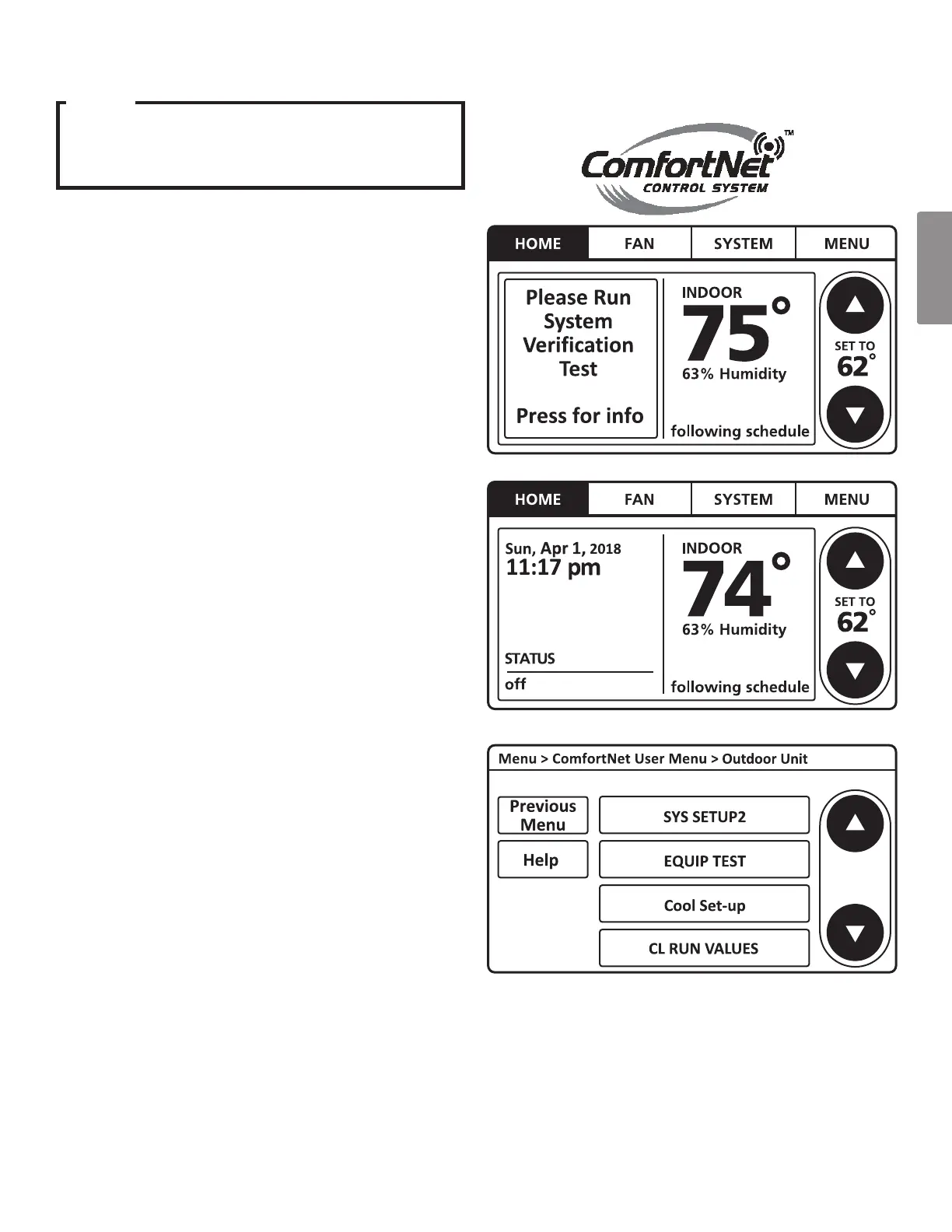
The “HOME” screen will be displayed showing
information similar to one of the adjacent screens.
Select “MENU”. Make sure the thermostat is in “OFF” and
select “SYSTEM” menu. Choose “OFF” before “SYSTEM
TEST”.
NOTE:
“SYSTEM TEST” must be run for all installations.
System will not operate without a completed initial
“SYSTEM TEST”.
4. Follow procedure to enter “ComfortNet User Menu” of
“Outdoor Unit” (Refer page 44). Then, scroll down
and select “EQUIP TEST”.



 To Next Page